Finance Validation
The cash register validations make it possible to configure custom validation criteria. If such a validation fails, the related import cannot be posted automatically via a job queue. In that case, posting is only possible manually or via manual batch posting.
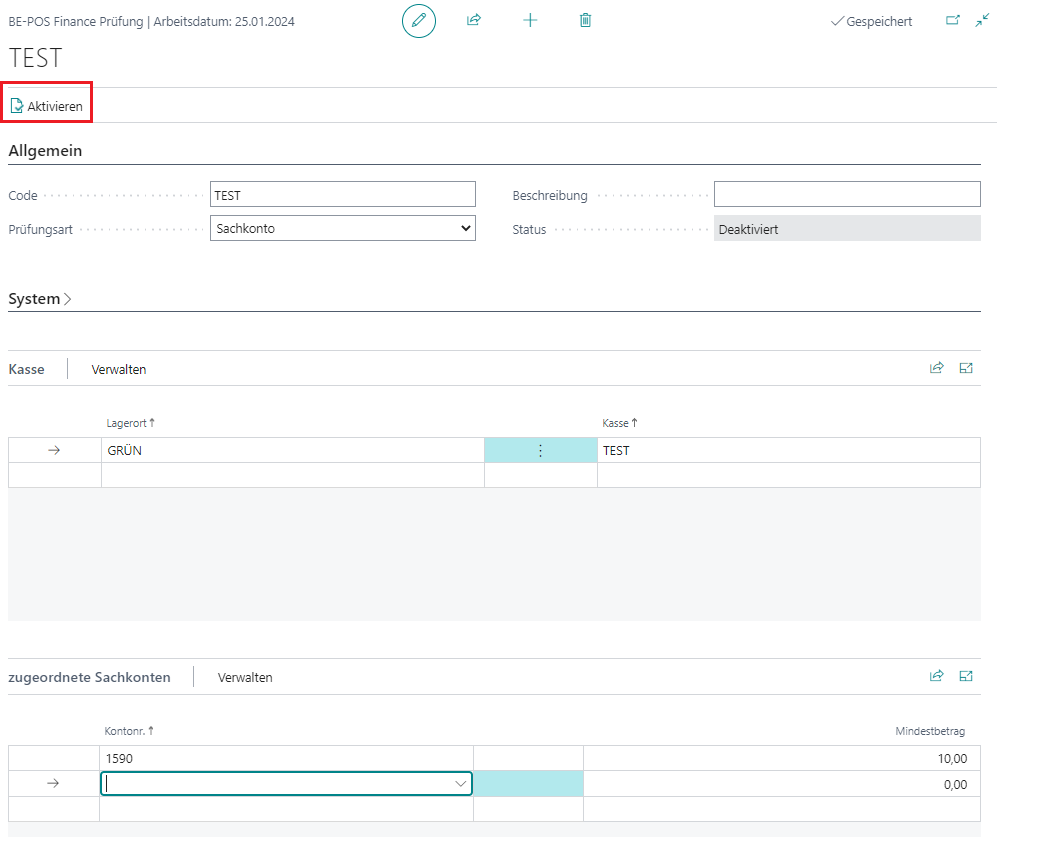
The validations are managed via the Finance Validation menu item. This opens a list of the available cash register validations. In the card, you can create a new validation or edit an existing one.
The following validation types are available:
- G/L account (with or without amount filter)
- Minimum number of journal lines
- Balance check
- G/L account across the entire import
For all validation types, G/L accounts must be assigned and cash registers can be assigned. The assignment can be made directly via the subpages. If there is no cash register assignment, the validation applies to all cash registers.
Validation Type Compare Sales Amounts
The sales amounts from the receipts are compared with the revenue lines in the financial journal.
Validation Type Compare Payment Amounts
The payment amounts from the receipts are compared with the payment lines in the financial journal.
Validation Type A Financial Journal Line Exists for the Sales Line
This checks that there is a decompressed financial journal line for every sales line that has not been canceled.
Validation Type A Financial Journal Line Exists for the Payment Line
This checks that there is a decompressed financial journal line for every payment line that has not been canceled.
POS Process Validation
The following messages are displayed:
- no sign-on receipt exists for the day
- no cash register closing receipt exists for the day
- no skim receipt exists for the day
- POS process X was started earlier
- POS process X was closed later
- POS process X has not yet been ended
Validation Type G/L Account
Cash register imports that use a specific G/L account are to be checked manually. To do this, select the G/L account validation type. An amount filter can be set for the assigned G/L accounts.
Minimum amount = 0 → The import cannot be posted automatically as soon as the account exists in the journal lines.
Minimum amount > 0 → The import cannot be posted automatically as soon as the account exceeds the minimum amount.
Validation Type Minimum Number of Lines
If an account must be present in the import, select the Minimum Number of Lines validation type.
Validation Type Balance Checks
This checks whether, after posting, the balance for each assigned account is 0, because currently only the no balance option exists. The opening balance of the account and the movement in the journal are added together.
Validation Type G/L Account Across Entire Import
This validation type also evaluates the accounts to be checked in the import. In this case, however, all existing lines are considered together and the amounts are added. The restriction to a minimum amount is available. This makes it possible to check whether an account balances to 0 within the import or whether there are differences below a threshold.