Update costing items
Brief context for Update costing items in BE-terna Project.
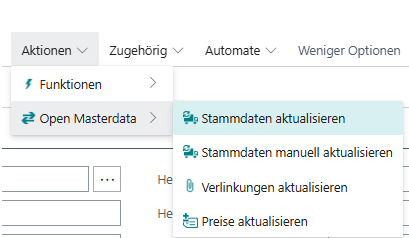
Various actions for updating costing items can be found on the costing item card under “Actions” –> “Open Masterdata”.
 Click to enlarge
There are the following update options:
- Update master data
The costing item is updated depending on the global or supplier-specific setup - Update master data manually
The data package can be individually defined for updating via a dialog box. - Update links
Only attachments (e.g. images, documents) are updated. - Update prices
Only the item’s pricing data is updated.