POS Setup
Tenant-wide POS Core settings for general parameters and email notifications.
POS Setup contains all settings that apply to the entire BE-POS module and cannot be configured individually per cash register. Setup is done under Setup → POS Setup.
Actions
| Action | Description |
|---|---|
| Email Setup | Opens the standard Business Central setup for sending emails |
General
| Field | Description |
|---|---|
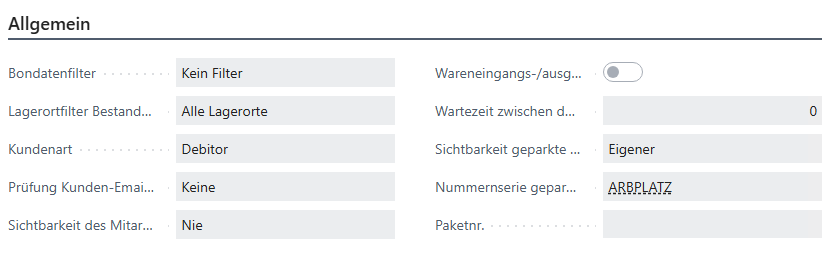
| Receipt Data Filter | You can restrict the visibility of analyses and archive tables. For example, the cash register can be configured so that only its own receipts are shown in the tables. The relevant cash register is determined via the signed-in user and the assigned cash register setup. |
| Location Filter for Inventory Inquiry | You can define whether the inventory inquiry should consider all locations or only locations with assigned cash registers. |
| Customer Type | Defines whether debtors or contacts are used at the cash register |
| Customer Email Check | During customer creation or editing within checkout, this setting can activate duplicate checking. If the check is active, you can define whether the cashier sees an error or only an informational message. |
| Contingent Visibility | You can choose whether the contingent is shown never, via a button, or directly in the list. |
| Suppress Item Receipt/Shipment Posting | When POS sales are posted through sales orders, no item receipt or shipment is created. |
| Waiting Time Between Posting POS Orders (in ms) | Specifies the waiting time between postings of POS orders, in milliseconds |
| Visibility of Parked Receipts | Defines which parked receipts and reservations are shown at the cash register. Available options are: Own: Only receipts of the current cash register are shown Location: Receipts of the current location are shown All: All receipts are shown |
| Number Series for Parked Receipts/Reservations | Stores the number series for parked receipts and reservations |
| Package No. | Defines whether the Package No. field in the relevant order or journal should automatically be filled with the predefined value when posting item sales/returns, for POS compatibility when package tracking is active |
Email Notifications
| Field | Description |
|---|---|
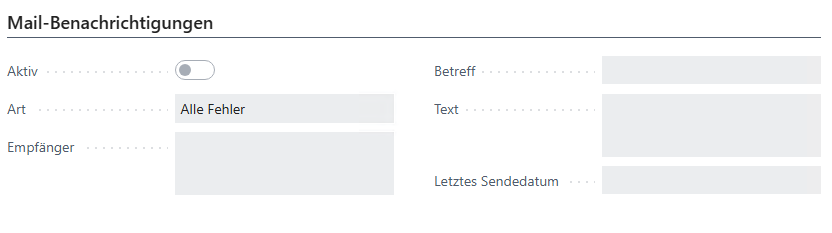
| Active | Activates email notifications |
| Type | Defines whether errors from sales data and/or finance imports should be sent |
| Recipient | Email distribution list; several addresses can be entered separated by semicolons |
| Subject | Subject line of the email |
| Text | Informational text for the recipients |
| Last Sent Date | Date the last email was sent |