Overview
Purpose
BE-terna Printconnect connects Microsoft Dynamics 365 Business Central with PrintNode so that print jobs can be prepared centrally and forwarded to available printers. The solution extends standard printing in Business Central with cloud-based printer management, print-job tracking, and configurable print options.
Business Value
- Connects Business Central with the printers that are available to the user through PrintNode.
- Reduces manual effort for printer assignments and recurring print scenarios.
- Supports print options such as color, duplex, collation, copies, and paper size.
- Makes print history traceable for support and troubleshooting.
- Checks whether the PrintNode service is reachable before a print job is sent.
Functional Scope
| Feature | Benefit |
|---|---|
| Printer Management | Available printers become visible and manageable for Business Central. |
| Printer Setup | Print options such as collation, color, duplex, copies, and paper size can be maintained per printer. |
| Default Printer Assignment | Recurring print jobs can be assigned to a preferred printer. |
| Print Job Statistics | The number of print jobs supports transparency and cost analysis. |
| Print Job History | Individual print jobs remain traceable for support and troubleshooting. |
| Customized Paper Size | Printer-specific custom formats can be mapped in addition to standard sizes. |
Documented Scope
Supported Editions
- Microsoft Dynamics 365 Business Central Essentials Edition 19
- Microsoft Dynamics 365 Business Central Essentials Edition 20
Supported Countries
- Denmark
- United States
- France
- Germany
- Norway
- Serbia
- Spain
- Sweden
Supported Languages
- Danish (Denmark)
- English (United States)
- French (France)
- German (Germany)
- Norwegian (Norway)
- Serbian (Serbia)
- Spanish (Spain)
- Swedish (Sweden)
Important Note for Initial Setup
During installation, Business Central should not already contain active local printers in printer management. This constellation can interfere with the setup and lead to unexpected installation errors.
Content Focus
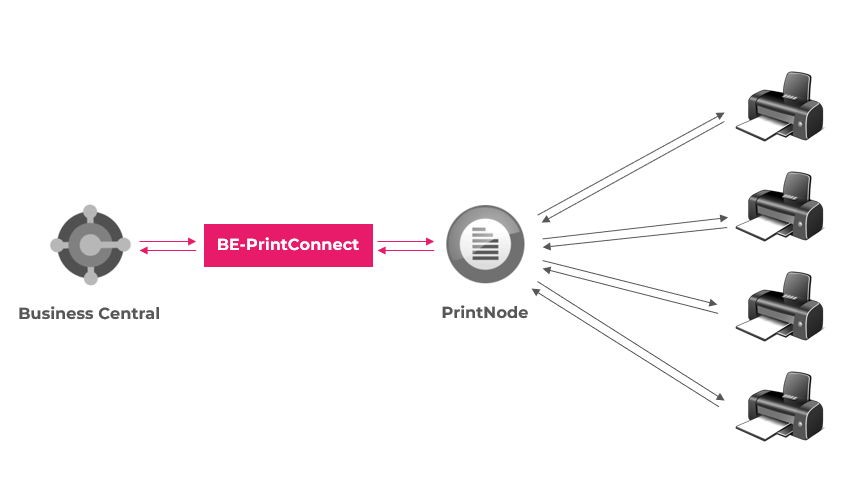
Architecture between Business Central, PrintNode, and end devices
BE-terna Printconnect forwards print jobs from Business Central to PrintNode. PrintNode connects the user context with local or network printers and executes the job on the selected device.
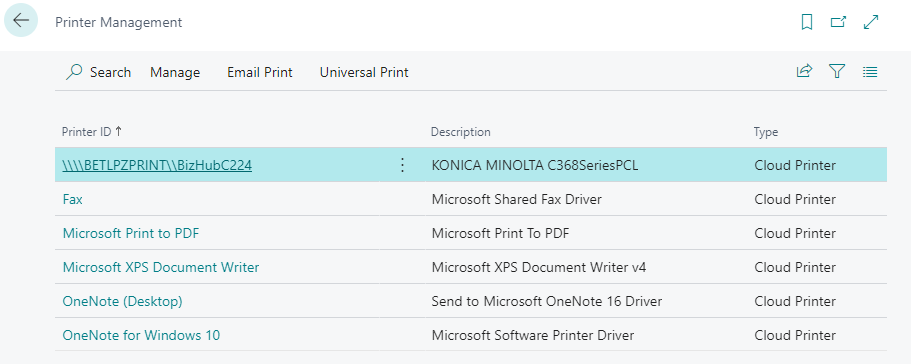
Transparent user interface for printer management and printer selection
Users can see which printers are available for Business Central and select them specifically for their print scenarios. This keeps productive printer assignments visible and understandable.
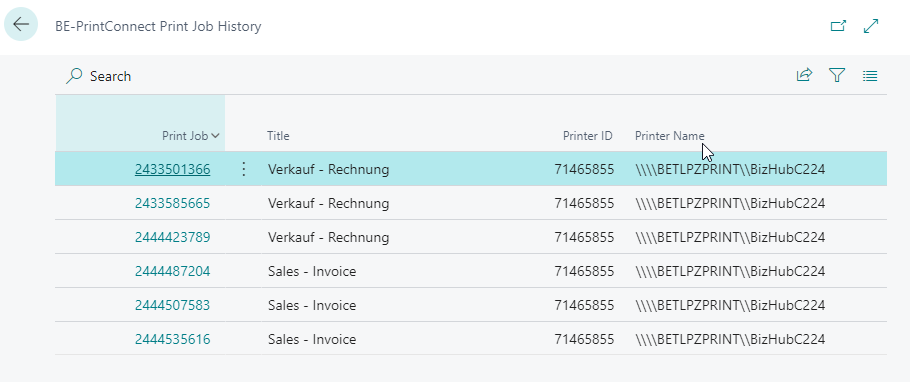
Central control of print options and follow-up processes
After the required printers are selected, default printers, print options, and follow-up activities such as print history or troubleshooting can be maintained on dedicated pages in Business Central.
Outcome
- You understand the purpose and system boundaries of BE-terna Printconnect.
- You know which pages are relevant for setup, printer management, print history, and troubleshooting.
- You can decide which printers and print options should be used in your Business Central processes.
Notes on the license agreement and privacy information are available through the linked external legal resources.
Links