Raw material surcharges
Raw material surcharges account for fluctuating raw material prices separately from the base price of an item or calculation item. You can use these surcharges in project documents and material requests. BE-terna Project applies the master data settings and stores the values that are relevant to each document.
You can represent any required raw material. The following examples use copper with the raw material code CU. The calculation logic applies to other raw materials in the same way.
Prerequisites
Before using raw material surcharges, set up the required raw materials in the master data. The relevant settings for each raw material include the current raw material price, price base weight, and price date. Changes to the raw material price are recorded in the raw material price history.
Then define the required weight-based or price-dependent raw material surcharges for the item or calculation item. When you later select the item or calculation item, BE-terna Project copies these settings to the corresponding document line. An item can contain multiple raw materials.
Compare surcharge types
BE-terna Project supports weight-based and price-dependent raw material surcharges. The main difference between the surcharge types is how the surcharge amount is determined.
Weight-based
- The calculation is based on the difference between the current raw material price and the base price.
- Raw material weight, reference quantity, and price base weights are included in the calculation.
- The surcharge changes continuously with the price difference.
- This surcharge type is suitable when the raw material content of the item is known, for example kilograms of copper per 100 meters of cable.
Price-dependent
- The calculation is based on the price range into which the current raw material price falls.
- The surcharge can be defined as a fixed amount or percentage. The price type and price unit are also taken into account.
- A price change can cause a different price tier to apply.
- This surcharge type is suitable for supplier models with specified surcharges for defined raw material price ranges.
- The result of the applicable price tier is shown as a fixed price in the document line.
Calculate a weight-based surcharge
For the calculation, the daily price and base price are first converted using their respective price base weights. The difference is then multiplied by the raw material weight and divided by the reference quantity of the line.
Surcharge per unit = (Daily price ÷ Daily price weight − Base price ÷ Base price weight) × (Raw material weight ÷ Reference quantity)
Example: A cable contains 50 kg of copper per 100 meters. The daily price is EUR 900 per 100 kg, and the base price already included in the item price is EUR 150 per 100 kg.
(EUR 900 ÷ 100 kg − EUR 150 ÷ 100 kg) × (50 kg ÷ 100 m) = EUR 3.75 per meter
The surcharge is added to the underlying purchase price. When the daily price changes, the surcharge changes accordingly.
Determine a price-dependent surcharge
For a price-dependent surcharge, define price ranges for the item or calculation item. For each range, specify whether to apply a fixed amount or a percentage surcharge or discount. Depending on the price type, a percentage can be based on the cost price or list price.
Example:
| Daily price for copper | Defined surcharge |
|---|---|
| EUR 0 to EUR 799.99 | EUR 0 |
| EUR 800 to EUR 899.99 | EUR 12 |
| EUR 900 or more | EUR 18 |
At a daily price of EUR 850, the EUR 12 surcharge applies. The daily price is therefore not used directly in a weight formula. Instead, it determines the applicable price tier. The result from that tier is stored as a fixed price in the document line.
Make sure that all required price ranges are defined without unintended gaps. If BE-terna Project cannot find a matching range, it does not create a price-dependent surcharge.
Use raw material surcharges in a project document
When you add an item or calculation item to a project document line, the configured raw material surcharges are added automatically. To view or edit the values for the selected line, open Raw Material Surcharges under Details in the Project Document Editor.
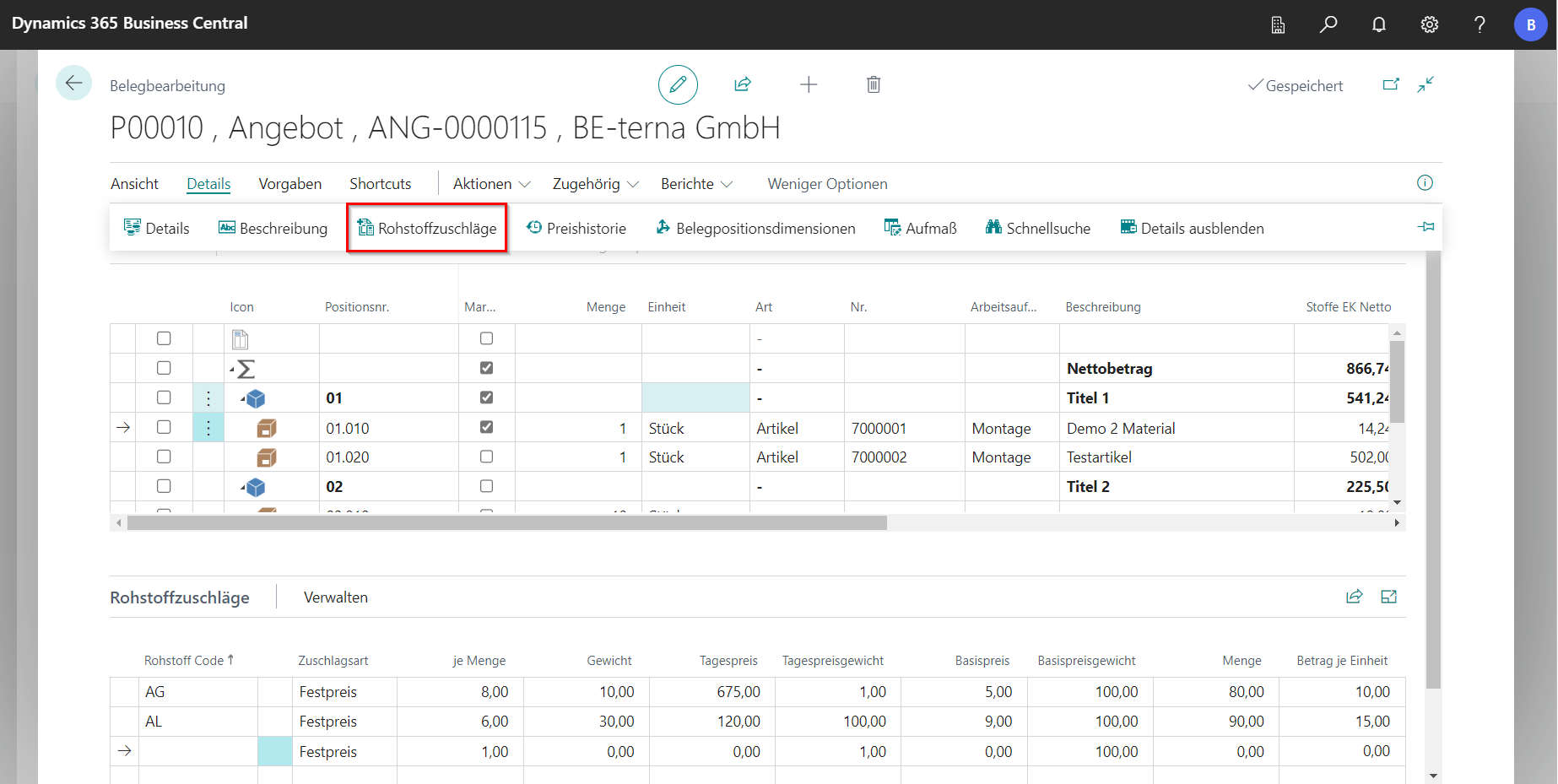
You can maintain multiple raw materials on a line. Depending on the surcharge type, you can edit the following values, among others:
| Field | Description |
|---|---|
| Raw material code | Identifies the raw material used. |
| Surcharge type | Specifies whether the amount is calculated by weight or as a fixed price. |
| Weight | Specifies the raw material content for the entered reference quantity. |
| Per quantity | Specifies the quantity to which the raw material weight or fixed price applies. |
| Daily price | Contains the current raw material price used for the project document. |
| Daily price weight | Specifies the price base weight of the daily price. |
| Base price | Contains the raw material price already included in the base price. |
| Base price weight | Specifies the price base weight of the base price. |
| Amount | Contains the surcharge amount when the surcharge type is Fixed Price. |
| Amount per unit | Shows the surcharge per unit calculated for the line. |
You can also add raw material surcharges manually. Whenever possible, use a raw material from the master data so that its price and price base weight are filled in automatically. If you enter a raw material code that has not been set up, you must maintain the required prices and weights manually.
Include raw material costs in price shares
Use the price shares to specify whether raw material costs are included in the calculation. You can also specify whether a sales markup is applied to the raw material share.
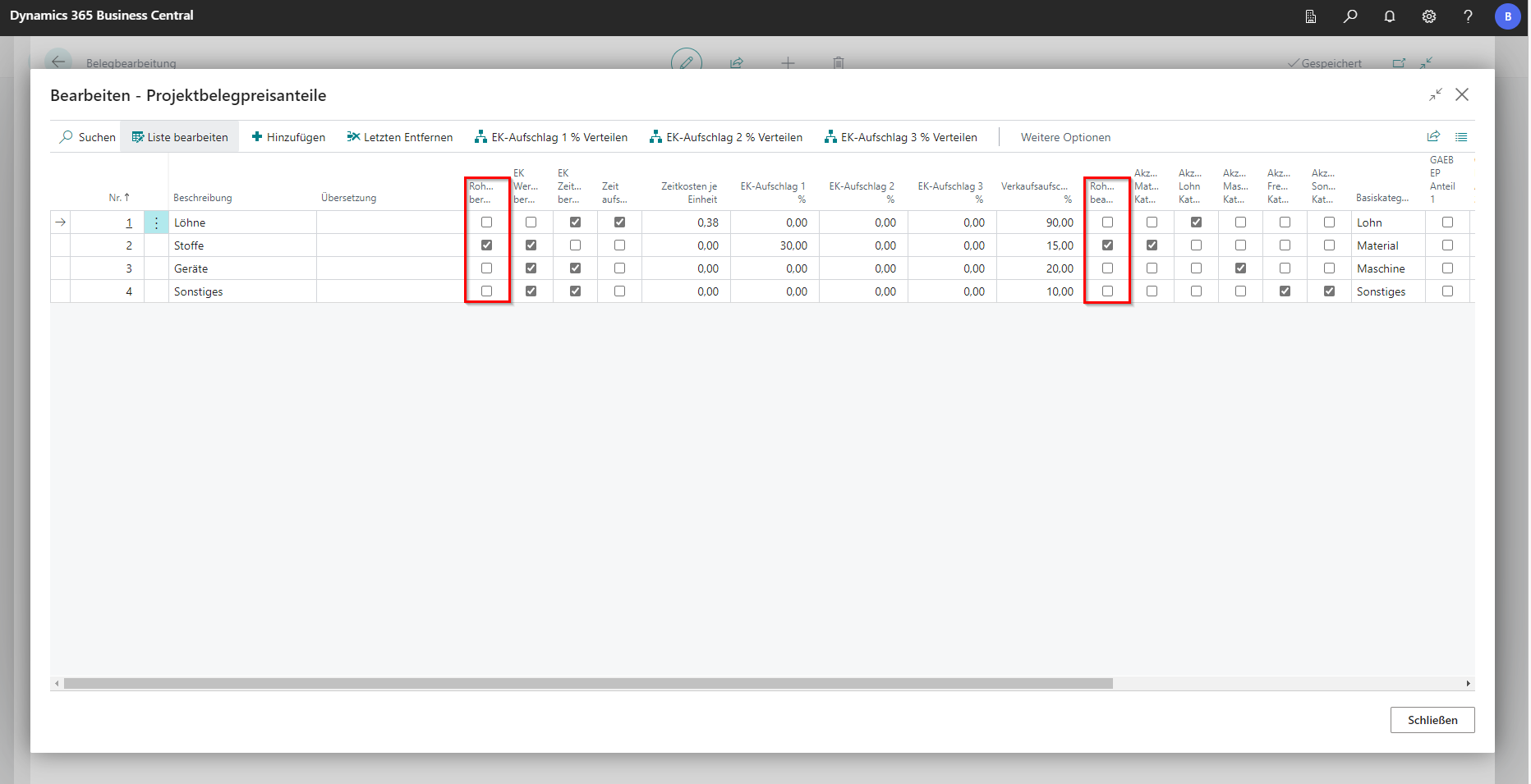
The calculated raw material surcharge is included in the purchase and sales price of the line according to these settings.
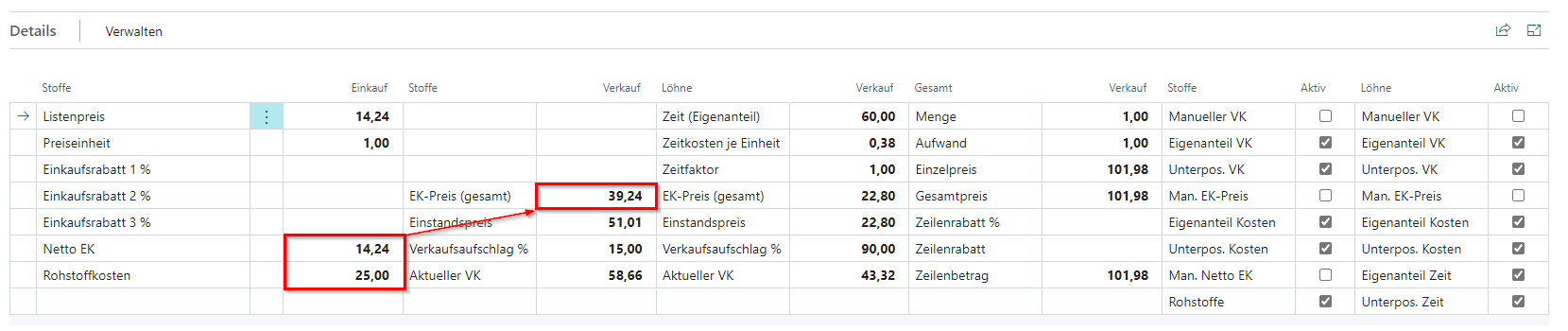
Update raw material prices in a project document
Project documents store their own raw material prices. This makes it possible to trace the price basis used to calculate a document. A later change to a raw material price in the master data therefore does not automatically change an existing project document.
To edit document-specific prices, open Raw Material Prices under Related > Settings. The list contains the daily price, daily price weight, and price date for each raw material.
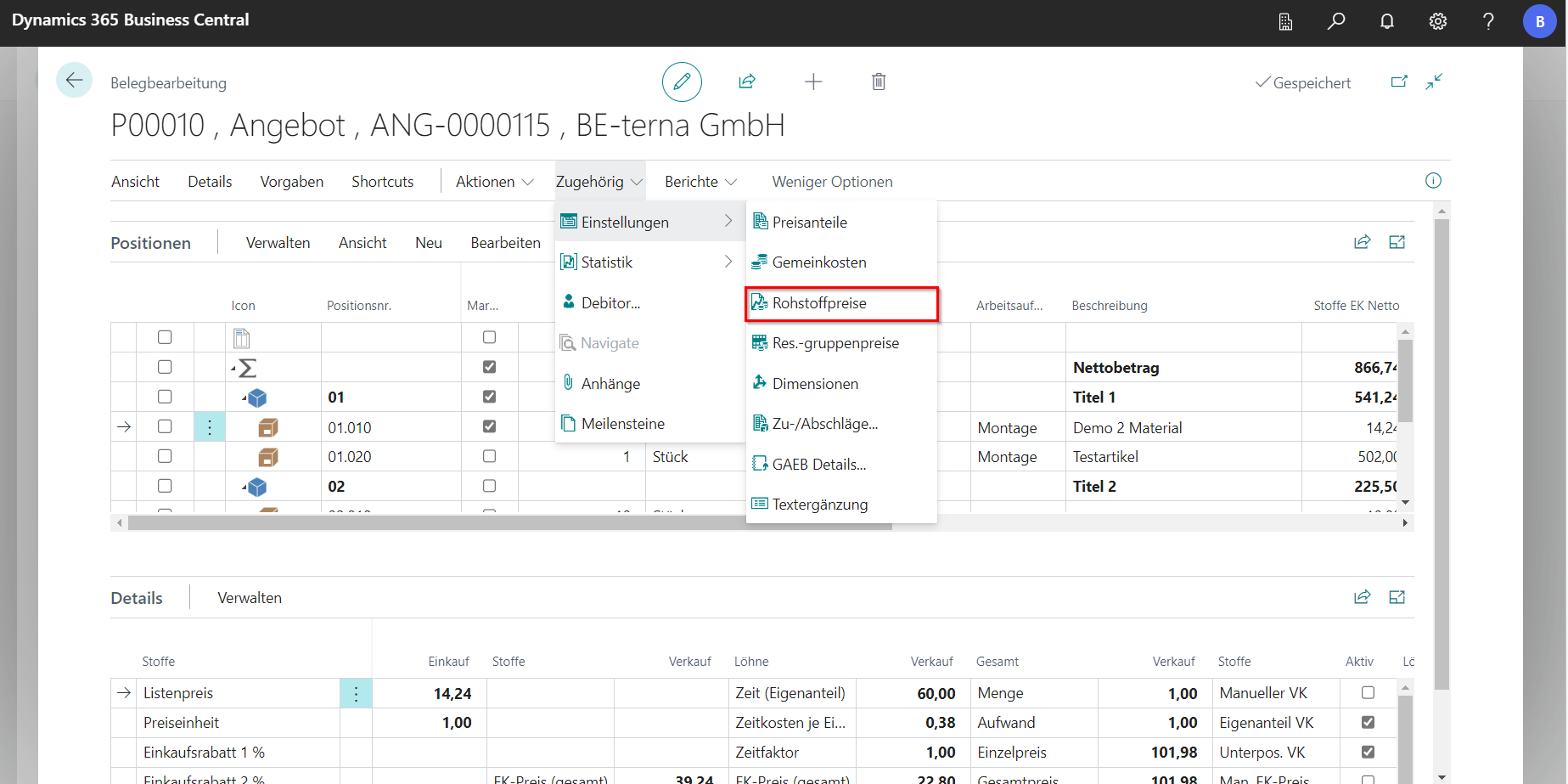
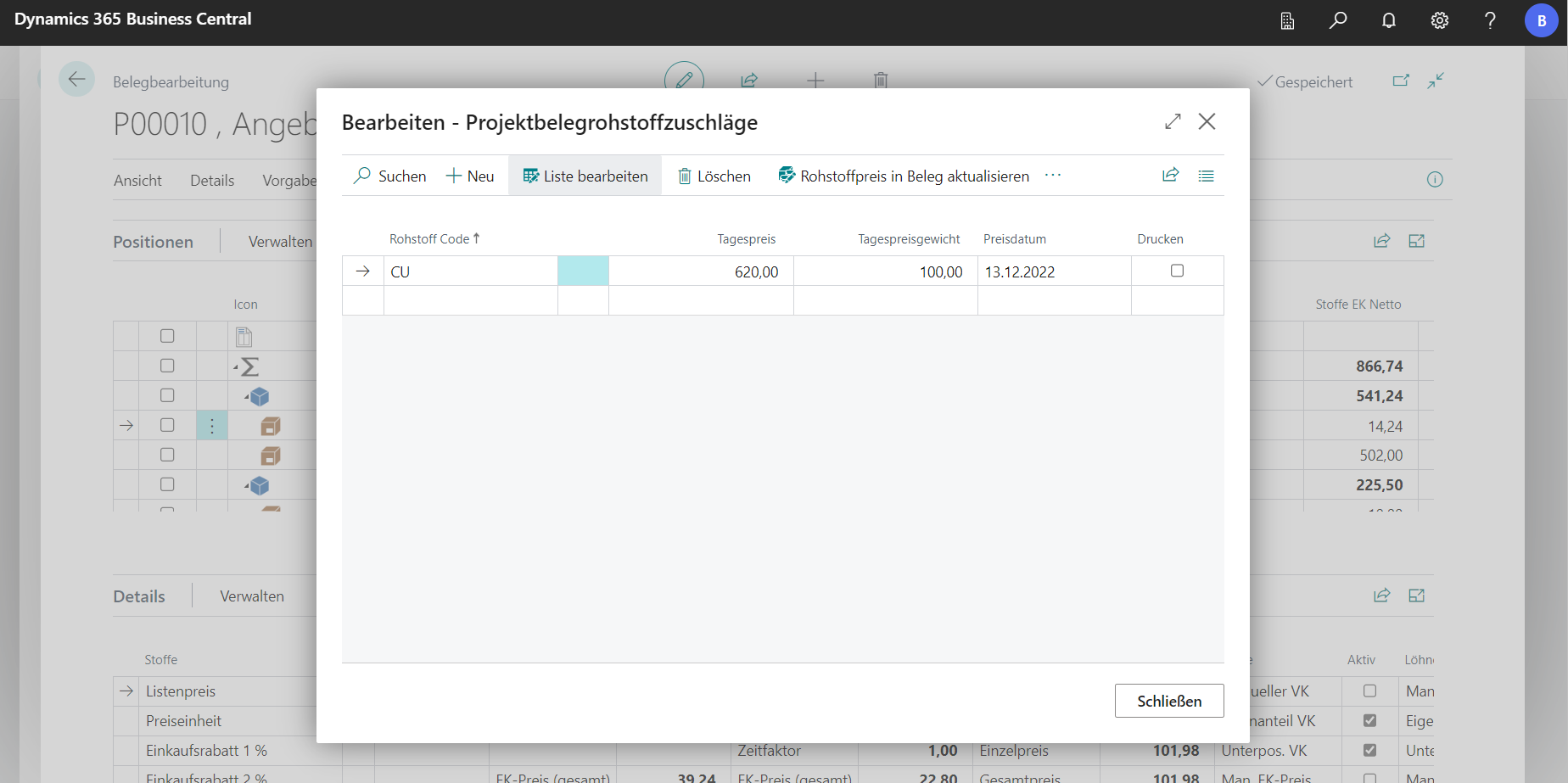
Change the price in this list, and then use one of the following actions:
- Update Raw Material Price in Document copies the selected raw material price to the corresponding lines.
- Update All Raw Material Prices in Document copies all prices from the list and recalculates the document.
Use the Raw Material Totals action in the bill of quantities to display a summary of the raw material quantities and surcharge amounts included in the project document.
For a document in a foreign currency, raw material prices are converted using the currency factor that applies to the document. Rounding differences are determined by the rounding precision configured for the document or currency.
Use raw material surcharges in a material request
BE-terna Project also applies the configured raw material surcharges when you select an item or calculation item on a material request line. Weight-based surcharges and matching price-dependent surcharges are determined separately.
You can find the raw material values for the selected line in the Raw Material Surcharges section. You can also open the details by drilling down on the Raw Material Unit Cost field. Changes to a raw material surcharge immediately update the raw material unit cost and line amount.
For each raw material line, you can edit the surcharge type, weight, reference quantity, daily price, daily price weight, base price, and base price weight, among other values. For the Fixed Price surcharge type, enter the surcharge amount instead. The amount per unit is calculated automatically.
Raw material surcharges can be edited while the material request is open and the line has not yet been transferred. The line must also be a normal, alternative, or requirement line. After the transfer, the stored values are retained but can no longer be changed here.
If a material request is created from an existing purchase document or with reference to a project document, BE-terna Project copies the raw material information stored there. This keeps the daily price, base price, and calculation type traceable throughout the process.
Transfer to purchasing
When transferring data to a purchase document, BE-terna Project can create raw material surcharges as surcharge lines assigned to the original item or resource line. This assignment ensures, among other things, that quantity changes are carried over to the surcharge lines. The calculation details are stored in the purchase document and can be viewed there.
For information about further processing, receipt, and invoicing, see Orders. The complete purchasing process is not covered in this article.
Import through interfaces
Depending on the data format, raw material information can also be imported through interfaces. These interfaces include IDS, DATANORM, and project document import. Depending on the interface, the data can include the raw material code, weight, reference quantity, daily price, and base price.
This article describes the subsequent calculation in BE-terna Project. For setup, data formats, and transfer steps, see IDS Connect, DATANORM, and Importing a Project Document.
Frequently asked questions
Why does a new master data price not change an existing project document?
The project document stores its own raw material prices so that its calculation basis remains traceable. Change the price under Raw Material Prices in the project document, and then update either the selected raw material or all raw materials in the document.
Why is no price-dependent surcharge created?
Check whether a matching price range has been set up for the current raw material price. Also check the raw material code, from and to prices, surcharge type, price type, and price unit for the item or calculation item.
Why can’t I edit the raw material surcharge in the material request?
The material request must be open, and the line must not have been transferred yet. Certain structure or status lines also do not allow raw material surcharges to be edited.
Why does the calculated amount differ from a manual calculation?
Check the daily price weight, base price weight, reference quantity, and price unit. For foreign currencies, the document currency factor and configured rounding precision can also result in small differences.