Automation
Purpose
Intercompany exchange ideally runs without manual intervention: the receiving company accepts incoming documents automatically and processes them further. This page describes how BE-terna Intercompany keeps automatic acceptance stable even when individual tasks fail.
Business value
- More stable automatic operation, because transient errors do not require manual rework.
- A clear upper bound on retries prevents endless loops.
- Activation and deactivation fully manage the job queue by themselves.
Focus areas
Standard behaviour
When an IC document is sent from company to company, the receiving company – with automatic acceptance enabled – creates a task in the job queue. If acceptance fails, the task stays in state Error and is not processed further without intervention.
Extension: periodic retry
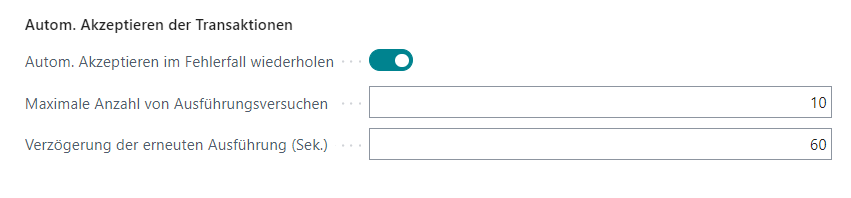
From the intercompany setup you activate an additional codeunit that periodically restarts failing acceptance tasks. Important points:
- The maximum number of retries must be set.
- Enabling the option automatically creates a recurring job queue entry.
- Disabling the option automatically removes that entry.
- The feature must be enabled in the receiving company, where automatic acceptance takes effect.
Automatic file import
Import from a server directory uses its own job queue entry. The related setup is covered on the Job queue setup page.
Outcome
- Failing acceptance tasks are retried automatically within the configured limits.
- Manual rework is only required for permanent errors.
Links