Purchase invoice
Incoming IC purchase invoices: create a new invoice or invoice via the existing purchase order – including partial invoices.
Purpose
An incoming IC purchase invoice can either be created as a new purchase invoice or invoiced through an existing purchase order. This page describes both variants and their implications for partial invoices and vendor references.
Business value
- Flexibility: a new invoice for simple cases, invoicing through the purchase order for automated end-to-end flows.
- Partial invoices stay stable as long as the purchase order ships automatically.
- The vendor invoice number can optionally be embedded into a custom number via a placeholder.
Focus areas
Create a new purchase invoice
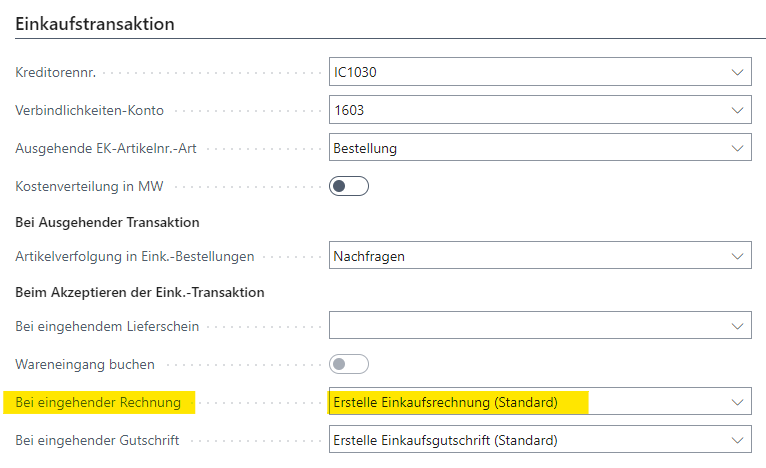
By default BE-terna Intercompany creates a new purchase invoice for an incoming IC invoice. This variant is simple to run and suits cases where no related purchase order exists or no link is wanted.
Invoice through the purchase order
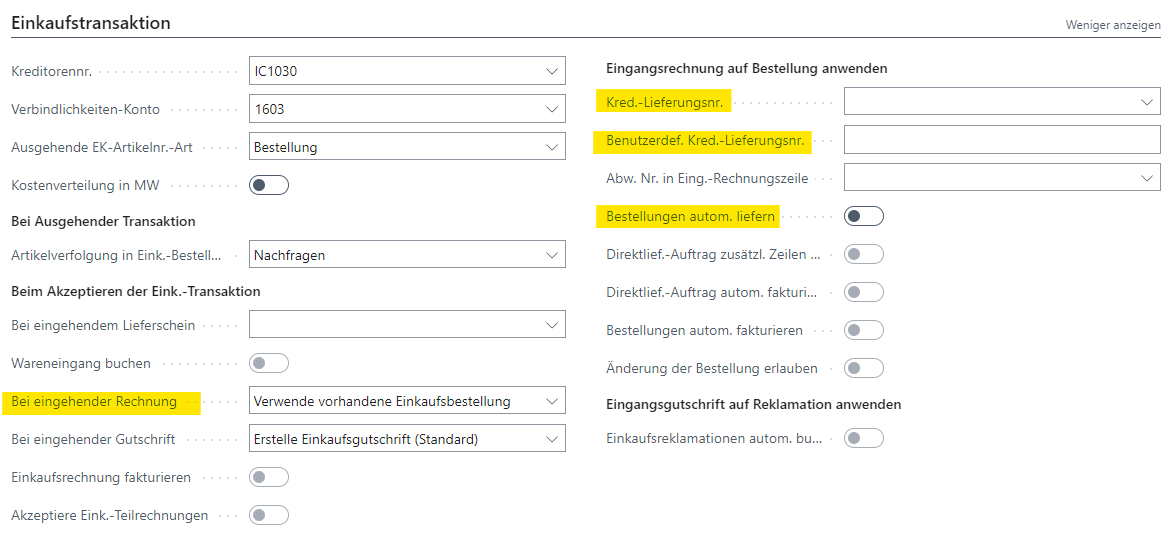
On the IC partner card you can alternatively configure the invoice to use the existing purchase order:
- Because the IC invoice does not transfer a vendor shipment number, either the vendor invoice number or a custom number is used.
- The custom number can contain the placeholder
%1for the vendor invoice number. - With partial invoices you should enable automatic shipping on the purchase order; otherwise later messages overwrite previously reported quantities.
Outcome
- Incoming invoices arrive in the structure agreed with the partner (new or via purchase order).
- Partial invoices remain consistent when the purchase order ships automatically.
Links