Setup and master data
Purpose
This page describes the foundational setup for Handling Unit Management. It covers packaging materials, packaging structure definitions, master-data-based assignments, and the rules and alternatives that are later used in document processes.
Prerequisites
- Handling Unit Management is installed in Business Central and enabled for the relevant processes.
- Item or resource master data for packaging materials and the required content items are available.
- Responsibilities for master data maintenance, release, and operational use are defined.
Quick start for end users
If you are new to HUM, complete this checklist in order:
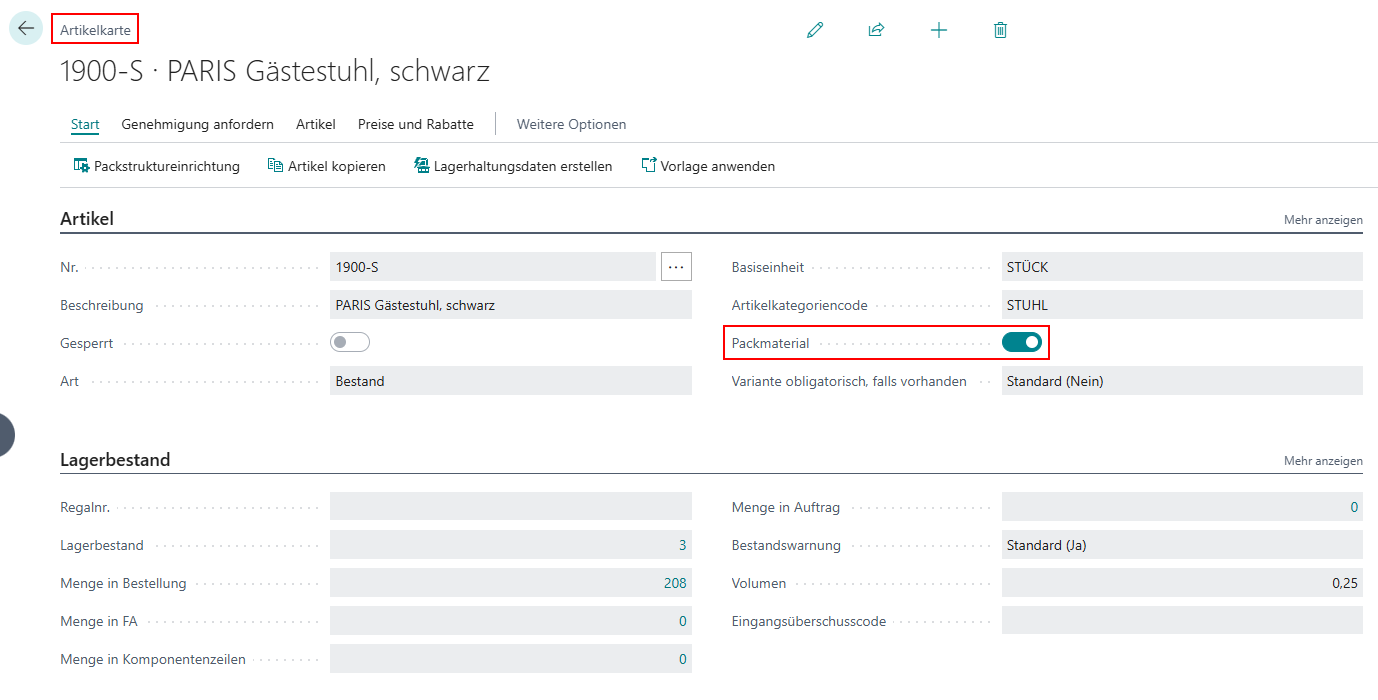
- Verify on the item card that relevant packaging materials are marked as packaging material.
- Check that weight and quantity-related values are complete.
- Open an existing packaging structure definition and verify hierarchy logic (one top line, at least one content line).
- Ensure that at least one structure in your business context has status Released.
- Then test usage in a document with a small test quantity.
Recommended order
- Mark packaging materials and maintain weights and relevant attributes in master data.
- Build packaging structure definitions with hierarchy levels, quantities, and content lines.
- Assign packaging structures to items, customers, vendors, or document contexts.
- Add alternatives and packaging rules, then release the structures for operational use.
Key settings in the system
HUM setup
On the Handling Unit Management Setup page, maintain the global baseline settings:
- Default Package Structure: fallback default when no more specific context applies.
- Package Nos.: number series for created package assignments.
Item and packaging-material master data
On the item card, the Package Material field controls whether an item is used as packaging material. For operations, these values are especially relevant:
- Weight: own weight used for tare and gross logic.
- Stacking Factor: maximum stacking value.
- Optional: dimensions and additional attributes for reporting and packing list output.
Package types and default rules
In Package Types, maintain per type:
- Code and description.
- Default Rule: suggested rule for related structure lines.
- Could be printed: print relevance indicator.
Validation rules for packaging structures
In Packaging Structure Rule, define business validations. Typical fields:
- Error: blocks registration on violation.
- Maximum Filling Quantity and Maximum Weight.
- Pure Item No. and Pure Lot No. for purity constraints.
- Print for print-capable units.
Document-line fields
On sales, purchase, transfer, warehouse shipment, and warehouse receipt lines, HUM fields are available:
- Package Instruction: points to the document-specific structure instruction.
- Packaging: marks automatically created packaging-material lines.
These fields help separate operational content lines from packaging lines.
Setup building blocks
Prepare packaging materials
Packaging materials can be based on items or resources. For operational use, they should be identified clearly and enriched with relevant information such as gross weight, dimensions, or material-related attributes.
In practice, the object is typically marked as a packaging material directly on the item card.
Create packaging structure definitions
Packaging structure definitions describe the reusable hierarchy of a handling unit. Pay particular attention to these basic rules:
- The top level has no assignment and must have quantity 1.
- Only one top line without an assignment is allowed.
- All further lines must refer to a superior packaging level.
- At least one line must describe the actual content.
Assign packaging structures to master data
Packaging structures can be assigned to master data such as items, customers, and vendors as well as to document-related contexts. This creates the basis for the system to select the appropriate standard structure automatically in sales, purchase, or transfer processes.
Maintain alternatives and rules
If multiple comparable packaging structures exist for the same context, alternatives must be defined. Pay particular attention to these points:
- Alternatives prioritize comparable structures within the same business context.
- At least one matching structure must be released so it can later be used as the standard packaging structure.
- Packaging rules validate additional requirements such as fill quantity, weight, structure type, or print relevance before a structure is used operationally.
The detailed business explanation of alternatives, copies, and rules is available on Packaging materials and structures.
Release and edit mode
Packaging structure definitions follow a clear status flow:
- Open: structure can be edited, expanded, and reorganized.
- Released: structure is approved for operational use.
If needed, a released structure can be switched back to edit mode via Reopen.
Common first-time setup mistakes
- Structure is not proposed in the document: often no released variant exists in the matching assignment context.
- Registration fails: check rule violations for fill quantity, weight, and required fields.
- Unexpected packaging-material lines: this behavior after registration is expected and required for posting.
- Quantities do not match: compare document target quantity with assigned quantities in the packaging structure.
Process Initial setup notes These points help you build packaging structures consistently and prepare them for operational use.
- Maintain weights and packaging-related attributes before using structure definitions productively.
- Use only one top line per structure and include at least one content line.
- Define alternatives whenever multiple structures compete on the same business level.
- Validate and release packaging structures before they are used as the standard packaging structure in documents.
Links