Lookup
Configuration of lookups with types, columns, filters, and actions in POS Core.
Under Designer → Lookup, the lookups for cashiering are configured.
| Type | Description |
|---|---|
| Salesperson | Configuration of the salesperson lookup |
| Customer | Configuration of the customer lookup |
| Item | Configuration of the item lookup |
| Item Variant | Configuration of the variant lookup |
| Return Reason | Configuration of the return-reason lookup |
| Unit of Measure | Configuration of the unit-of-measure lookup |
| Cash Account Book | Configuration of the cash account book lookup |
| Tender | Configuration of the tender lookup |
| Discount Reason | Configuration of the discount-reason lookup |
| Voucher Sale | Configuration of the lookup for open vouchers |
| Voucher Redemption | Configuration of the lookup for redeemable vouchers |
| Customer Ledger Entries | Configuration of the customer ledger entry lookup (open entry balance) |
| Contact | Configuration of the contact lookup |
| Item Reference | Configuration of the item reference lookup |
| Resource | Configuration of the resource lookup |
| Item Category | Configuration of the category lookup |
| Contact Editing | Configuration of contact creation/editing |
| Customer Editing | Configuration of customer creation/editing |
| Customer History | Configuration of the lookup for previous customer purchases |
| Price Information | Configuration of item price determination |
| Lot Information | Configuration of the lot lookup |
| Fattura PA | Configuration of invoice data for Italian fiscalization |
| Receipt Return | Configuration of return capture |
| Location | Configuration of the location lookup |
| Campaign | Configuration of the manual campaign lookup |
| Coupon | Configuration of the manual coupon lookup |
| Reservation | Configuration of the reservation lookup |
| Serial No. | Configuration of the serial-number lookup |
| Tax Free | Configuration of subsequent tax-free capture |
| Demoscopic Query | Configuration of the demoscopic-query lookup |
| Campaign Entries | Configuration of the lookup for campaigns currently registered/applied on the receipt |
| Receipt | Configuration of the receipt lookup |
| Employee | Configuration of the employee lookup |
Actions
| Action | Description |
|---|---|
| Reset | Resets the currently selected lookup to the default settings |
| Reset All | Resets all lookups to the default settings |
Setup
General
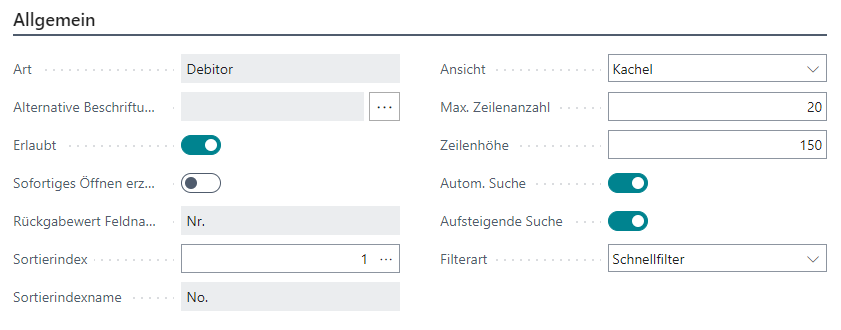
| Field | Description |
|---|---|
| Type | Shows the lookup type. There can only be one lookup per type |
| Alternative Caption | Offers the option to use an alternative heading for this lookup |
| Allowed | Defines that the lookup can be called within cashiering |
| Force Immediate Opening | For some lookups, direct opening can be configured |
| Return Value Field Name | Shows the name of the field returned by the lookup |
| Sort Index | The ID of the currently selected sort index. The Assist Edit button shows all sort indexes |
| Sort Index Name | Shows the name of the currently selected sort index |
| View | Defines how the data should be displayed Tile: The search results are shown as tiles List: The search results are shown in a table Map: The search results are shown on a map |
| Max. Number of Rows | The maximum number of rows or search results to display |
| Row Height | The row/tile height in pixels |
| Automatic Search | If this setting is enabled, the search is executed automatically one second after entering a filter and the corresponding search results are displayed; otherwise Enter must be pressed manually to start the search |
| Ascending Search | Defines whether the displayed search results should be sorted in ascending or descending order |
| Filter Type | Defines how the filters should be applied Quick Filter: The entered filter is applied to all filterable fields (OR condition) Detail Filter (optional): Each filterable field can be filtered individually (AND condition), the search window can optionally be opened Detail Filter (automatic): Each filterable field can be filtered individually (AND condition), the search window opens automatically |
| Multiple Selection Allowed | Enables the simultaneous selection and processing of multiple records (only for item sales and reservations) |
Columns

| Field | Description |
|---|---|
| Position | Defines the order in which the columns should be displayed |
| ID | The field number of the field to be shown in this column. The Assist Edit button shows all table fields, including FlowFields |
| Alternative Caption | Offers the option to use an alternative heading for this column |
| Visible | Defines whether this column should be displayed in the lookup |
| Highlighted | Highlights the content of this column in bold (only visible outside customer and contact editing) |
| Mandatory Field | Marks the column as mandatory, so it must contain a value (only visible within customer and contact editing) |
| Width | The column width in typical HTML units, for example 100px or 20% |
| Editable | Marks the column as editable (only for customer and contact editing) |
| Filterable | Shows whether this column should be considered in the full-text search |
| Filter Expression | The data in this column is filtered at runtime according to the expression stored here. In addition to the known BC filter expressions, the following placeholders can be used: $Location$ for the current location $CashRegister$ for the current cash register $ReceiptNo$ for the current receipt number $ProcessNo$ for the current POS process number $Language$ for the current user language $Customer$ for the customer currently stored on the receipt |
| Formatting | Defines a special formatting of the column data. Each ‘%1’ in the expression is replaced by the current column data, for example %1 Item |
| Automatic Line Break | Defines whether an automatic line break should occur after this column (tile view only) |
| Default Filter | Offers the option to filter directly on a specific field from the cashiering screen |
| Language Filter | Defines for which language code this column should be used |