Maintenance Setup
Brief context for Maintenance Setup in BE-terna Project.
General
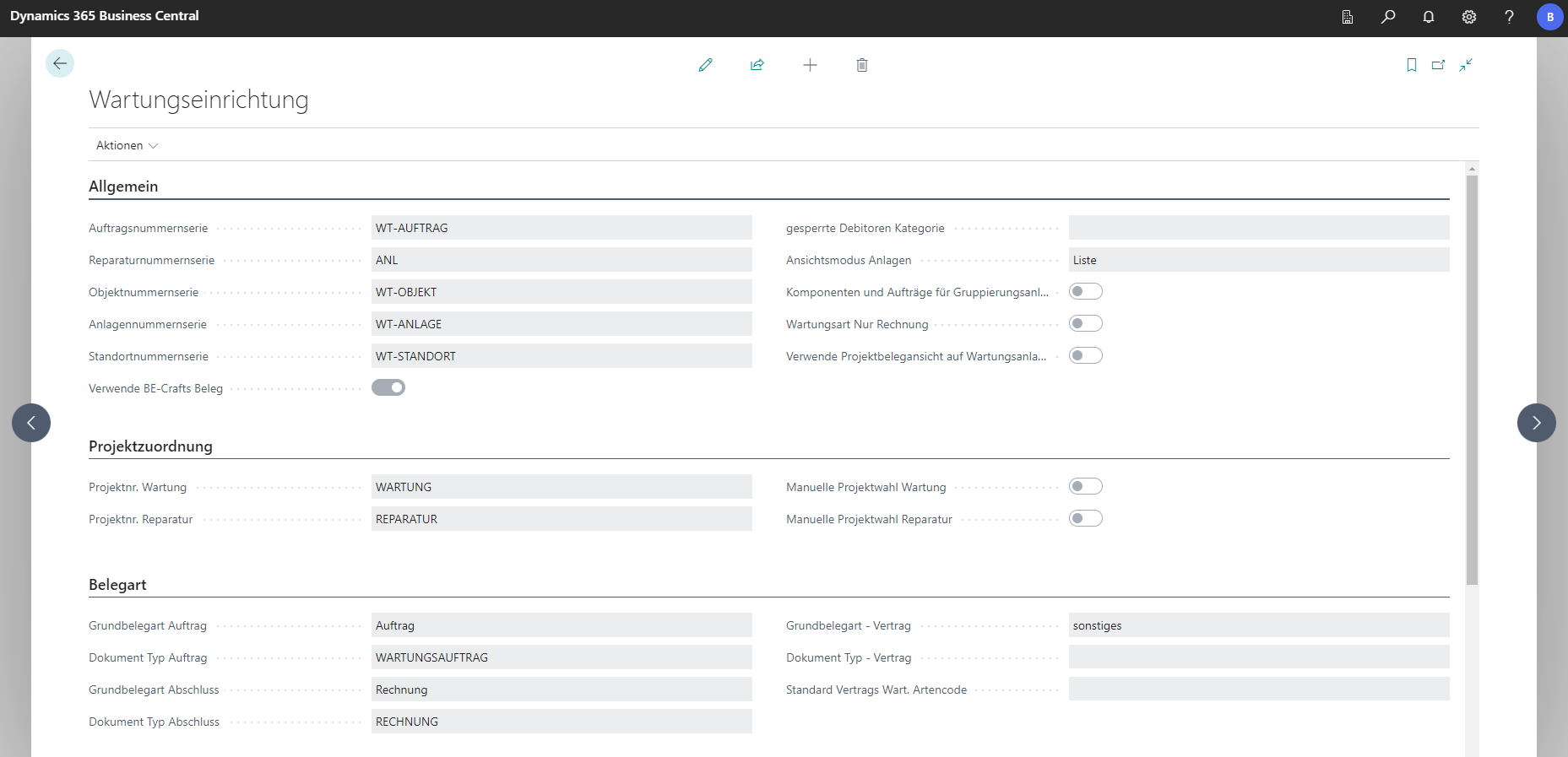
| Field | Explanation |
|---|---|
| Auftragsnummernserie | Number series code for new maintenance orders. |
| Reparaturnummernserie | Number series code for repair orders. |
| Objektnummernserie | Number series code for new objects (for example, a customer company or building). |
| Anlagennummernserie | Number series code for a specific installation within an object. |
| Standortnummernserie | Number series code for an installation location. A location is treated as a subunit of an object. |
| Verwende BE-terna Project Beleg | Defines that BE-terna Project documents are used for invoicing when maintenance or repair orders are created. |
| gesperrte Debitoren Kategorie | Color used to mark blocked debtors for objects, installations, and orders. |
| Komponenten und Aufträge für Gruppierungsanlagen zulassen | If enabled, installation hierarchies can be created and one combined order can be created for grouped, hierarchically related installations. |
| Wartungsart Nur Rechnung | Enables the maintenance type “Invoice only”. In this mode, recurring invoicing runs without creating a separate order document. |
Project Assignment
| Field | Explanation |
|---|---|
| Projektnr. Wartung | Defines the default project for new maintenance orders. |
| Projektnr. Reparatur | Defines the default project for new repair projects. |
| Manuelle Projektwahl Wartung | If enabled, users must manually select a project when creating a maintenance order. |
| Manuelle Projektwahl Reparatur | If enabled, users must manually select a project when creating a repair order. |
Document type
| Field | Explanation |
|---|---|
| Grundbelegart Auftrag | Defines the base document type for a new maintenance order (selectable from a dropdown). |
| Dokument Typ Auftrag | Defines the document type associated with the order base document type. |
| Grundbelegart Abschluss | Defines the base document type used when closing a maintenance order. |
| Dokument Typ Abschluss | Defines the document type associated with the closing base document type. |
| Grundbelegart - Vertrag | Defines the base document type for a new contract. |
| Dokument Typ - Vertrag | Defines the document type associated with the contract base document type. |
| Standard Vertrags Wart. Artencode | Defines the default contract maintenance code used when a contract is created from an installation. For “GROSS”, the default interval is 12 months; for “KLEIN”, 6 months. Additional contract types can be added and existing ones can be edited. |
Rotation management
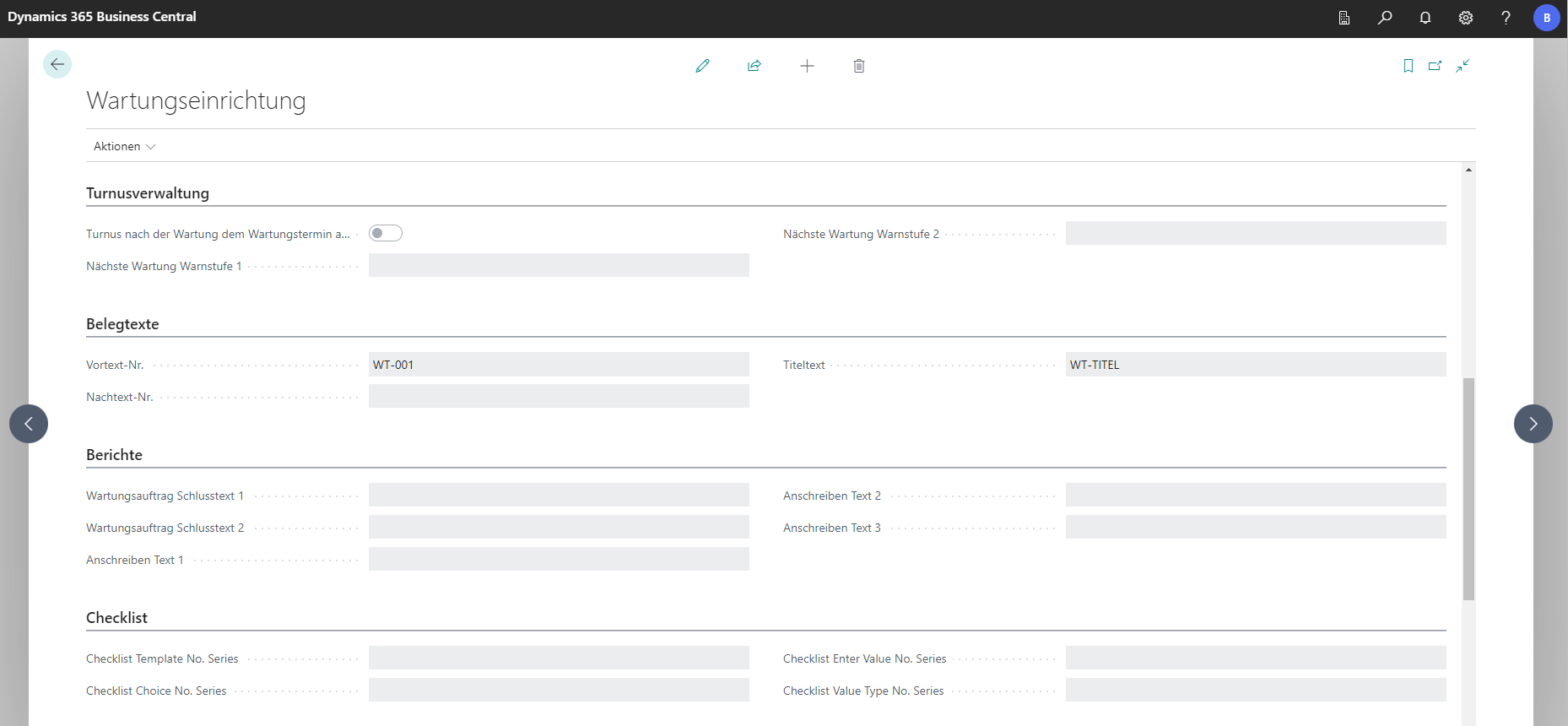
| Field | Explanation |
|---|---|
| Turnus nach der Wartung dem Wartungstermin anpassen | If enabled, the maintenance interval is recalculated based on the actual maintenance date. |
| Nächste Wartung Warnstufe 1 | Entering a date formula (for example, -1M) calculates from today to the maintenance date and applies warning level 1 color (yellow) to the installation. |
| Nächste Wartung Warnstufe 2 | Entering a date formula (for example, +1M) calculates from today to the maintenance date and applies warning level 2 color (red) to the installation. |
Supporting texts
| Field | Explanation |
|---|---|
| Vortext-Nr. | Uses the preface text number to select a long text that is inserted at the beginning of the document. |
| Nachtext-Nr. | Uses the closing text number to select a long text that is inserted at the end of the document. |
| Titeltext | Uses the title text code to select a long text that is inserted as the title description. |
Reports
| Field | Explanation |
|---|---|
| Wartungsauftrag Schlusstext 1 | Selects the long text shown at the end of the printed maintenance order. |
| Wartungsauftrag Schlusstext 2 | Selects an alternative long text shown at the end of the printed maintenance order. |
| Anschreiben Text 1, 2 und 3 | Combines these long texts into a document sent to customers, typically an information letter. |
MFF Setup
MFR is an external service that allows craft businesses to manage their replenishment. To ensure that the service and BE-Crafts or ProServ interact with each other as desired, settings can be made at this point.
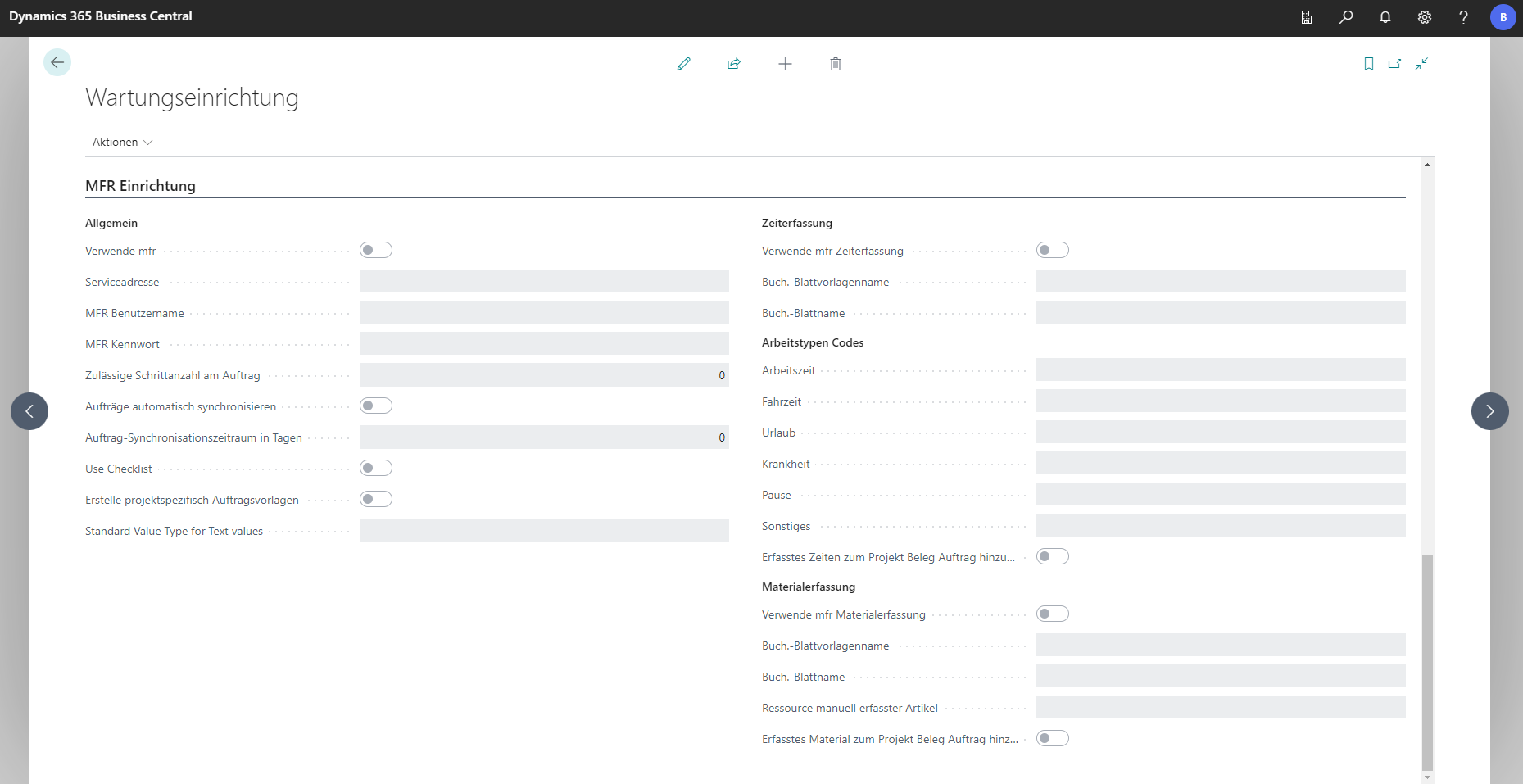
General
| Field | Explanation |
|---|---|
| Verwende mfr | Activates the MFR service. |
| Serviceadresse | URL of the MFR interface. |
| MFR Benutzername | Username used to sign in to the MFR service. |
| MFR Kennwort | Password used to sign in to the MFR service. |
| Zulässige Schrittanzahl am Auftrag | Maximum number of work steps allowed within the MFR profile for an order. |
| Aufträge automatisch synchronisieren | If enabled, you can define a day interval in the field below for automatic synchronization of new orders with MFR. If disabled, synchronization must be triggered manually in MFR. |
| Auftrag-Synchronisationszeitraum in Tagen | Defines the synchronization interval in days between the system and MFR for orders. |
| Use Checklist | If disabled, work steps are stored as project document lines in the maintenance order. If enabled, the checklist documents feature is used to manage and synchronize checklists with MFR. |
| Erstelle projektspezifische Auftragsvorlagen | Creates an MFR order template for the project assigned to the maintenance order. |
| Standard Value Type for Text values | Defines the default value type for texts so synchronization between MFR and BE-Crafts works correctly. This field is mandatory. |
Time Tracking
| Field | Explanation |
|---|---|
| Verwende mfr Zeiterfassung | If enabled, time tracking from MFR is synchronized with BE-terna Project. |
| Buch.-Blattvorlagenname | Defines the journal template used to post times from MFR into BE-terna Project (for example, material withdrawal, project journal, recurring project journal). |
| Buch.-Blattname | Selects the specific journal used for posting times from MFR. Use a different journal than for material capture to avoid unintended deletions. |
Work Types Codes
| Field | Explanation |
|---|---|
| Arbeitszeit | Synchronizes working time between MFR and BE-terna Project. |
| Fahrzeit | Synchronizes travel time between MFR and BE-terna Project. |
| Urlaub | Synchronizes vacation entries between MFR and BE-terna Project. |
| Krankheit | Synchronizes sick days between MFR and BE-terna Project. |
| Pause | Synchronizes breaks between MFR and BE-terna Project. |
| Sonstiges | Synchronizes other time entries between MFR and BE-terna Project. |
| Erfasste Zeiten zum Projekt Beleg Auftrag hinzufügen | Adds a new line with recorded time as a resource in the project document. |
Material Capture
| Field | Explanation |
|---|---|
| Verwende mfr Materialerfassung | If enabled, material capture from MFR is synchronized with BE-terna Project. |
| Buch.-Blattvorlagenname | Defines the journal template used to post captured materials from MFR into BE-terna Project. |
| Buch.-Blattname | Selects the specific journal used for posting captured materials from MFR. Use a different journal than for time tracking to avoid unintended deletions. |
| Ressource manuell erfasster Artikel | Manually captured MFR items are always posted as resources in BE-terna Project. This field defines which resource is used. |
| Erfasstes Material zum Projekt Beleg Auftrag hinzufügen | Adds captured material as a new item line in the project document. |