Overview
Purpose
BE-terna Manufacturing extends Microsoft Dynamics 365 Business Central with additional capabilities for production planning, production order handling, purchasing, logistics, tool management, and costing and reporting. This documentation brings the main use cases together so that users and key users understand the business flow, the required master data, and the downstream processes in context.
Business Value
- Brings daily tasks, KPIs, and navigation targets for manufacturing together in a dedicated role center.
- Reduces manual maintenance through automatic defaults for routings, production BOMs, locations, and production orders.
- Supports planning through enhanced planning worksheets, automatic planning runs, and production families.
- Makes release, posting, correction, and reopening of production orders easier to trace and more reliable.
- Connects production with purchasing, logistics, tool management, and costing in one connected process landscape.
Areas and Topics
Role center and daily orientation
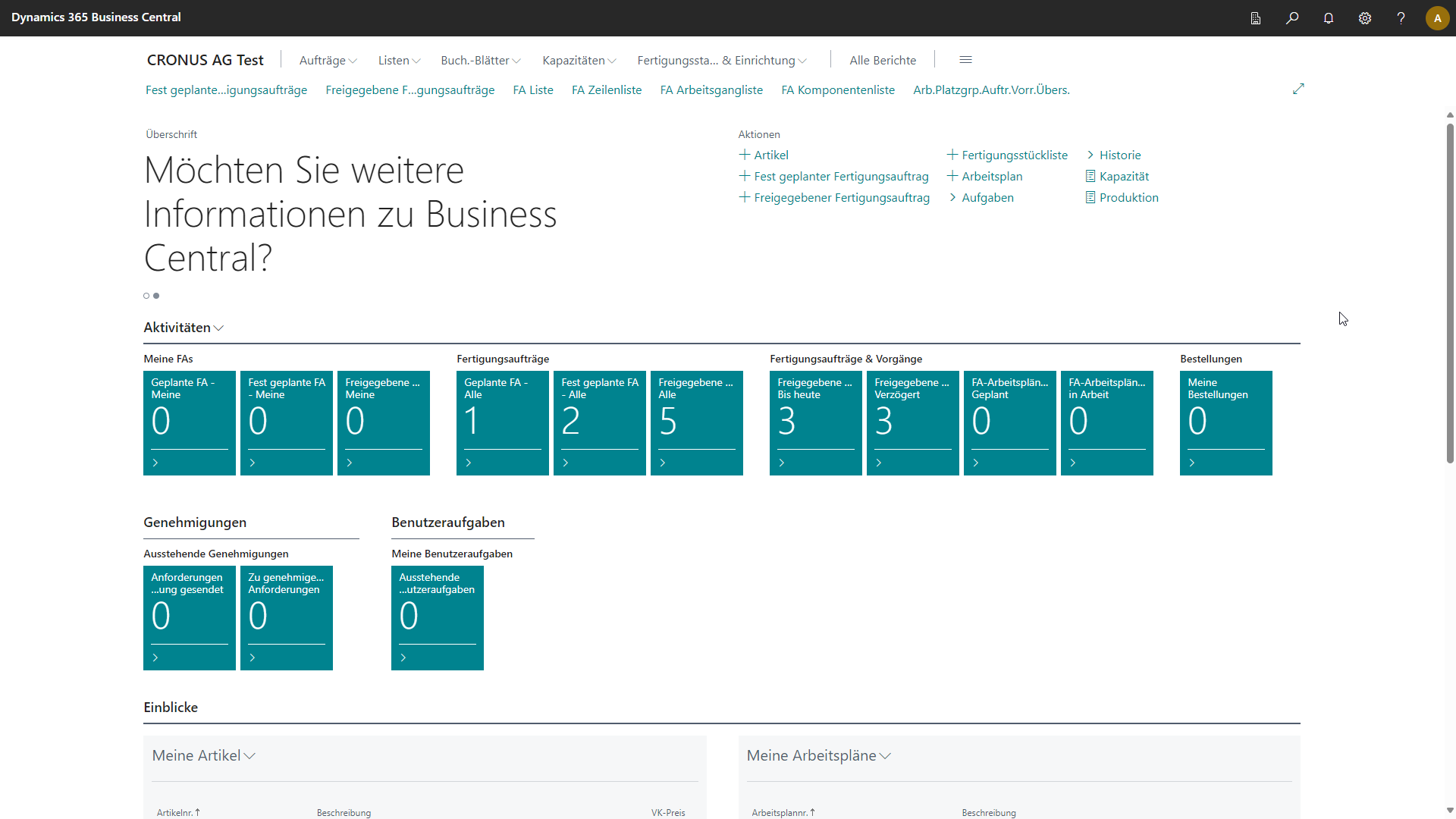
The BE-terna Manufacturing role center combines the main entry points for items, production orders, routings, BOMs, capacities, and tasks. Users also see KPIs for their own and general production orders, delayed operations, and follow-up tasks for day-to-day control.
Area: Master Data
This area explains how Manufacturing Setup, items, routings, production BOMs, item versions, location defaults, and routing link codes work together. It covers both the initial configuration and the validation rules that prevent incorrect defaults from flowing into production orders or journals later on.
Area: Production Planning
The planning pages cover operational order planning from sales and planning worksheets, automatic planning runs through the job queue, and the planning of production families. Additional personnel and tool requirements in routings are also explained here.
Area: Production Order Management
This area covers the complete production order lifecycle: create, refresh, release, review, process, post, reopen, and handle rework. It also includes item tracking, related output and consumption posting, correction suggestions, inventory visibility in journals, and worker time registration with authentication and filters.
Area: Purchasing
This area describes the functions that belong to the purchasing area of Business Central. It focuses on subcontracting purchase orders, subcontracting prices, purchase-transfer link lines, and the planning context needed to work with subcontractors.
Area: Logistics
The logistics topics extend warehouse receipts in subcontracting and the handling of pending consumption. This shows how returns from subcontractors, location rules, and follow-up processing of open consumption quantities fit together from a business perspective.
Area: Tool Management
Tools and complete tools are documented not only as master data, but also in their use in routings, output reporting, repairs, and tool journals. This includes dimensions, service life logic, cavities, and status handling.
Area: Costing and Reporting
For follow-up analysis, BE-terna Manufacturing provides production printouts, production order job cards, final costing, WIP valuation, and tracing of related item ledger entries. This supports both operational follow-up and financial or quality-oriented review.
Result
- You understand the main functional areas of BE-terna Manufacturing inside Business Central.
- You can use the documentation by master data and setup, production planning, production order management, purchasing and subcontracting, logistics, tool management, and analysis.
- You know which topic areas belong together for master data, operational production, and follow-up review.
Links