Role center
Intercompany role center: single entry point for partners, transactions, error log, and job queue.
Purpose
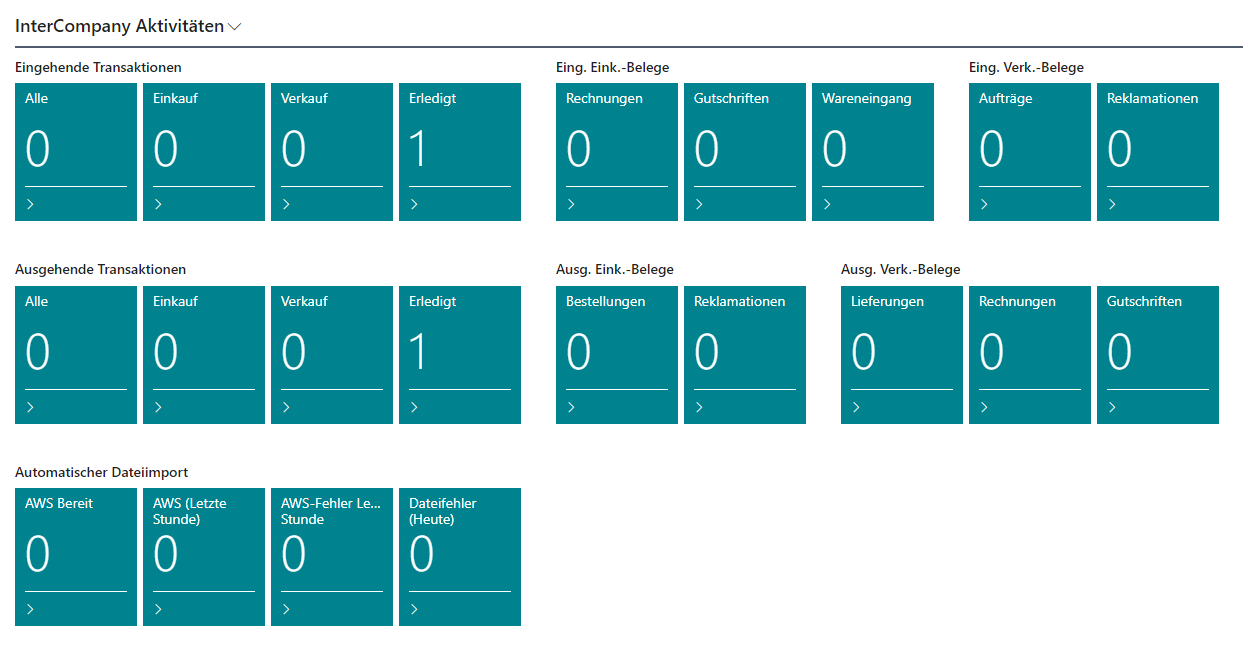
The Intercompany role center is the central entry point for everyone who works with IC documents regularly. It bundles navigation, key figures, and actions in one place so that typical tasks can be done without detours.
Access in Business Central
Pick the role center through the user/role assignment in user management or through My settings.

Prerequisites
- User has the right permissions (see Permissions).
- Intercompany is configured at the company level.
Activities
- Entry point for partner maintenance, transaction overviews, and the error log.
- Direct navigation to the job queue for retries and error analysis.
- Start common actions for sending, accepting, and remediating IC documents.
Fields and actions
| Area | Purpose |
|---|---|
| Tiles | Overview of open and failed IC transactions. |
| Navigation | Access to partners, inbox, outbox, error log, and job queue. |
| Actions | Frequent tasks such as sending, accepting, and clearing errors. |
Monitoring and troubleshooting
- Unusual numbers on the tiles (for example the number of failed transactions) surface the need for action early.
- Every tile drills down to the underlying documents.
Best practices
- Assign this role center to users with daily IC contact.
- Review the tiles regularly even when no concrete error has been reported.
Links