Setup
Device Management Setup
The Device Management Setup sets the basic parameters needed to work with devices, handovers, checks, and calendar functions. It forms the basis for the consistent use of the module.
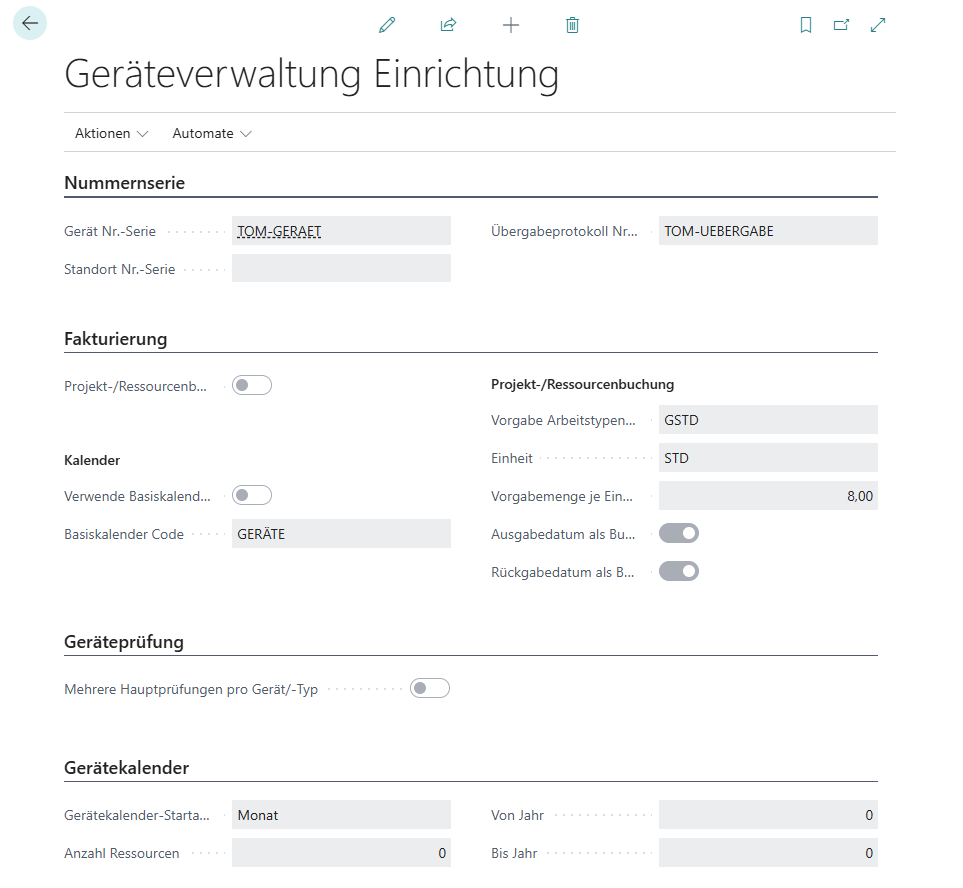
| Bereich | Feld | Erklärung / Zweck |
|---|---|---|
| Nummernserien | Gerät Nr.-Serie | Legt fest, aus welcher Nummernserie Gerätenummern automatisch vergeben werden. |
| Übergabeprotokoll Nr.-Serie | Definiert die Nummernserie für Übergabeprotokolle (Reservierung, Ausgabe, Rückgabe). | |
| Standort Nr.-Serie | Nummernserie für Standorte. | |
| Fakturierung | Projekt-/Ressourcenbuchung aktiviert | Verknüpft die Geräteverwaltung mit Projekt- oder Ressourcenbuchungen. |
| Verwende Basiskalender | Aktiviert die Nutzung eines Basiskalenders für die Geräteplanung. Verwendet einen definierten Basiskalender um Feiertage etc. aus der Mengenberechnung von Proj.-/Ress.-Buchung auszuschließen | |
| Basiskalender Code | Definiert den Basiskalender, der für alle Geräte gilt (z. B. GERÄTE). | |
| Vorgabe Arbeitstypencode | Standard-Arbeitstyp für Buchungen (z. B. GSTD). | |
| Einheit | Maßeinheit für Buchungen (z. B. STD = Stunden). | |
| Vorgabemenge je Einheit | Standardbuchungsmenge (z. B. 8 Stunden pro Tag). | |
| Ausgabedatum als Buch.-Datum verwenden (Geräteausgabe) | Wenn aktiv, wird das Ausgabedatum als Buchungsdatum übernommen. Falls nicht aktiviert, wird das Buchungsdatum (Belegkopf) zur Buchung der Geräteausgabe verwendet. | |
| Rückgabedatum als Buch.-Datum verwenden (Geräterückgabe) | Wenn aktiv, wird das Rückgabedatum als Buchungsdatum übernommen. Falls nicht aktiviert, wird das Buchungsdatum (Belegkopf) zur Buchung der Geräterückgabe verwendet. | |
| Geräteprüfung | Mehrere Hauptprüfungen pro Gerät/Typ | Erlaubt die Pflege mehrerer Prüfungen pro Gerätetyp (z. B. UVV + Sicherheitscheck). |
| Gerätekalender | Gerätekalender-Startansicht | Bestimmt die Standardansicht (Tag, Woche, Monat) beim Öffnen des Kalenders. |
| Anzahl Ressourcen | Definiert die Anzahl der Ressourcen, die im Kalender angezeigt werden. | |
| Von Jahr | Beginn des Zeitraums, für den der Gerätekalender gültig ist. | |
| Bis Jahr | Ende des Zeitraums, für den der Gerätekalender gültig ist. |
User Setup
The User Setup in Dynamics 365 Business Central defines which people have access to device management and how they are stored in the system. This controls which users can book, reserve or check devices.
Test Protocol Setup
The Audit Trail Setup in Dynamics 365 Business Central sets the basic settings for managing and documenting device audits. Specifications are defined here that apply to all test protocols.
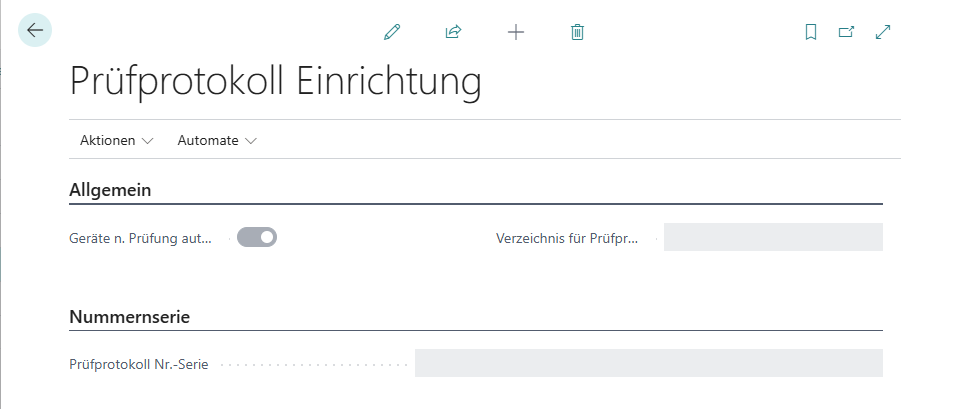
| Bereich | Feld | Erklärung / Zweck |
|---|---|---|
| Allgemein | Geräte n. Prüfung automatisch ent-/sperren | Wenn aktiviert, werden Geräte nach einer Prüfung automatisch gesperrt, bis ein Ergebnis dokumentiert ist. |
| Verzeichnis für Prüfprotokolle | Definiert den Speicherort, in dem Prüfprotokolle standardmäßig abgelegt werden (z. B. SharePoint, Dateiserver). | |
| Nummernserie | Prüfprotokoll Nr.-Serie | Legt die Nummernserie fest, aus der die Prüfprotokolle automatisch vergeben werden. Sichert eine eindeutige und fortlaufende Nummerierung. |
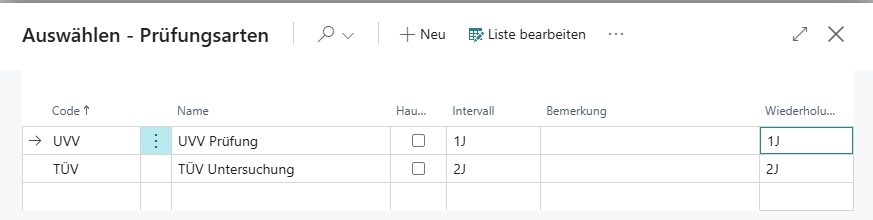
Set up exam types
In the list Types of inspections you can specify different types of tests, such as TÜV, UVV, etc., with information on the interval, the repetition period and whether it is a general inspection. These types of checks can later be assigned to a specific device type or device.
Device parameters
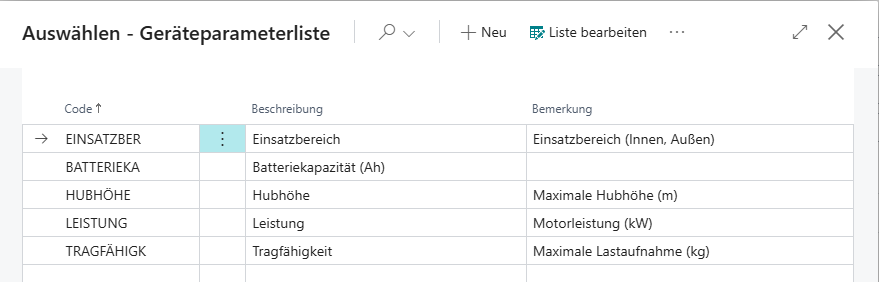
The Device Parameter List in Dynamics 365 Business Central is used to centrally manage additional features and properties of devices. Parameters allow for more precise search and categorization, allowing devices to be filtered according to technical, organizational, or usage-related criteria. The device parameter list can be opened via the central search function.
Structure of the overview
The list consists of three columns:
-
Code
Unique abbreviation for the parameter (e.g. LIFTING HEIGHT_, BATTERY-KA). -
Description
Plain text label of the parameter as it appears in Device Search or Device Management. -
Note
Additional information, such as units of measurement, value ranges, or usage notes.
Benefits and function
-
In the Device Search, parameters can be used as filter criteria to find devices faster and more specifically.
-
In the Device Management, devices can be provided with parameters in order to document technical properties and operating conditions in a structured manner.
-
By combining several parameters, even complex searches can be mapped (e.g. “Forklift with load capacity ≥ 2,500 kg and lifting height ≥ 4 m”).
-
Flexible expandability with additional parameters as needed
Device Types
The Device Type Management in Dynamics 365 Business Central can be used to define different types such as IT, Machine, Security Device. Each device type can then be assigned specific parameters and test types.
This determines which additional information can be maintained for the devices of this type and used later in the search or evaluation.

Structure of the overview
The list displays the following information:
| Feld | Erklärung / Zweck |
|---|---|
| Code | Eindeutige Kurzbezeichnung des Gerätetyps (z. B. IT, MASCHINE). |
| Description | Plain text label of the type (e.g. IT Infrastruktur, machine). |
| Remark | Free field for additional clues. |
| Number of devices (total) | Number of devices associated with this type. |
| Anzahl Prüfungsarten | Zeigt, wie viele unterschiedliche Prüfungsarten für diesen Typ definiert wurden. |
Benefits and function
-
Start → parameters: Store device parameters for the type (e.g. load capacity, lifting height, power for machines).
-
Inspection: Define types of inspections that are valid for this type of equipment (e.g. UVV inspection for machines, safety check for IT).