Module
Device management in progress
The Device Management module in Dynamics 365 Business Central helps companies centrally record, manage, and track devices of all kinds. It provides functions for:
- Inventory overview: Record devices, categorize them, and manage locations.
- Handovers: Document reservations, issues, and returns of devices.
- Inspections: Plan, perform, and log safety and maintenance inspections.
- Calendar and search: Review reservations, utilization, and availability through the device calendar and flexible device search.
- Parameters and device types: Define standardized characteristics, such as load capacity or performance, and inspection types for each device type.
Device management provides transparency, efficiency, and traceability across the full lifecycle of equipment.
Role Center and lists
The Role Center serves as the start page and provides a quick overview of available devices, their usage, and important activities. In addition to master data, the device list also shows the last and next inspections, the current user, the location, and the reservation status directly in the list.
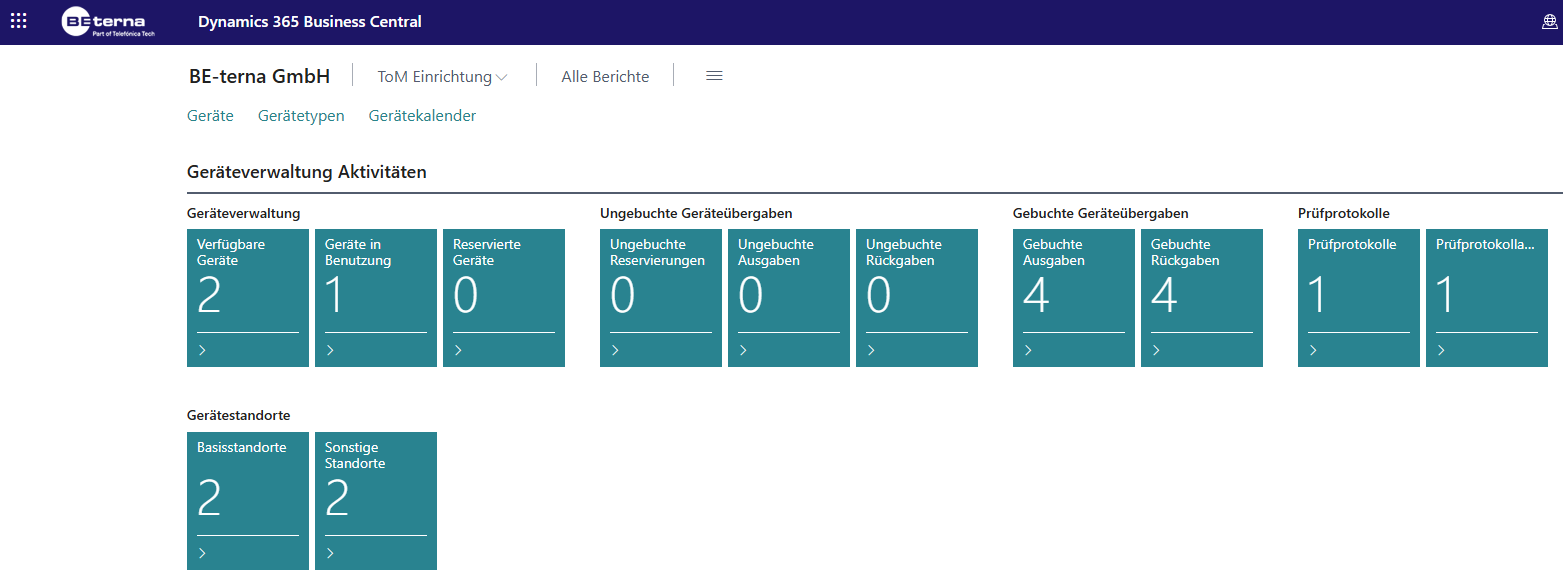
Navigation
The upper area contains the main menu items:
- Devices: Overview and management of all devices.
- Device types: Definition and maintenance of device types, such as laptop, smartphone, or tablet, with parameters and inspection types.
- Device calendar: Calendar view for reservations, issues, and returns.
From there, the Device menu provides actions such as:
- Handover Entries and Reservation Entries for history
- Reservation, Issue, and Return for new handover processes
- Comments and Parameters for additional data
- Assigned Inspection Types, Inspection Logs, and New Inspection Log for inspection processes
- Calendar and Device Search for overview and search
Device Management Activities
The Role Center displays key figures as tiles. They provide a quick overview of the device management status.
Device management:
- Available devices: Number of currently available devices.
- Devices in use: Number of currently issued devices.
- Reserved devices: Devices with future reservations.
Unposted handovers: Processes that have been created but not yet posted, such as reservations, issues, or returns.
Posted handovers: Already completed postings with date and documentation status.
Inspection logs: Documented inspections including results, plus inspection log evaluations for analysis.
Device locations: Base locations such as headquarters or branches, plus other locations such as home-office pools or project warehouses.
Device list
In addition to the basic fields, the list also contains:
- Last main inspection result/date/type and Next main inspection date/type
- Blocked
- Current user, Current location, and Currently reserved for user
Device details
The device card extends the list with operational maintenance for handovers and inspections:
- New handovers through Reservation, Issue, and Return
- Linked comments and parameters
- Inspection mapping, inspection logs, and creation of new inspection logs
- Calendar and device search directly from the card
Device User List
The device user list can be opened through global search. The Device User List is used to manage all people who use, reserve, or can be assigned devices. Each user is shown with basic information and current reservations or issues.
Use New to create a new device user with master data.

| Field | Description |
|---|---|
| Code | Abbreviation or identifier for the user, for example SOS. |
| Name | Full name of the device user, for example Stefan Mustermann. |
| Phone no. / Mobile phone no. | Contact details of the user. |
| Email address of the user for notifications. | |
| Resource no. | Link to the resource in resource management. |
| No. of currently reserved devices | Number of devices currently reserved by the user. |
| No. of currently issued devices | Number of devices currently issued to this user. |
| Comment | Free-text field for additional notes, such as department or project assignment. |
Device locations
The Device Locations page distinguishes between base locations and additional device locations. Locations can be linked to a project and a responsible location owner.
The list also shows the number of issued devices, reserved devices, and devices available at the base location. Use Finished to mark a location as no longer active. Create new locations with New on the location card.