Campaign Entries
Describes the overview of all applied campaigns in POS Core.
The Campaign Entries menu item contains all campaigns applied so far.
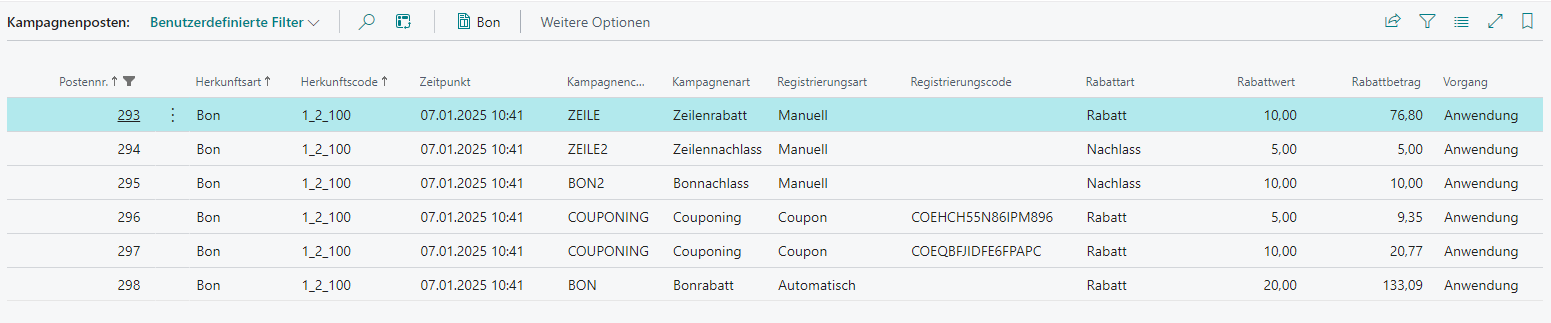
| Field | Description |
|---|---|
| Entry No. | Unique and sequential entry number |
| Source Type | Trigger of the campaign, currently always receipt |
| Source Code | Primary key, currently always receipt ID |
| Time | Date and time of campaign registration |
| Campaign Code | Code of the applied campaign |
| Campaign Type | Type of the campaign at the time of application |
| Registration Type | Type of campaign registration Automatic: The campaign was registered automatically Manual: The campaign was registered manually Coupon: The campaign was registered by a coupon |
| Registration Code | Contains the code used for manual registration |
| Discount Type | Type of discount at the time of application Discount: Percentage reduction Reduce: Absolute reduction |
| Discount Value | The percentage or absolute reduction value |
| Reduce Amount | The sum of all reductions made by this campaign |
| Transaction | The type of campaign application Issue: The reduction was printed as a coupon when the receipt was finished Application: The campaign was applied |