Campaign
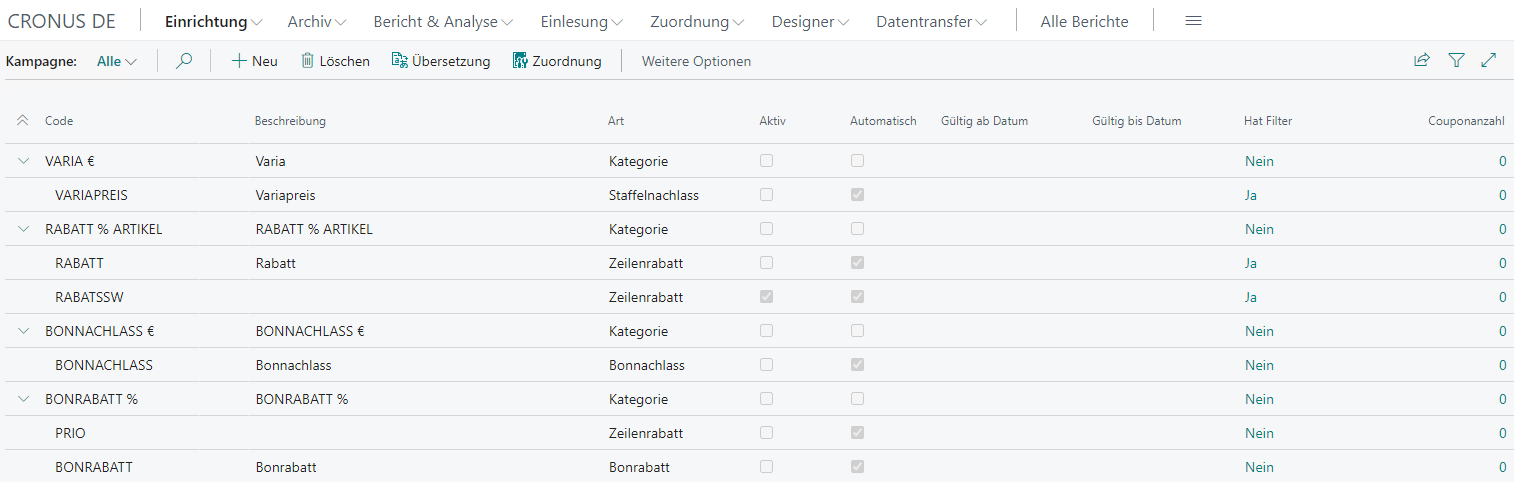
Under Setup → Campaign, you can configure time-limited and/or product-dependent automatic discount campaigns. This avoids the need to adjust item price lines manually for short-term promotions.
Actions
The card contains several actions, which are briefly described below:
| Field | Description |
|---|---|
| Activate | Activates the campaign for all cash registers whose cash register setup allows campaigns |
| Deactivate | Deactivates the campaign so it can no longer be used at any cash register |
| Filter | Opens the filter overview for this campaign |
| Assignment | Opens the assignment overview for this campaign |
| Entries | Opens the related campaign entries |
| Coupons | Opens coupon management |
| Barcode | Opens barcode setup |
Activate
This releases the campaign for use. After that, no further changes can be made to the campaign until it is deactivated.
Deactivate
This blocks the campaign from use again so that changes can be made.
Filter
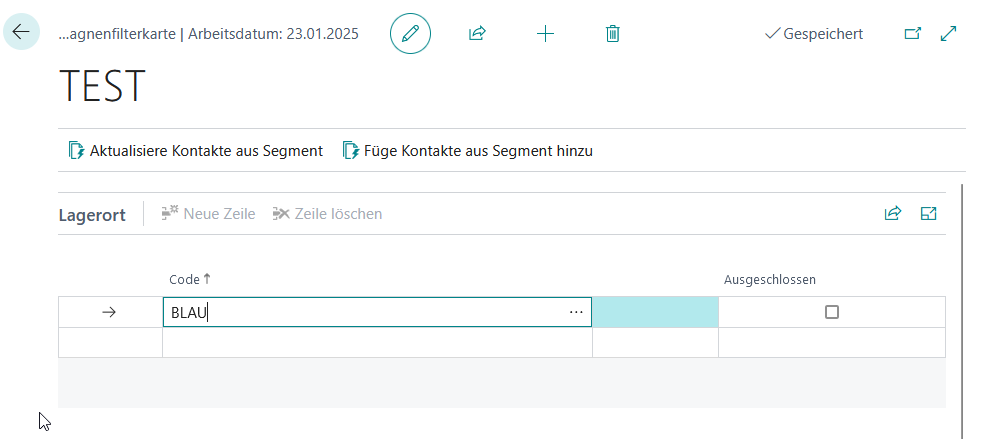
In the filter overview, the selected campaign can be restricted to specific criteria, for example only to selected items, categories, or locations.
Actions
| Button | Description |
|---|---|
| Update Contacts from Segment | Here you can select a segment. The contacts from the segment are transferred to the campaign’s contact filter. Contacts that are already assigned but are not in the segment are removed from the contact filter. |
| Add Contacts from Segment | Adds the contacts from the segment to the campaign’s contact filter |
Filters
| Field | Description |
|---|---|
| Type | Defines the filter type in the form of tabs Location: Campaign is applied only for selected cash register setups Item: Campaign is applied only to selected items/variants Item Category: Campaign is applied only to selected item categories Vendor: Campaign is applied only to items from specific vendors Resource: Campaign is applied only to selected resources Debtor: Campaign is applied only if specific debtors are assigned to the receipt Contact: Campaign is applied only if specific contacts are assigned to the receipt |
| Code | Code depending on the filter, for example location code or item number |
| Excluded | Excludes a record depending on the code: Code: The relevant record is excluded Blank: The entire filter group is excluded ’’: All blank records are excluded |
Triggers
Using so-called triggers, it is possible to ensure that a campaign is only applied when one or more filter-independent conditions are met.
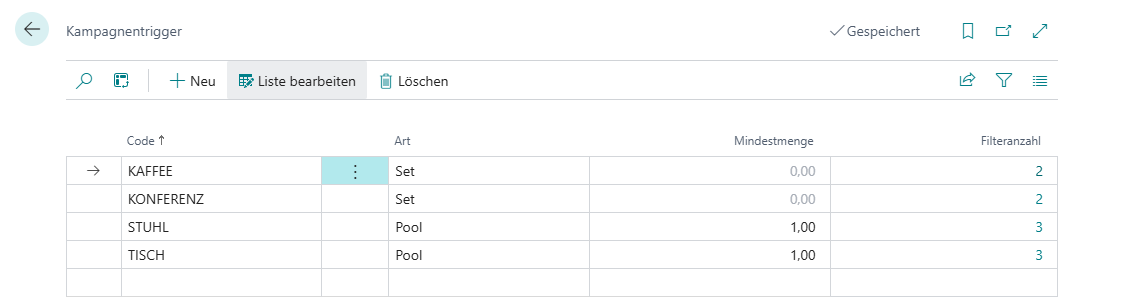
There are two types of triggers: pool triggers and set triggers.
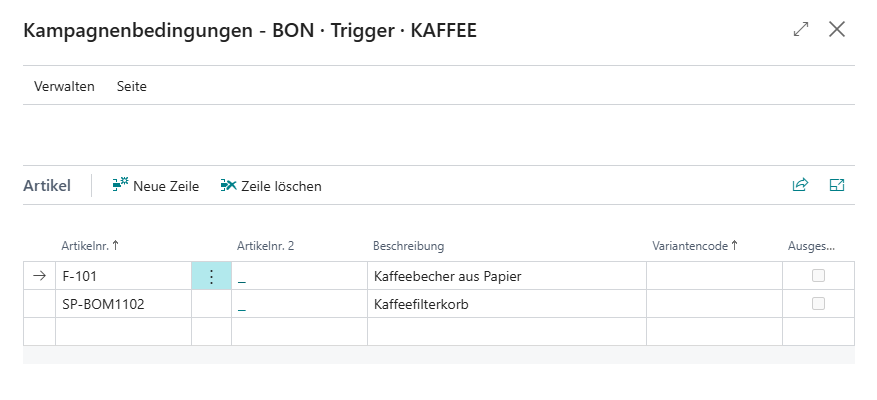
Set Trigger
Set triggers allow you to define a specific number of items, for example, all of which must be included in the current receipt so that the campaign is triggered.
Pool Trigger
Pool triggers allow you to define a specific number of items, for example, of which at least the minimum quantity must be present in the current receipt for the campaign to be triggered.
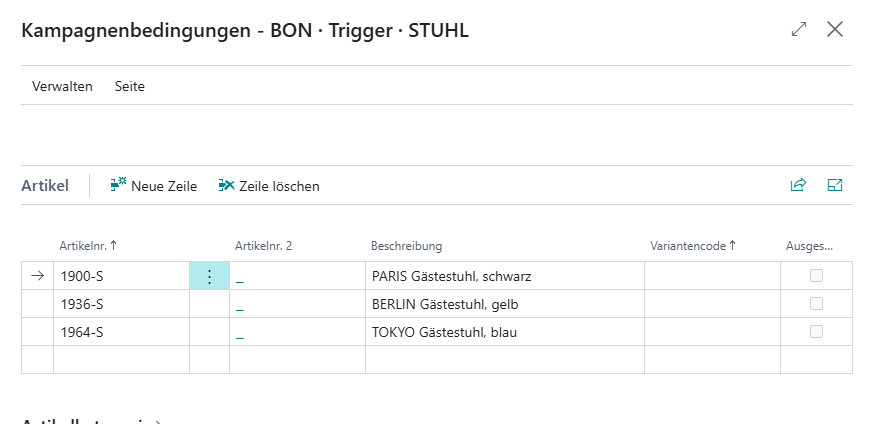
When combining multiple pool and set triggers, all pool triggers and at least one set trigger must be fulfilled for the campaign to be triggered.
Assignment
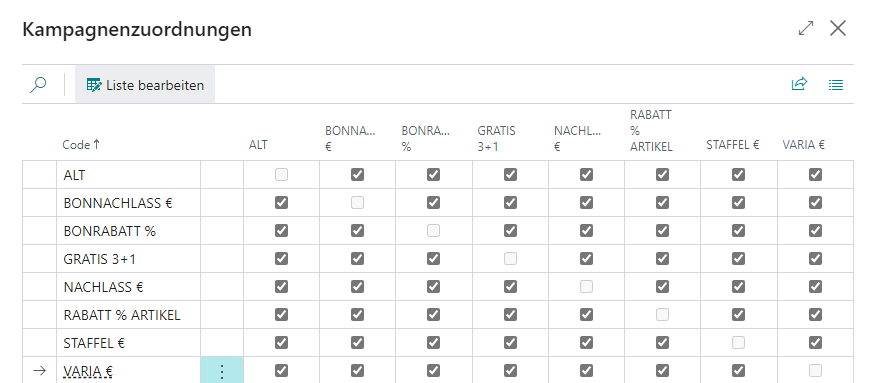
The assignment matrix can be used to configure whether campaigns can be combined with other campaigns or categories and, if so, with which ones.
Entries
Shows the related entries that reflect the respective campaign actions or applications.
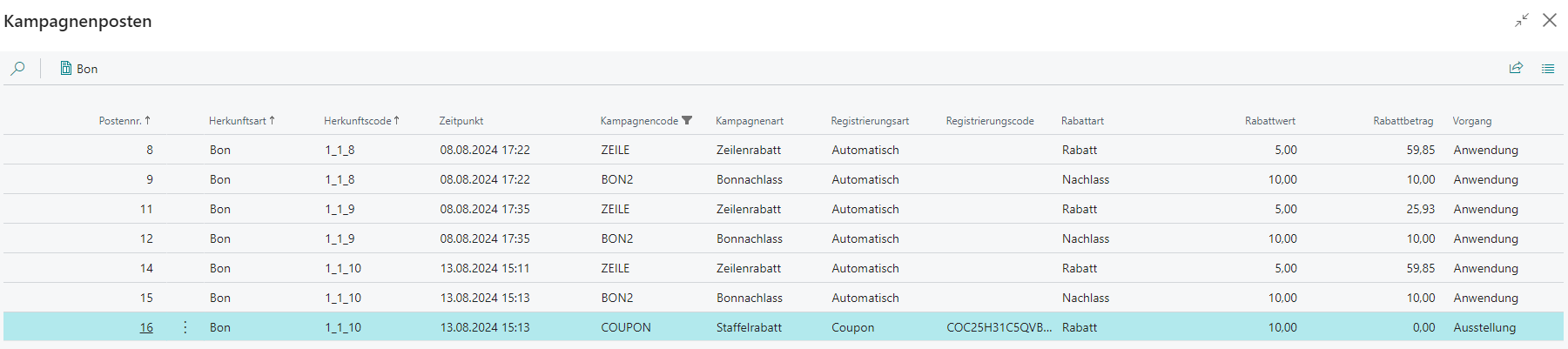
| Field | Description |
|---|---|
| Entry No. | The unique entry number |
| Origin Type | Identifies the table in which the campaign was applied Receipt: The campaign was applied in a receipt |
| Origin Code | Identifies the record, normally the receipt ID, in which the campaign was applied |
| Timestamp | Date and time at the moment of registration |
| Campaign Code | Contains the code of the applied campaign |
| Campaign Type | Stores the campaign type at the time of application |
| Registration Type | Contains the type of registration Automatic: The campaign was registered automatically Manual: The campaign was registered manually via campaign code or campaign barcode Coupon: The campaign was registered via coupon barcode |
| Registration Code | If the registration type is coupon, the coupon number is stored here |
| Discount Type | Contains the discount type at the time of application |
| Discount Value | Contains the absolute or percentage discount/reduction |
| Reduce Amount | Stores the absolute reduction granted |
| Process | The process carried out Application: The campaign was applied within the receipt Issue: The campaign was issued as a coupon at the end of the receipt |
Coupons
For campaigns that must be registered manually, coupons can be created. These can be assigned to a specific customer and redeemed either once or multiple times.
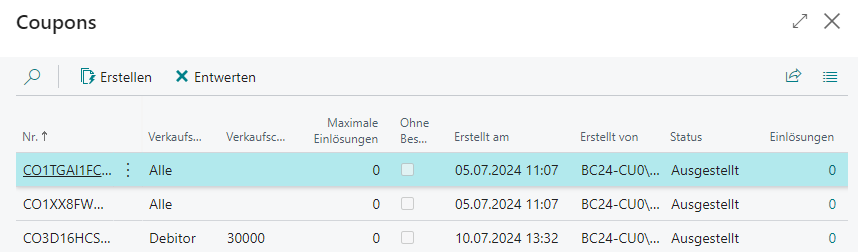
| Field | Description |
|---|---|
| No. | Randomly generated coupon code |
| Sales Type | Specifies who can redeem this coupon All: The coupon can be redeemed by everyone Debtor: The coupon can only be redeemed by a specific debtor Contact: The coupon can only be redeemed by a specific contact |
| Sales Code | The relevant contact or debtor number |
| Maximum Redemptions | Specifies how often the coupon can be redeemed, where 0 allows unlimited use |
| Without Restrictions | Specifies that this coupon can be redeemed regardless of all stored campaign filters, applies only to coupon issue |
| Discount Type | Specifies whether the coupon should be applied as a reduce or discount, only for couponing campaigns |
| Discount Value | Specifies which absolute or percentage value is applied by the coupon, only for couponing campaigns |
| Created On | Indicates when the coupon was generated |
| Created By | Indicates who generated the coupon |
| Status | Shows the current coupon status Issued: Coupon has been created and can be redeemed Redeemed: Coupon has reached the maximum number of redemptions and can no longer be redeemed Canceled: Coupon was manually canceled |
| Redemptions | Indicates how often the coupon has already been redeemed |
Create
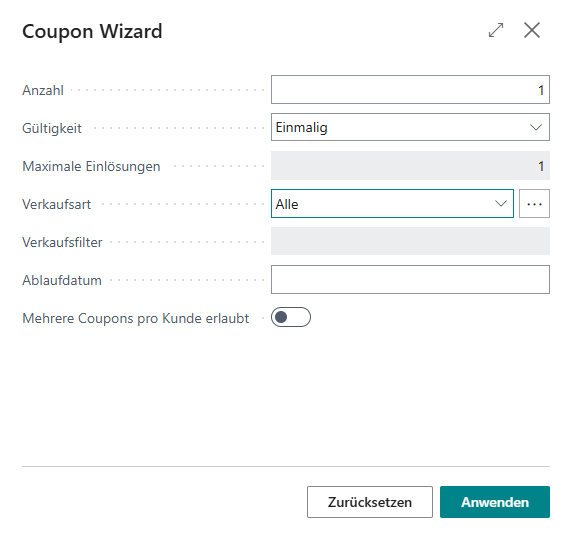
This action opens the coupon wizard, which can be used to generate new coupons.
| Field | Description |
|---|---|
| Quantity | The number of coupons to generate; for debtor or contact assignment, the quantity applies per debtor/contact |
| Validity | Specifies how often the coupon can be redeemed One-Time: The coupon can only be redeemed once, for example a birthday coupon Multiple: The coupon can be redeemed multiple times, for example an advertising coupon |
| Maximum Redemptions | For multiple validity, you can optionally define the maximum number of redemptions; 0 means unlimited validity |
| Sales Type | Specifies who can redeem this coupon All: The coupon can be redeemed by everyone Debtor: The coupon can only be redeemed by a specific debtor Contact: The coupon can only be redeemed by a specific contact Segment: The coupon can only be redeemed by contacts within the specified segment |
| Sales Filter | Contains the corresponding debtor, contact, or segment filter |
| Expiration Date | Defines the latest redemption date for the coupon(s) to be created. Both date values and date formulas are possible, for example +3M for three months from today. |
| Multiple Coupons per Customer Allowed | If this switch is enabled, new codes are always generated for the debtor/contact when coupons are created, regardless of whether coupons already exist for that debtor/contact within the current campaign. Otherwise, the system checks that only one coupon exists or is generated per debtor/contact within the current campaign. |
Barcode
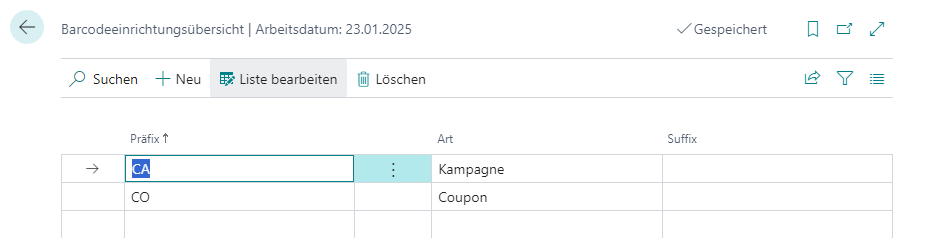
This opens barcode setup, which is required both for the use of coupons and for the registration of manual campaigns.
Setup
General
| Field | Description |
|---|---|
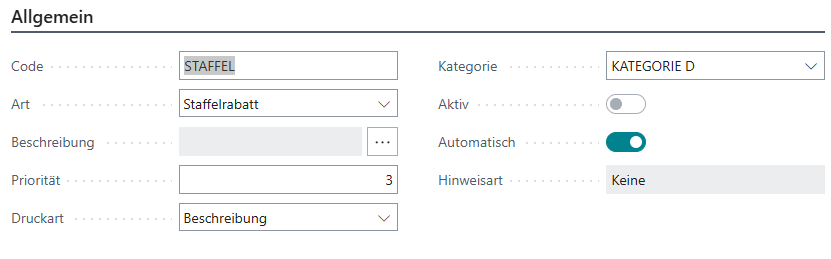
| Code | Unique campaign code |
| Type | Type of campaign Line Discount: The campaign is applied as a percentage at line level Line Reduce: The campaign is applied as an absolute amount at line level Receipt Discount: The campaign is applied as a percentage at receipt level Receipt Reduce: The campaign is applied as an absolute amount at receipt level Tiered Discount: The campaign is applied as a percentage at receipt level, with discounting based on receipt quantity and/or total Tiered Reduce: The campaign is applied as an absolute amount at receipt level, with the reduce based on receipt quantity and/or total M for N: The campaign is applied as an absolute amount to the receipt, where the total of the cheapest items representing the difference between M and N is granted as a receipt reduce Couponing: The campaign is used only for registering assigned coupons Category: The campaign is no longer treated as a campaign but as a category to which several campaigns can be assigned |
| Description | Language-dependent campaign description |
| Priority | Defines the order in which the campaign/category should be applied |
| Print Type | Defines the preferred print type on the receipt None: Campaign is not printed Code: The campaign code is printed Description: The campaign description is printed, alternatively the campaign code Coupon: The coupon that registered the campaign in the receipt is printed, otherwise the campaign description |
| Category | Assigns the campaign to a specific category |
| Active | Indicates whether the campaign has been released for use |
| Automatic | Indicates whether the campaign is applied automatically or must be registered manually |
| Notification Type | For couponing campaigns, makes it possible to list all coupons of the customer currently assigned to the receipt that can still be redeemed None: No notification is shown Always: An overview of all not yet redeemed but currently redeemable coupons is shown |
Settings
The available settings depend on the selected campaign type.
Receipt/Line Discount or Reduce

| Field | Description |
|---|---|
| Value | Percentage discount or absolute reduce value |
| Overpayment Allowed | Specifies whether the line or receipt reduce can still be applied if it exceeds the open receipt amount |
Tiered Discount or Reduce
| Field | Description |
|---|---|
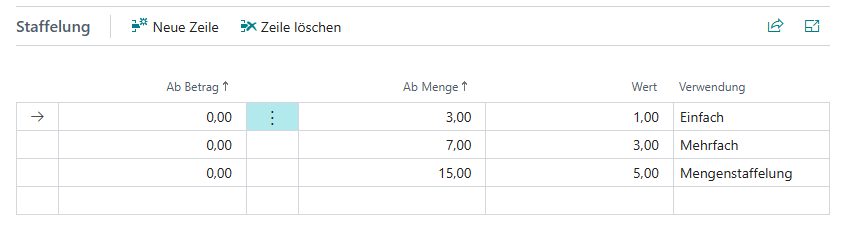
| From Amount | Total amount from which the campaign should be applied |
| From Quantity | Item quantity from which the campaign should be applied |
| Value | Percentage or absolute reduction to be applied at this point |
| Usage | Defines how the reduction should be applied Single: The reduction is applied once to the eligible lines Multiple: The reduction is multiplied by the quantity of eligible lines and then applied Quantity Scale: The reduction is multiplied from the required quantity onward with each additional line Quantity Scale for Total Quantity: The reduction is multiplied from the required quantity onward with the total quantity |
M for N
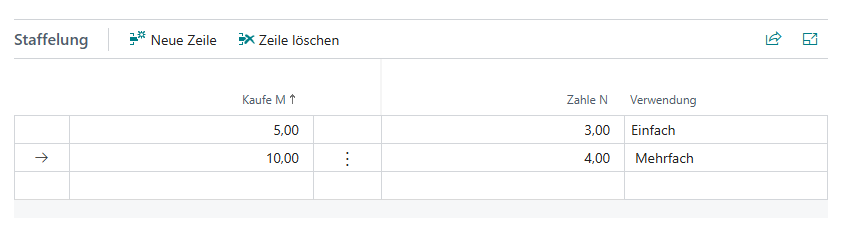
| Field | Description |
|---|---|
| Buy M | Item quantity in the receipt that triggers the campaign |
| Pay N | Number of the cheapest items in the receipt for whose total a receipt reduce is granted |
| Usage | Defines how the campaign should be applied Single: Regardless of item quantity in the receipt, the campaign is applied at most once Multiple: Depending on the item quantity in the receipt, the campaign is applied once or multiple times |
Couponing

| Field | Description |
|---|---|
| Value | The value is not stored on the campaign itself, but directly on the relevant coupons |
| Overpayment Allowed | Specifies whether coupons can be redeemed if their reduce value exceeds the open receipt amount; in that case the coupon is treated as fully redeemed, no partial carry-forward is provided |
M plus N
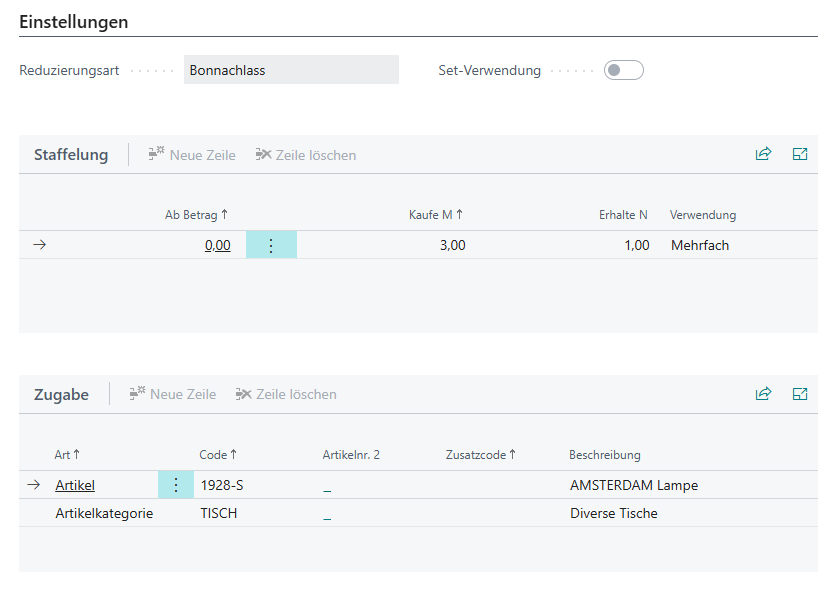
| Field | Description |
|---|---|
| Reduction Type | Defines how the reduce of the free items should be distributed Receipt Reduce: The total of all free items is distributed at receipt level as a reduce across all eligible lines Line Reduce: The relevant free item is granted free of charge by means of a line reduce |
| Set Usage | Defines that all assigned items can only be returned as a set |
| Field | Description |
|---|---|
| From Amount | Item amount in the receipt that triggers the campaign |
| Buy M | Item quantity in the receipt that triggers the campaign |
| Get N | Number of free items that can additionally be issued |
| Usage | Defines how the campaign should be applied Single: Regardless of item quantity in the receipt, the campaign is applied at most once Multiple: Depending on the item quantity in the receipt, the campaign is applied once or multiple times |
| Field | Description |
|---|---|
| Type | Defines what should be granted free of charge Item: Manual assignment of items possible Resource: Manual assignment of resources possible Item Category: Automatic assignment possible for items in a specific category |
| Code | The unique product code |
| Additional Code | Optional additional code, for example item variant |
| Description | The product description |
Validity
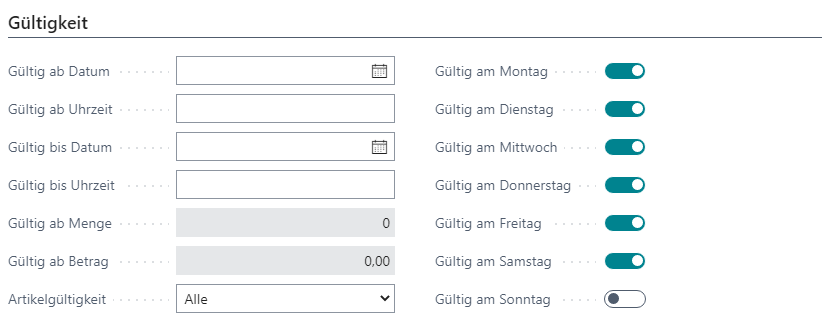
| Field | Description |
|---|---|
| Valid From Date | Start date of validity |
| Valid From Time | Start time of validity |
| Valid To Date | End date of validity |
| Valid To Time | End time of validity |
| Valid From Quantity | Valid from item quantity, only for receipt discount/reduce |
| Valid From Amount | Valid from total amount, only for receipt discount/reduce |
| Item Validity | Restricts the application to specific items All: Applies to all items Reduced: Applies only to reduced items Not Reduced: Applies only to items that are not reduced |
Coupon Issue
For certain campaign types, it is possible not to apply them directly in the receipt, but instead issue a corresponding coupon at the end of the receipt that can then be redeemed at any time without further restrictions.
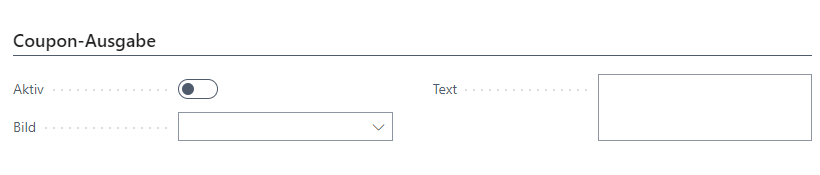
| Field | Description |
|---|---|
| Active | Activates coupon issue for this campaign |
| Image | Allows you to store an image for the campaign that should be printed on the coupon |
| Text | Allows you to store a text for the campaign that should be printed on the coupon |