The bill of quantities with FastIndex and table header
Brief context for The bill of quantities with FastIndex and table header in BE-terna Project.
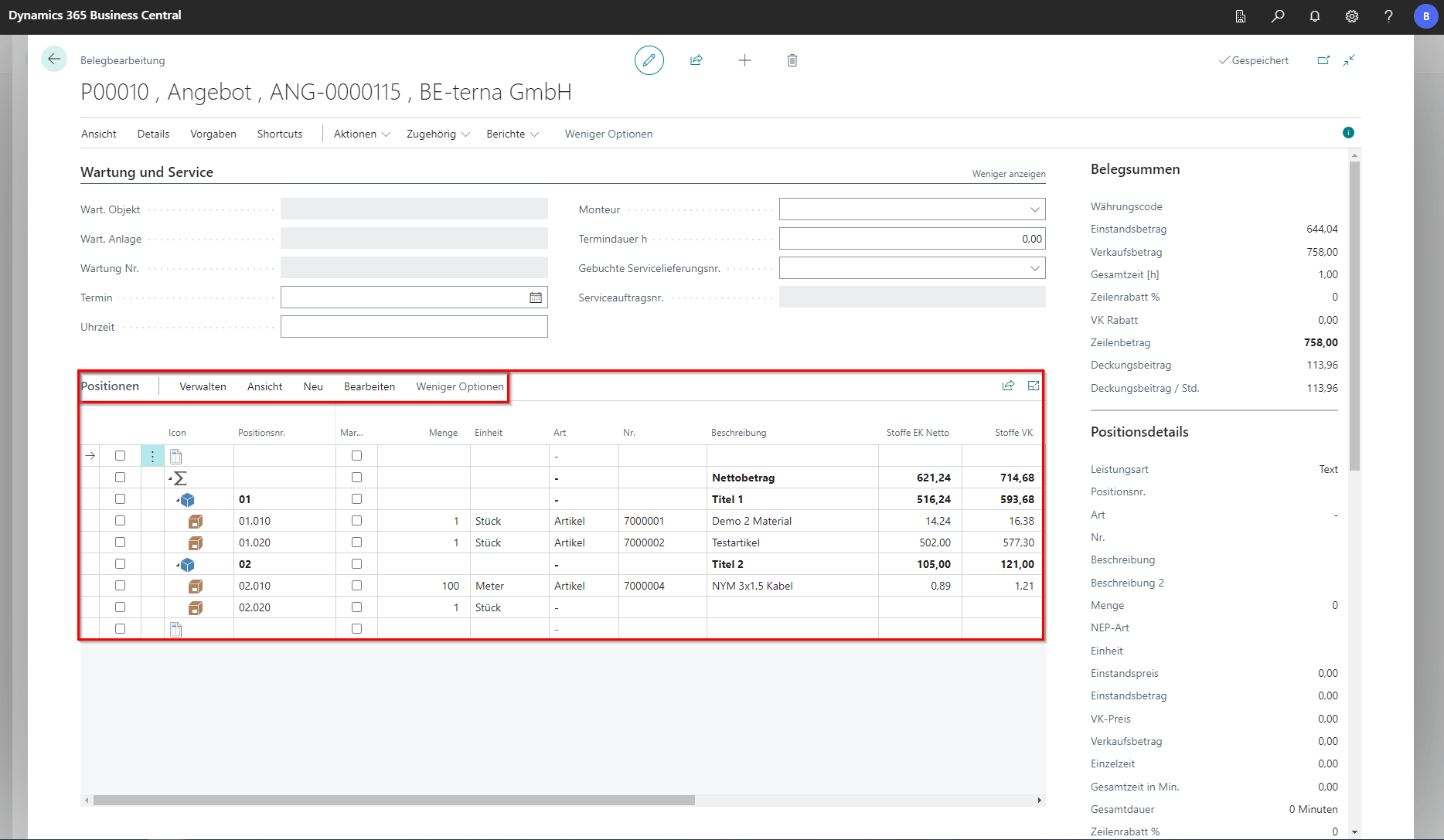
In this area, the bill of quantities is processed. Most of the functions for this are located in the FastRegister.
Manage
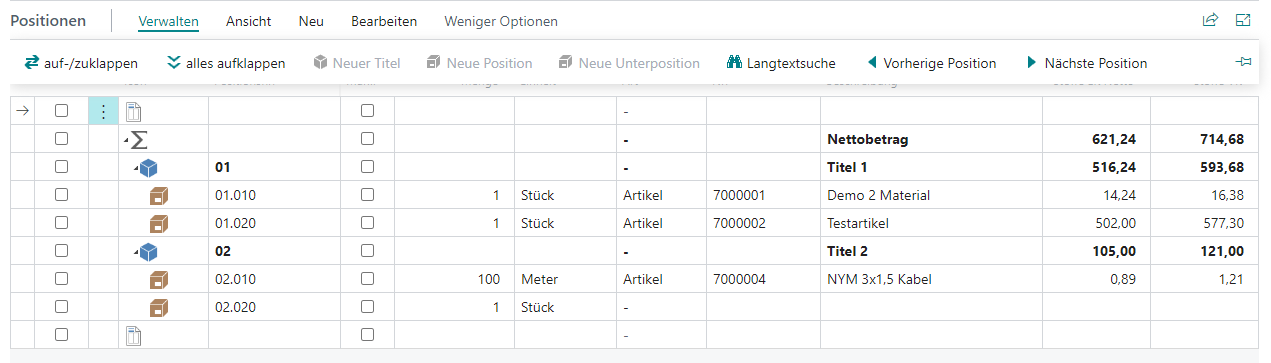
| Field | Explanation |
|---|---|
| Expand/Collapse | Expands or collapses the currently selected position. If the total amount line is selected, the entire bill of quantities is expanded or collapsed. |
| Expand all | Expands all positions. |
| New title | Inserts a new title. |
| New position | Creates a new position in the bill of quantities. |
| New subposition | Inserts a subposition under the selected position. |
| Long text search | Opens a dialog to search positions by long text. |
| Previous position | Switches to the previous position in the bill of quantities. |
| Next position | Switches to the next position in the bill of quantities. |
View
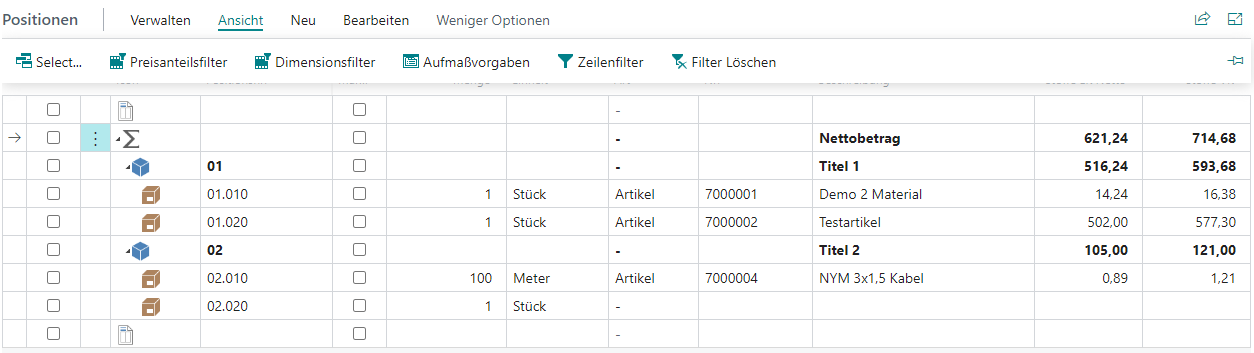
| Field | Explanation |
|---|---|
| Select… | Opens a dialog to choose from all available views. |
| Price share filter | Opens a FastTab to filter the bill of quantities by specific values in specific price shares. This is especially useful for large bills of quantities. |
| Dimension filter | Opens a FastTab to filter the bill of quantities by specific dimension codes. |
| Measurement defaults | Opens the measurement FastTab. |
| Zeilenfilter | Blendet alle Zeilen, außer der ausgewählten, aus. |
| Filter löschen | Setzt die Filter zurück. |
New

| Field | Explanation |
|---|---|
| Title | Inserts a new title at the bottom of the bill of quantities. You must first select a position or a title. |
| New title from here | Inserts a new title after the selected position. |
| Position | Creates a new position in the bill of quantities. |
| Subposition | Adds a subposition to the selected position. |
| Additional position | Opens a dialog to choose whether to create a following or subordinate new position. |
| Surcharge | Adds a surcharge position to the currently selected position. |
| Text | Opens a dialog to choose where a new text position should be inserted. |
| Insert position from IDS | Opens a supplier overview with configured IDS connection. In the next step, an item can be inserted from the web shop. |
| Insert position from project entry | Opens the project entries list filtered to consumption entries. Allows prior consumption entries to be inserted into the document for invoicing. |
| Position from search tree | Opens a dialog with search trees. You can choose the search tree and transfer quantity for elements to adopt. After confirming with [OK], selected search tree elements with entered quantities are transferred into the document. |
Edit

| Field | Explanation |
|---|---|
| Edit | Opens a dialog for detailed position editing. |
| Copy | Copies the currently selected position. |
| Paste | Inserts the copied position at the desired location. |
| Delete | Deletes selected positions with all subordinate elements. |
| Mark selection | Marks selected positions. |
| Unmark selection | Removes the marking from selected positions. |
| Price shares | Opens a dialog for editing price shares. |
| Activate all price shares | If at least one price share was disabled before, all price shares are now activated. |
| Raw material totals | Opens a dialog with the list of all raw material surcharges. |
| Group totals | Opens a dialog for calculating group totals. |
| Position measurement lines | Opens a dialog with an overview of the position measurements. |
| Create measurement line | Opens a dialog for editing measurement details. |
| Link to measurement line | Opens a dialog with the list of measurement lines that can be linked to the selected position. |
| Position batch processing | Opens a dialog for position batch processing. |
| Text additions | Opens a dialog for managing text additions defined by the issuer/bidder. |
| IDS Deep Link | Provides direct visibility into current prices and item availability. |
| Position attachments | Opens a dialog with the list of position attachments. |
| Dimensions | Opens a dialog for editing dimension set entries. |
| Create item from position… | Creates a new item in master data from the selected position. |
| Create costing item from calculation | Creates a new costing item in master data from the selected position. |
| Create item package from position | Creates a new item package in master data from the selected position. Subpositions are added as components. Missing master data is created as items. |