Thresholds
Purpose
Thresholds define how operational deviations for business-rated subcriteria are translated into grades. This turns process data into a reproducible evaluation result.
Prerequisites
- The rating criteria schema contains subcriteria with Business rating enabled.
- The corresponding Business criterion is selected for each subcriterion.
- The desired business tolerances have been aligned.
Recommended order
- Open the relevant subcriterion in the rating criteria schema.
- Enable business rating and choose the correct business criterion.
- Maintain thresholds that match the criterion.
- Verify the outcome with real process data.
Setup components
Evaluate delivery time
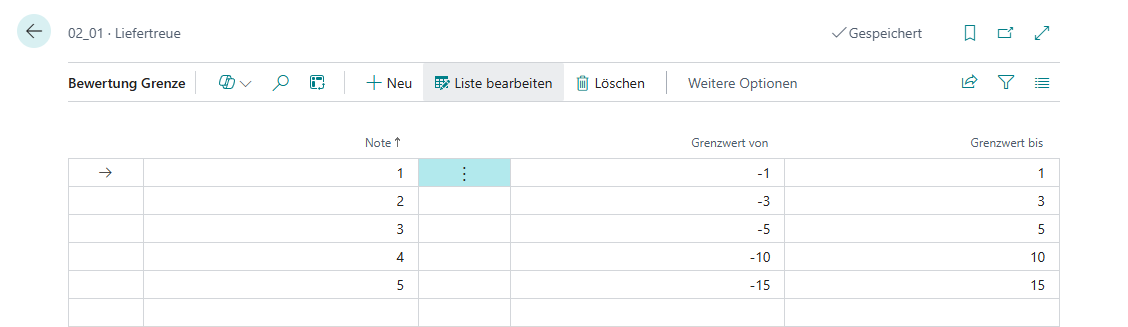
For the Delivery time criterion, maintain thresholds as a deviation in days from the agreed delivery date. When the goods receipt is posted, the system compares due date and actual posting date and derives the appropriate grade automatically.
Evaluate delivered quantity
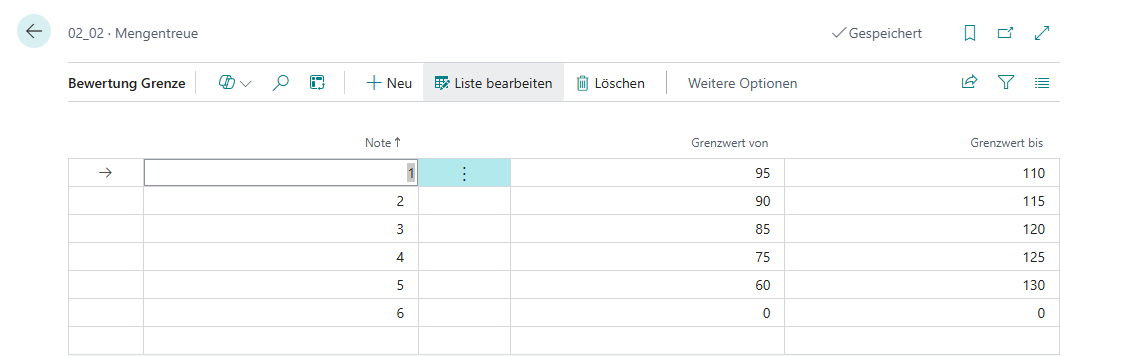
For the Delivered quantity criterion, maintain thresholds in percent of the ordered quantity. This allows the system to evaluate short or insufficient deliveries; overdeliveries are not rated.
Criteria without thresholds
No thresholds are maintained for Appearance and PPM. The appearance grade is entered directly in the operational process, while PPM is calculated from complaints and delivered quantities.
Links