Intercompany setup
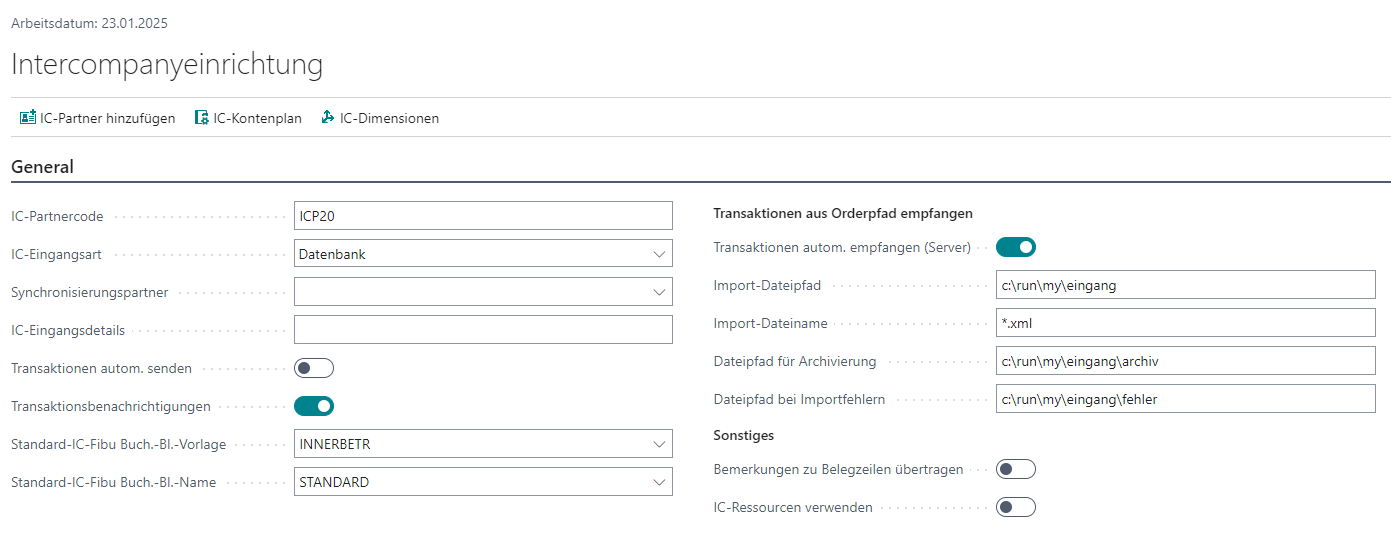
Global intercompany setup in Business Central: switches and options that apply company-wide to BE-terna Intercompany.
Purpose
The intercompany setup controls how BE-terna Intercompany processes documents company-wide. The page groups every non-partner-specific switch and defines the frame for exchange with all IC partners.
Prerequisites
- BE-terna Intercompany is installed in the company.
- A user with permission for the Intercompany Setup page is available.
- The Intercompany role center can be activated in user settings (see Role center).
Recommended order
- Open the intercompany setup and review the base values.
- Align transfer of line comments and item tracking with your own processes.
- Configure the job queue for file import and automatic acceptance.
- Create one partner card per IC partner and refine the switches there.
Setup building blocks
Document line comments
When line-comment transfer is active, comments on purchase and sales document lines travel with the IC document and become visible at the partner. See Line comments.
Automatic retry on acceptance
With automatic acceptance enabled, a failing task stays in the job queue in state Error. The setup restarts such tasks periodically; the maximum number of retries must be configured. See Automation.
Automatic file import
For automatic import of files from a server directory or Azure File Share a job queue entry is created. See Job queue setup.
Links