Setup
Purpose
Before you rate vendors, configure the core parameters for BE-terna Vendor Rating. This setup defines the time frame, scoring logic, and classification model that all later evaluations and reports are based on.
Prerequisites
- BE-terna Vendor Rating is installed and available in Business Central.
- You have access to the setup area as well as the relevant master and transaction data.
- The rating period, scoring logic, and desired vendor classification have been aligned from a business perspective.
Recommended order
- Maintain the rating setup with periods, total score, and business criteria.
- Define grade percentages so manual ratings can be converted into points.
- Define classifications with percentage thresholds.
- Optionally create an example setup as a starting point.
- Complete the rating criteria schema, thresholds, and vendor-specific settings.
Setup components
Rating setup
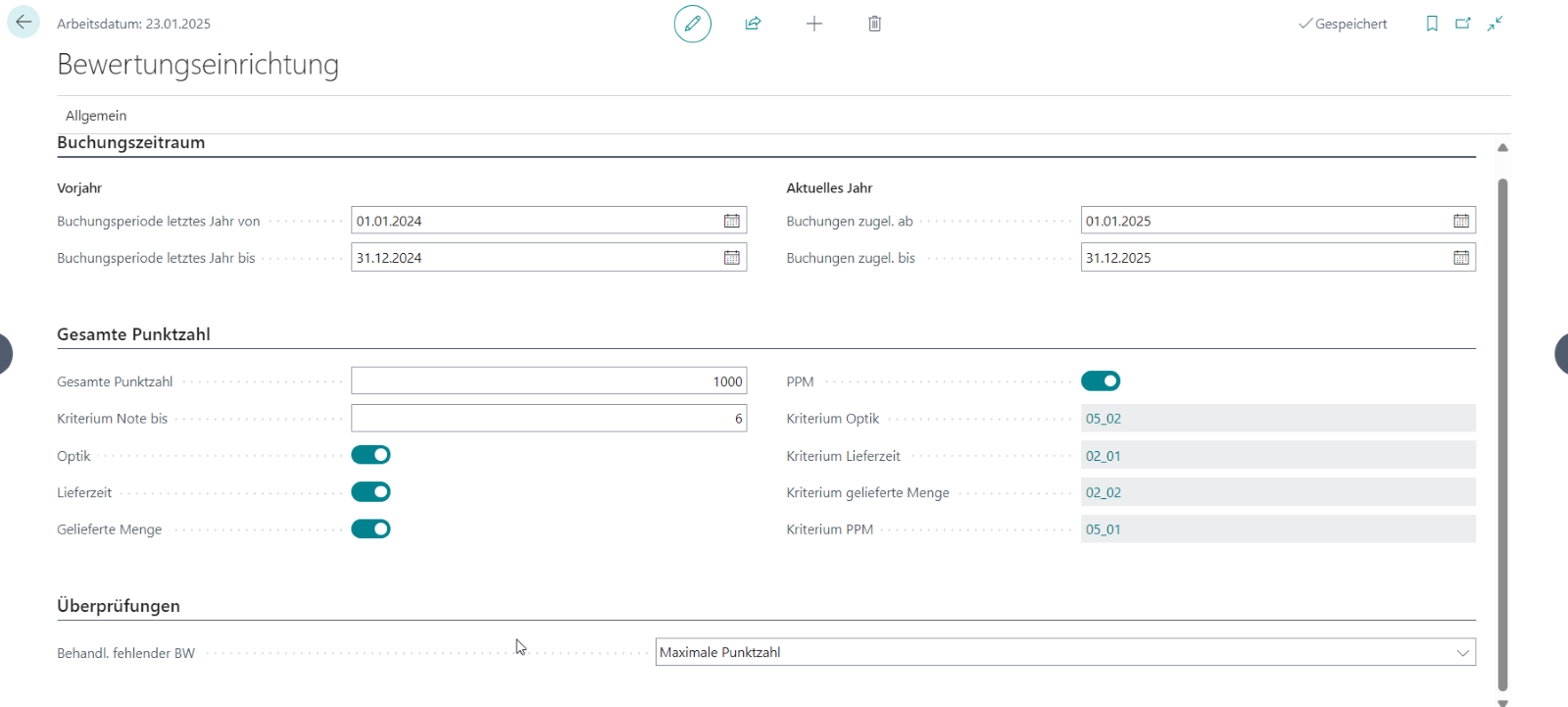
The rating setup defines the basis for later evaluations. This includes the relevant posting period, the maximum score, and the business criteria that are taken over from Business Central.
Maintain in particular:
- Previous-year period for comparisons and historical review
- Current-year period for the active rating period
- Total score to control the granularity of the result, recommended at 1000 points
- Criterion “Grade up to” as the highest grade used in the system, recommended at 5 or 6
- business criteria such as appearance, delivery time, delivered quantity, and PPM
Classification
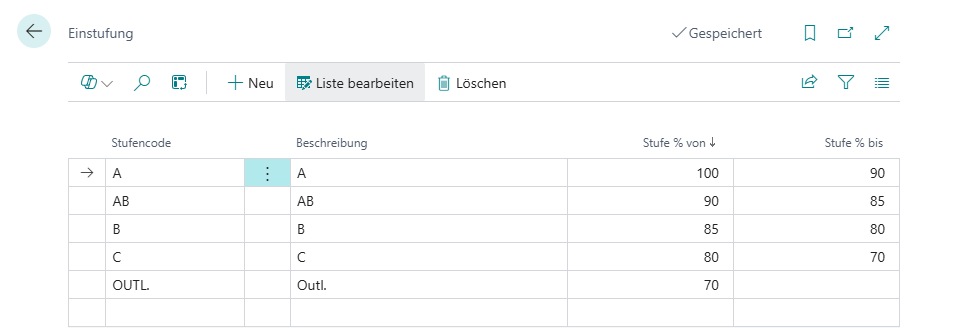
In Classification, you define how vendors are grouped based on their overall result. The system calculates an overall percentage and automatically assigns a class such as A, AB, or B.
Define:
- the class code
- the corresponding percentage range
Grade percentages
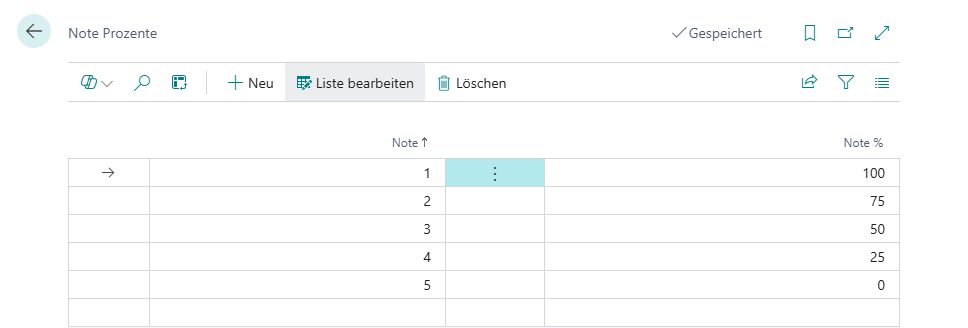
In Grade Percentages, you define which percentage value belongs to each grade. These values determine how many points are awarded in the rating audit for a given grade.
Example: If grade 2 is assigned 75%, the vendor receives 75% of the available points for that grade.
Only change these assignments at the beginning or end of a rating period so that existing ratings remain consistent.
Example setup and master data
If you want to start from a predefined structure, you can create an example setup. Afterwards, complete the rating criteria schema, grade definitions, thresholds, and vendor-related settings.
Vendor card
On the vendor card, you define whether a vendor is included in vendor evaluation. The page also shows key figures from the last rating as well as PPM-related target values.
Open the relevant vendor and go to the Rating section. There you maintain or review the following fields in particular:
- Vendor evaluation to enable rating for the vendor
- Calculate PPM to include the vendor in PPM evaluation
- Current PPM target and New PPM target
- Last calculation and Last achieved points
- ABC class and ABC class (manual)
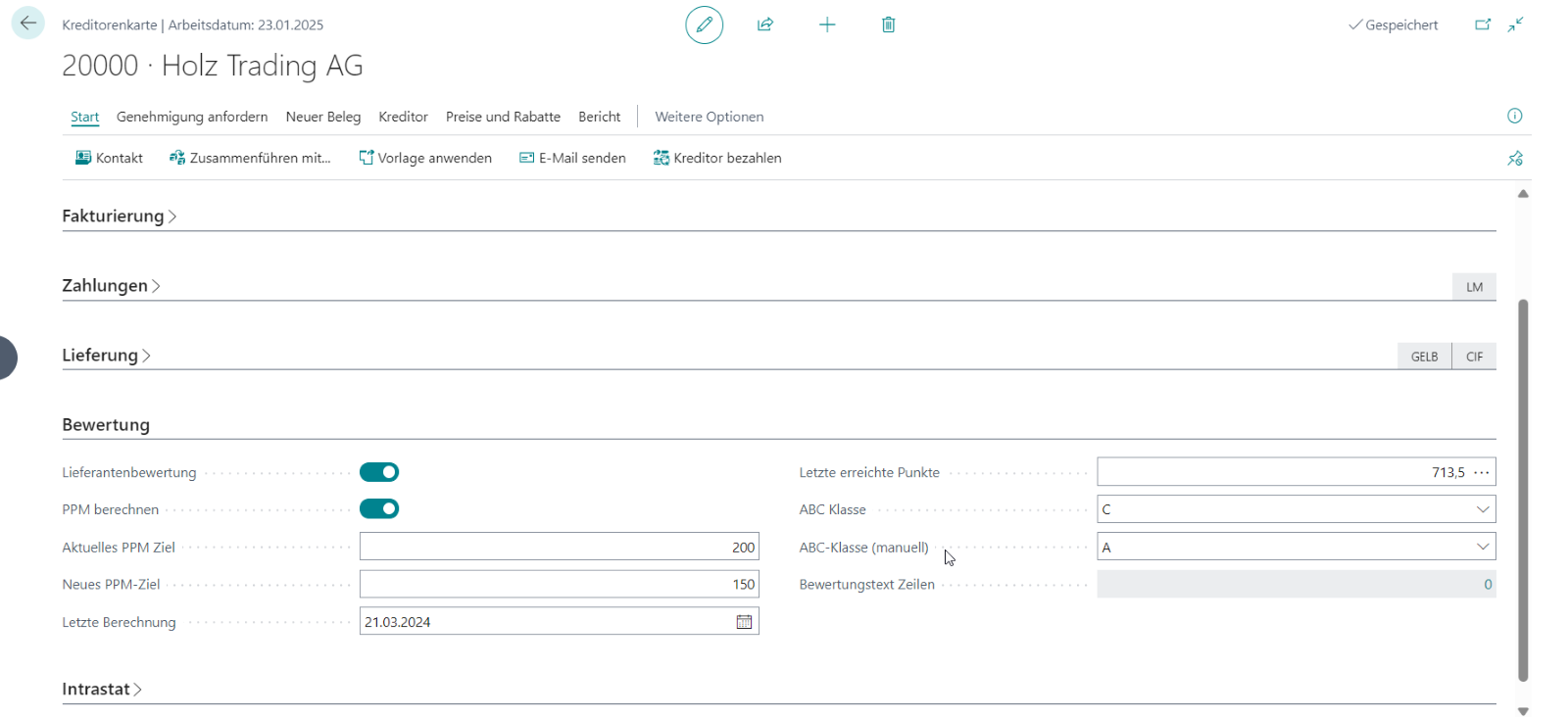
The latest achieved points and the automatically calculated ABC class give you a quick view of the vendor’s current performance. You can maintain the manual ABC class if you need to document a different internal assessment; the automatically calculated rating remains the objective basis for reporting.
Process Initial setup guidance These points help you establish a consistent first productive rating setup.
- Change grade percentages and classification thresholds only at the beginning or end of a rating period.
- Enable only business criteria that are maintained consistently in your purchasing processes.
- Before the first productive rating run, also review the rating criteria schema, thresholds, and vendor master data.
Links