Configuration
Global Facility
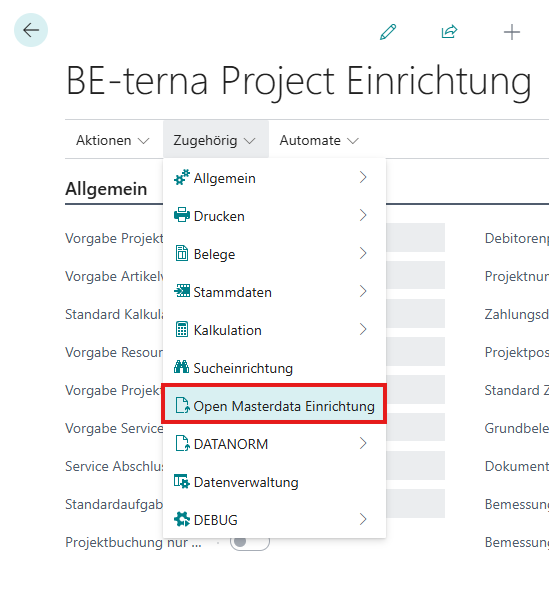
Within the Be-terna Project facility, the Open Masterdata facility can be accessed as follows:
General
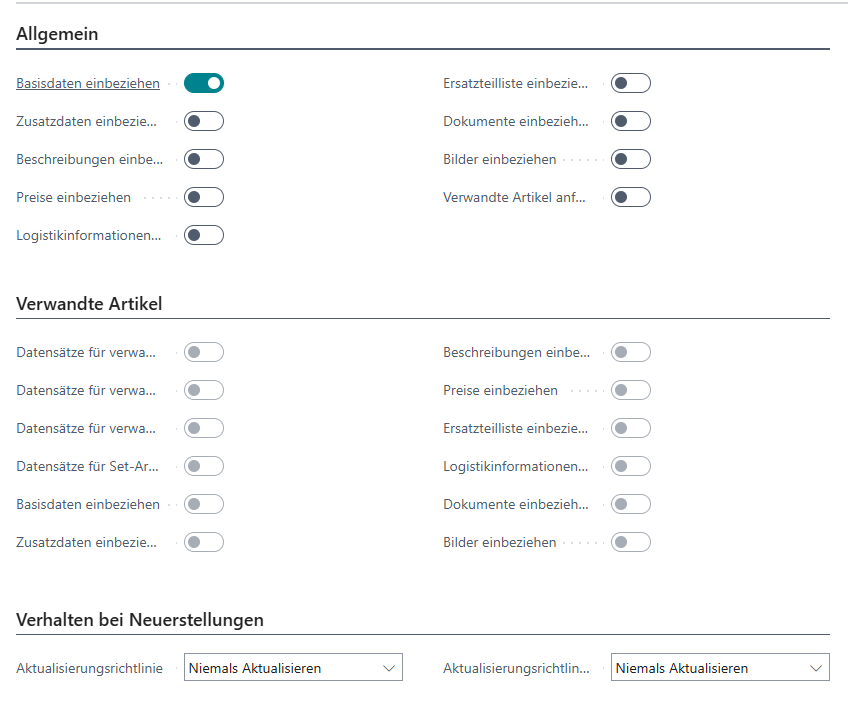
A window opens which first allows the configuration of the data package to be transmitted by Open Masterdata by default. \
Related Articles
Furthermore, the behavior in dealing with articles related to the requested article can also be determined. If these are also imported, the data package can also be used for these articles.
Rebuild behavior
In this area, the update policy for requested and related articles can be determined.
This refers to the case of requesting an item that already exists in the system. \
There are three choices:
- Never Update - The request is ignored
- Always Update - The requested item will be updated instead of creating a new item
- Always Ask - For each existing article, a dialog box will ask if the article should be updated
Supplier-specific setup
In addition to the global setup, there is a customizable setup for each supplier.
The specific setup can be activated via the following button in the “Open Masterdata” area of the supplier:

The setup can be configured via the “Data Exchange” action –> “OMD Supplier Setup”