Azure File Share
File exchange between IC partners via Azure File Share: prerequisites, configuration, and typical checks.
Purpose
BE-terna Intercompany supports file exchange between IC partners via an Azure File Share. This page describes daily administration of that exchange – the underlying permissions are maintained in the Azure portal.
Access in Business Central
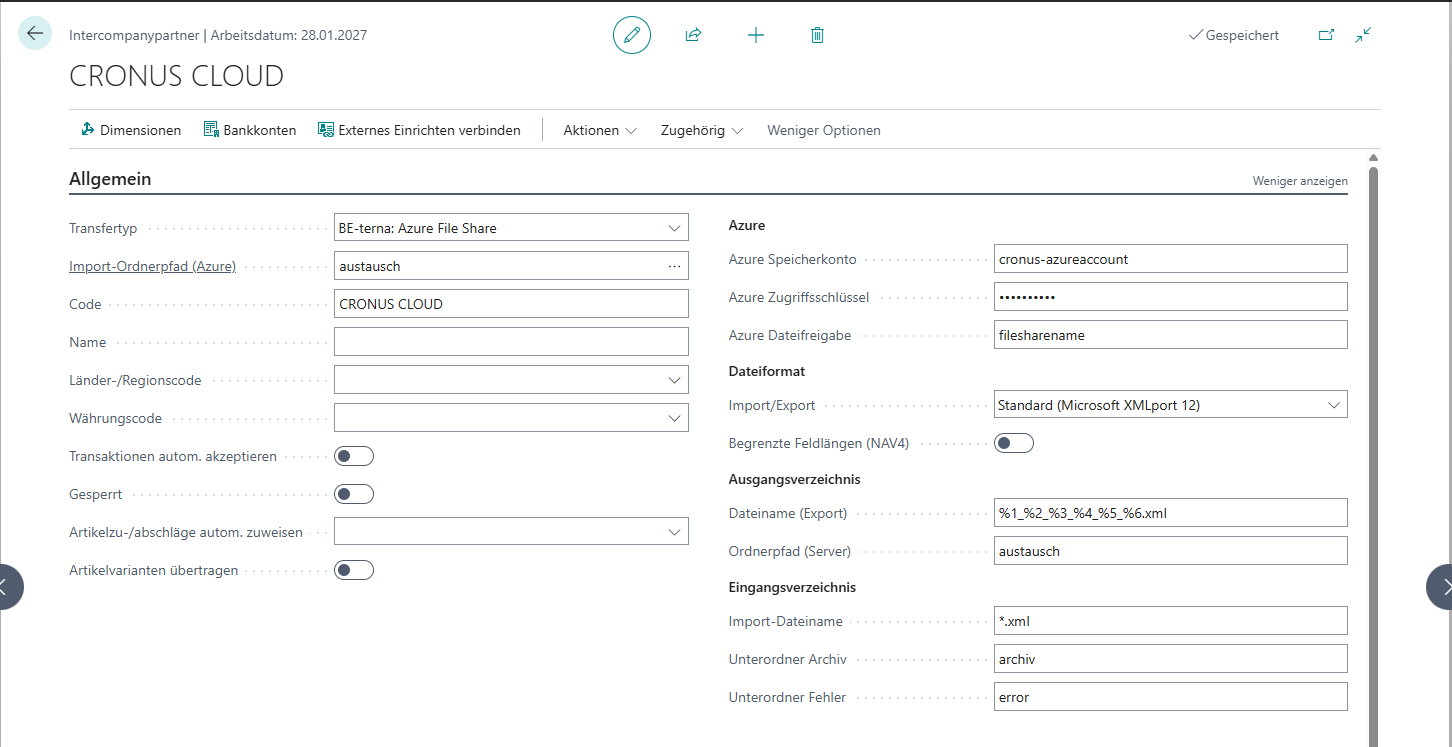
Azure File Share settings are visible on the IC partner card in the transfer-type section.
Prerequisites
- Azure storage account with a file share; access is granted through a SAS token (never through persistent account keys inside BC).
- Partners use the same file-share path for the bilateral exchange.
- Transfer type File location is active on the IC partner card.
Activities
- Monitor SAS token validity and renew it in time.
- Keep the share permissions in Azure as narrow as possible.
- On issues: check network access and target folder before touching the IC setup.
Fields and actions
| Field | Purpose |
|---|---|
| File share path | Source or target folder of the exchange. |
| Access token | Time-limited SAS token. |
| Checksum | Optional: validates exchanged files. |
Monitoring and troubleshooting
- File not found almost always points to an expired token or a changed path.
- Connection issues create entries in the Error log.
- The job queue for automatic import only works if the IC partner folder exists.
Best practices
- Issue SAS tokens with the shortest reasonable validity and minimal rights.
- Separate folders per partner to prevent data mixing.
Links