Logistics
Purpose
This page describes the logistics enhancements in BE-terna Manufacturing around returned goods from subcontracting. It helps users connect returned subcontracted work to the standard warehouse receipt flow and understand the limits of this process.
Business Value
- Reuses standard warehouse receipt, put-away, and inventory put-away processes for suitable subcontracting return scenarios.
- Standardizes the approach for item purchasing and subcontracting returns.
- Clarifies when the subcontracting operation must be the last operation.
- Points users to pending consumption when component inventory is missing.
Area: Logistics
Content Focus
Handle pending consumption in the production order
Pending consumption postings are described on a dedicated detail page under Production Order. Use Pending Consumption when automatic backward postings were only partially posted because inventory was insufficient and open residual consumption must be reposted or cancelled.
During subcontracting returns, this topic can become relevant when the subcontractor location contains components with Flushing Method = Backward and routing link codes.
Use warehouse receipt and put-away for subcontracting returns
If the subcontracting operation is the last operation in the routing, returned work from the subcontractor can be processed through standard Warehouse Receipt, Put-away, or Inventory Put-away logic. If it is not the last operation, the receipt may still be posted, but the internal follow-up move to the next operation is not supported by this feature.
This means that subcontracting receipts do not always have to be posted through the receipt function on the purchase order. Users can apply a standardized logistics process for both item purchasing and returned subcontracted production.
The most important rules are:
- The subcontracting operation should be the last routing step if warehouse receipt and put-away are expected to complete the return process cleanly.
- If the subcontracting step is not last, the receipt can be posted but the internal continuation must be organized manually.
- If backward-flushed components with routing link codes are involved, the warehouse receipt may fail on insufficient stock. In that case, use either strict abort behavior or pending consumption handling.
Prepare Location and Warehouse Setup
The required setup is maintained on the Location Card as supported by standard Business Central. This also includes setting up Warehouse Employees for the assigned locations. No further BE-terna Manufacturing-specific setup is required for this flow.
Before operational use, check:
- Is the location set up for Warehouse Receipt and Put-away if a two-step process should be used?
- Is a suitable Warehouse Employee set up for the users involved?
- Is the subcontracting operation really the last operation in the routing?
- Are there components with Flushing Method = Backward and a routing link code that will be consumed automatically during receipt?
If backward-flushed components are involved, Warehouse Setup should be configured so that posting stops after the first posting error. This prevents the logistics process from continuing partially while a related automatic consumption posting failed.

Alternatively, use Pending Consumption for suitable locations.
Post the Warehouse Receipt
Warehouse receipts are created with the same functions as in standard Business Central. Posting the warehouse receipt works the same way as for normal item purchase orders.
In practice, this sequence works best:
- In the routing or in the released production order, first verify that the subcontracting operation is really the last operation.
- Then review the return location. Supported patterns are either Warehouse Receipt with Put-away or the combination without a separate warehouse receipt but with Put-away as Inventory Put-away. No additional special setup is required beyond the normal Business Central location and warehouse employee setup.
- Process the subcontractor return like a normal Business Central warehouse receipt and post the Warehouse Receipt or register the Inventory Put-away according to the standard process used for that location.
- If posting aborts, first review components with Flushing Method = Backward and a routing link code. Where inventory is missing, make an explicit choice between aborting for correction and handling the quantity through Pending Consumption.
Register the Put-away After Warehouse Receipt
If two-step warehouse logic is active, Business Central creates a Put-away after the warehouse receipt. Register this put-away as provided by the standard warehouse process.
Use this flow only when the subcontracting operation is the last operation in the routing. Only then can the delivered quantity be moved into the logistics follow-up process correctly.
Register Inventory Put-away Without Separate Warehouse Receipt
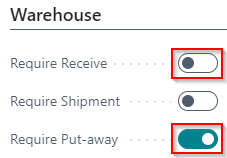
If Require Receive is turned off but Require Put-away is turned on for the location, Business Central directly creates an Inventory Put-away. You can register this document as usual if the subcontracting operation is the last operation in the routing.
For the inventory put-away variant without a separate warehouse receipt, this location setup combination is the relevant one:
Non-final subcontracting operations are not supported by inventory put-away. The combination of non-final subcontracting operation and inventory put-away should be excluded from the business process.
Treat Non-final Subcontracting Operations as Exceptions
For a non-final subcontracting operation, the warehouse receipt still posts the received quantity in the purchase order. However, the posted warehouse receipt is then treated as fully picked, and no put-away is created.
The transport of the delivered unfinished work to the next work center must be organized manually in this case. BE-terna Manufacturing does not support this follow-up process automatically.
After every subcontracting return, verify these three points:
- Was the delivered quantity transferred correctly?
- Was the expected Put-away or Inventory Put-away actually created and registered?
- Did open consumption need separate follow-up handling through Pending Consumption because component inventory was missing?
Result
- You understand the conditions under which warehouse receipt and put-away reliably support subcontracting returns.
- You know when the return flow should use warehouse receipt, put-away, or inventory put-away.
- You can identify and avoid unsupported cases with non-final subcontracting operations.
Links