Structure of the Role Center
The Role Center represents the home screen in Microsoft Dynamics Business Central. The look and feel design of the Microsoft Office product range ensures simple and intuitive operation.
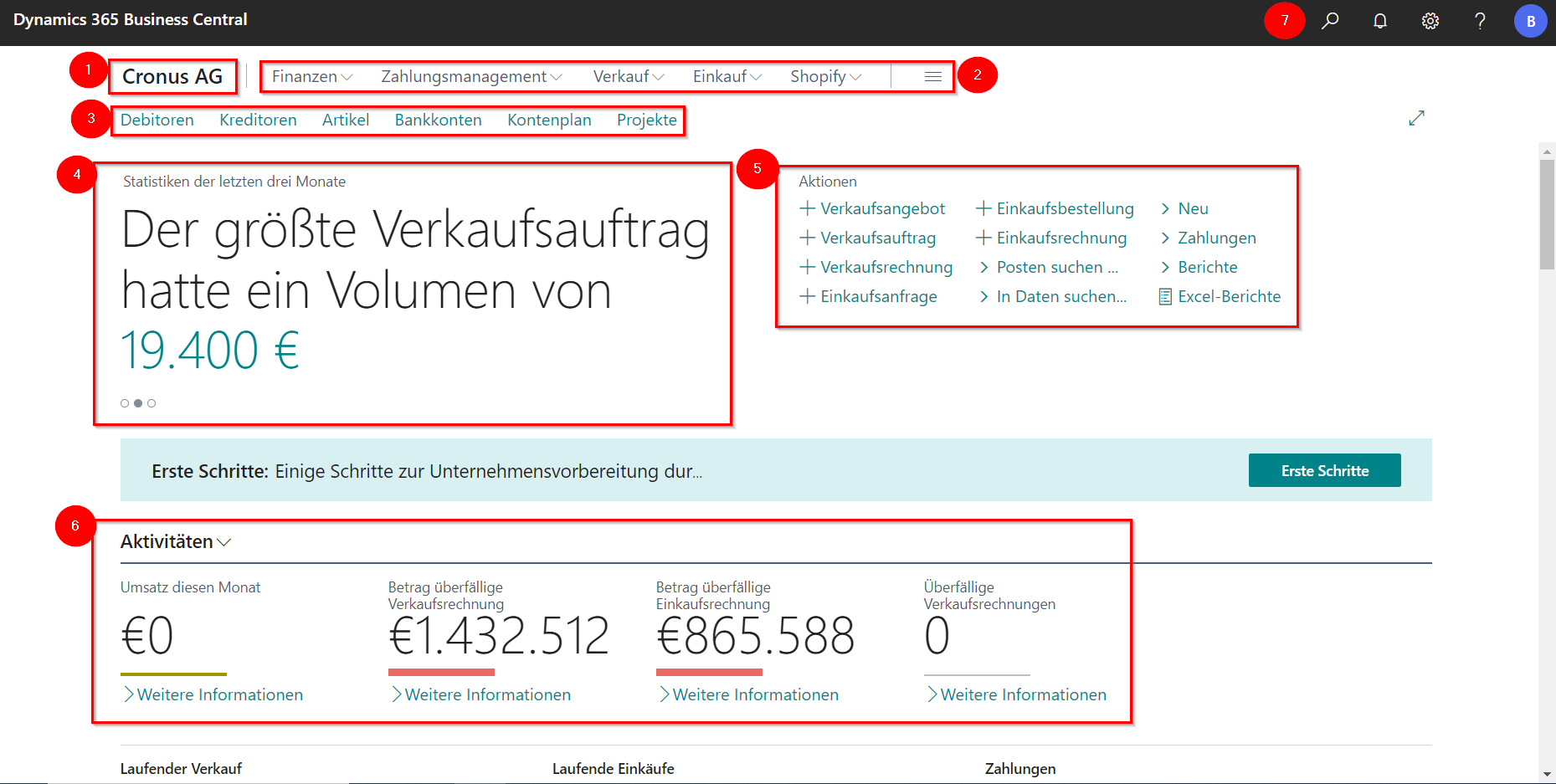
Structure of the Role Center
The Role Center is divided into different areas:
- Current client
- Explore business features
- Bookmark
- Business Insights
- Direct Call Actions
- Activities/Key Figures
- “tell-me” search function and settings
The client name is located at the top left of the window and shows the user which client he is currently in.
The Explore Other Business Features area is used to navigate to all modules of the system. By clicking on the individual modules, further menu and action items for the respective workspace are displayed.
The Bookmarks section allows you to quickly navigate through Business Central. This section contains the most important actions for operating the module.
The Business Insights provide a summary of the most important business transactions.
The Actions for Direct Call serve as a shortcut to create new documents or search for data in specific areas.
In the area of Activities and KPIs there is a representation for a user-specific overview of the most important business KPIs and processes. This area can be manually adjusted.
The search button searches the entire system for pages, lists and actions. Under Settings Business Central can be personalized and you can edit company data.