Drop shipment
Purpose
Drop shipments link a sales order and a purchase order so that the supplier ships directly to the end customer and the selling company only handles the commercial side. BE-terna Intercompany automates this flow between IC partners so that it runs through without manual intermediate steps.
Business value
- Shorter process: purchase order and sales order are shipped and invoiced together.
- Automatic posting reduces manual work at the receiving company.
- Additional lines (for example freight) can optionally be shipped along.
- The Sales before purchase invoicing constraint can be lifted when needed (see Vendor and purchase).
Focus areas
Auto-post orders
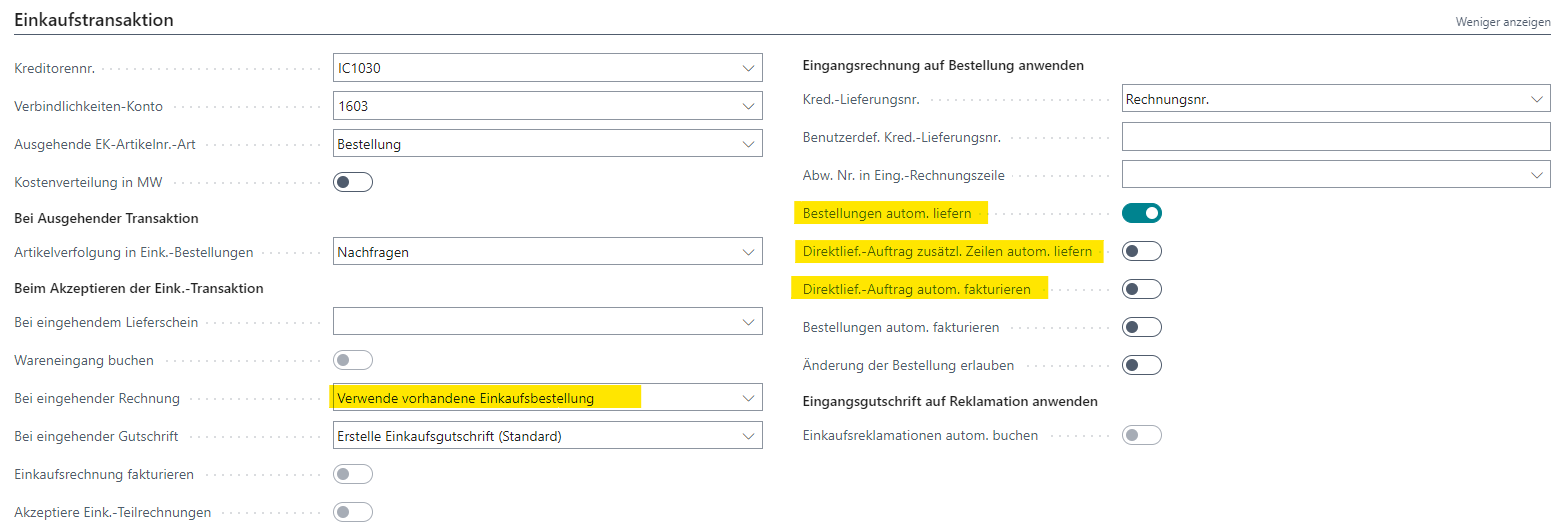
For automatic posting on drop shipments, posting must run against the existing purchase order. Incoming invoices are then applied automatically to that order.
Auto-ship purchase orders
To have sales orders ship automatically with the purchase order, enable auto-ship on the IC partner card. Optionally, additional sales lines (for example freight) that are not linked to the purchase order can be shipped along when the purchase order is shipped.
Auto-invoice drop-shipment order
After shipping purchase and sales, the sales order can be invoiced automatically.
Invoice purchase before sales
By default, Business Central blocks invoicing the purchase order before the sales side. From the Vendor and purchase setup you can lift this lock when needed.
Outcome
- With the options enabled, drop shipments run fully automatically.
- Only exceptions (for example partial shipments, special terms) require manual inspection.
Links