History
Purpose
Tool ledger entries contain transaction details for every tool or complete tool. They represent the history, for example commissioning, usage in production, repair, resetting, or service life estimate.
Tool ledger entries are read-only and cannot be changed after creation.
Which Activities Create Tool Ledger Entries?
- Usage during output reporting or direct posting.
- Service Life Estimate through tool journals.
- Commissioning through tool journals.
- Resetting through tool journals or service repairs.
- Repair when repair orders are finished.
Tool ledger entries can be created directly through a tool journal or indirectly through output reporting and repair orders. Output reporting and repair orders also use the posting function of the tool journal internally.
Review Examples
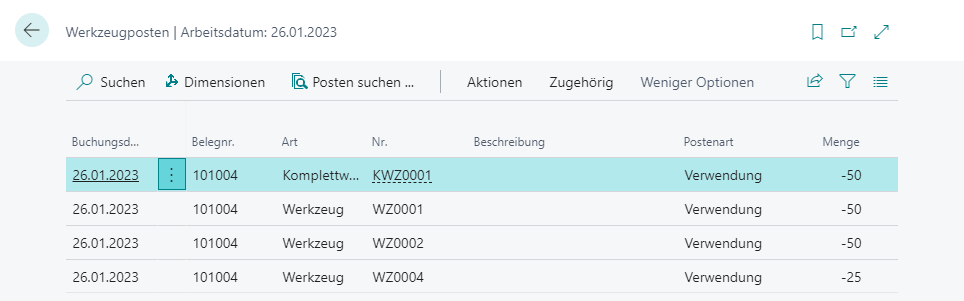
When output of 50 pieces is posted for a production order, the system also posts tool ledger entries. If a tool has two cavities, only 25 shots are required.
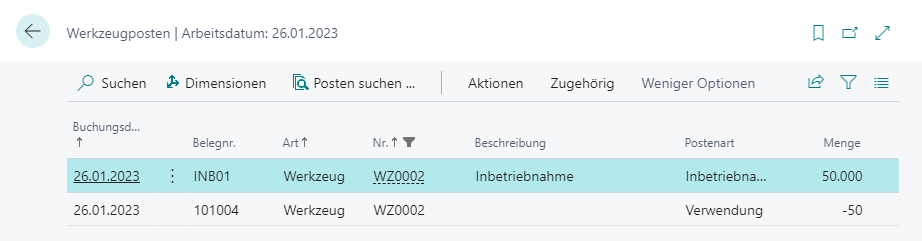
The sum of tool ledger entries results in current service life on the tool card. In the example, tool WZ0002 has a current service life of 49,950.
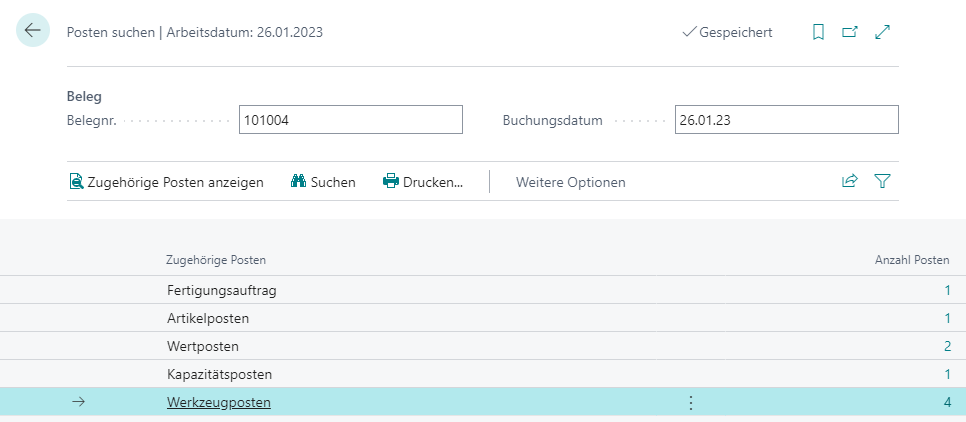
Use Find Entries
Tool ledger entries are integrated with Find Entries. If you call Find Entries from a posted usage, repair, or other posting, Business Central shows the related tool ledger entries together with the standard entries.
Result
Tool ledger entries let you trace when a tool was used, commissioned, reset, repaired, or evaluated for service life. The history is protected and serves as lifecycle log of the tool.
Links