Tools in Production Orders
Purpose
Tools and complete tools are assigned to operations in the routing. When a production order is calculated or refreshed, these assignments are checked against tool-to-item assignments and transferred into the production order.
Prerequisites
- The routing contains at least one operation.
- The required tools or complete tools are set up.
- For shared routings, matching tool-to-item assignments are maintained.
Assign Tools to an Operation
- Open the Routing.
- Set the focus on the required Operation.
- Select Operation > Tools.
- Fill the fields.
| Field | Meaning |
|---|---|
| Tool Type | Tool, Complete Tool, or blank. A blank tool type can be used for a descriptive line without a tool reference. |
| No. | Number of the tool or complete tool. If tool type is blank, any code can be entered. |
| Description | Copied from the tool and can be adjusted. |
| Tool Family | Shows the tool family of an entered tool. For complete tools and descriptive lines, the field remains blank. |
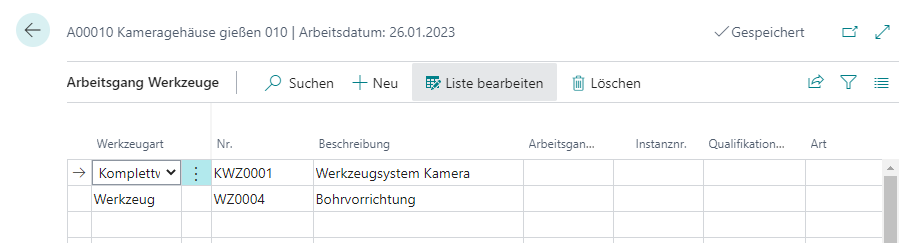
You can change the tool assignment even when the routing has status Certified.
Refresh the Production Order
Make sure the item to be produced has Replenishment System = Production Order and a Routing No. When the production order is refreshed, Business Central transfers the tools assigned to the routing.
- Create or open the production order.
- Refresh the production order.
- Open the routing from the line.
- Open the transferred tools through Line > Tools.
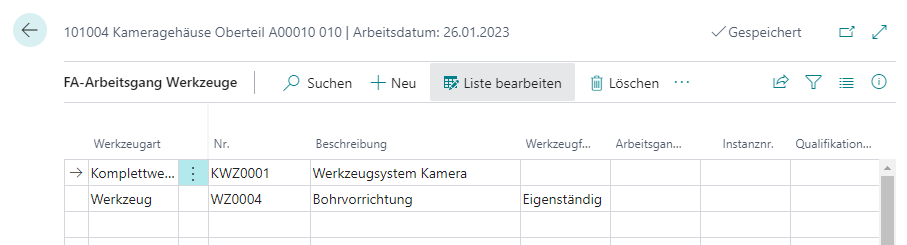
Review Complete Tool Structure
For complete tools, the structure is transferred as well. Open it through Tool Configuration.
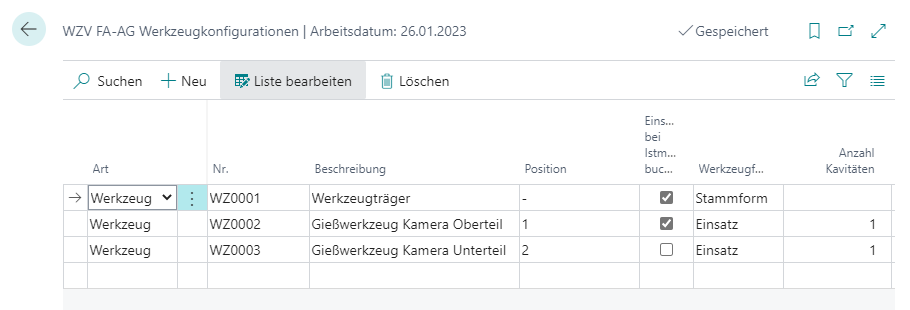
During calculation, the system performs these steps:
- It uses the Active Tool BOM Version of the complete tool.
- It transfers only the components that are installed in that version.
- It selects Post on Output Reporting when the tool component has a tool-to-item assignment for the item being produced, or when the component is of type Item.
This behavior allows several items to use the same operation and the same complete tool. For each production order, only the tool component that matches the produced item is posted.
Single tools receive a substructure as well. It only contains the single tool itself, and Post on Output Reporting is also calculated from the tool-to-item assignment.
Post Output with Tools
During output reporting, no additional tool data must be entered. The required data is already stored in the production order.
The posting flow works as follows:
- The system checks whether the production order operation contains tools or complete tools.
- For every tool or complete tool, an internal Tool Journal Line is created.
- Order data is copied from the production order: order type, order number, order line number, routing number, routing reference number, operation number, work center number, and capacity ledger entry sequence number.
- For tools, cavities are calculated; for complete tools, active cavities of installed tools are considered.
- The usage quantity is calculated as output quantity divided by number of cavities.
- The internal tool journal lines are passed to the tool posting function.
- For complete tools, components with Post on Output Reporting are also posted as separate tool ledger entries with entry type Usage.
Result
Tools and complete tools are transferred from the routing into the production order and historized automatically during output reporting. This makes it possible to trace which tools were used in which production step.
Links