Tools
Purpose
Tools are independent units in tool management. A tool can be maintained as a self-contained tool, an insert, or a base mold. Tool groups, service life, location, cavities, and tool-to-item assignments prepare tools for routing operations and production orders.
Recommended Setup Data
Before creating tools, prepare these data areas:
| Data | Meaning |
|---|---|
| Tool Groups | Classify tools and support searching and filtering. |
| Dimensions | Can be assigned as default dimensions on tools. |
| Manufacturing Setup | Contains the number series for tools if tool numbers should be assigned automatically. |
Create a Tool
- Open Tool Overview.
- Select +New.
- Depending on the number series setup, press
Enterto receive a tool number automatically or enter one manually. - Fill the tool card.
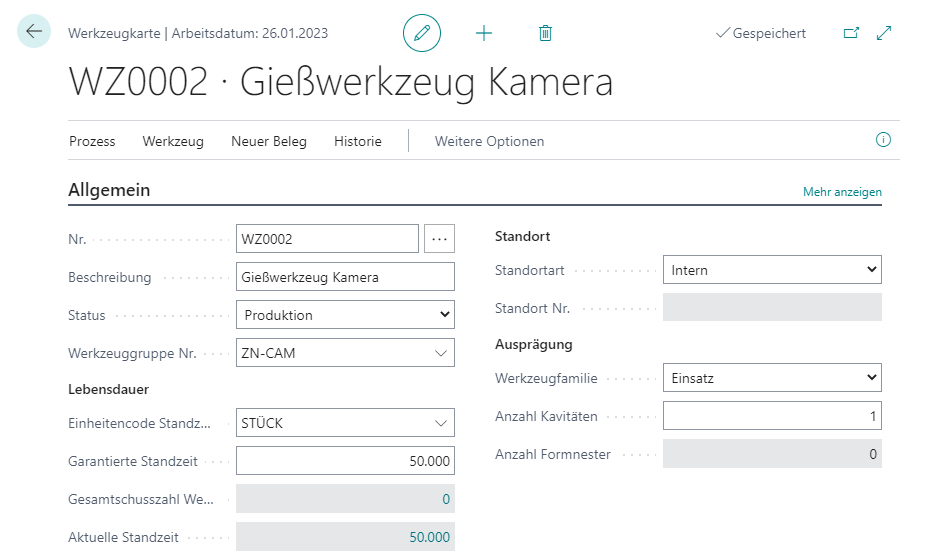
Important Fields
| Field | Meaning |
|---|---|
| Description | Short tool description. It is transferred, for example, into repair orders. |
| Status | Possible statuses are Development, Sampling, Production, Maintenance/Service, and Blocked. If a tool is used in a production order and is not in Sampling or Production, a status warning is shown. |
| Tool Group No. | Assigns the tool to a group. The group can be used for search and filtering. |
| Service Life Unit Code | Unit in which service life is tracked, for example PCS for a casting tool. |
| Guaranteed Service Life | Manufacturer information about guaranteed service life. The field is informational. |
| Location Type | Shows whether the tool is internal, at a customer, or at a vendor. |
| Location No. | Location code, customer, or vendor, depending on location type. |
| Tool Family | Defines whether the tool is Self-contained, Insert, or Base Mold. |
| Number of Cavities | For Self-contained or Insert tools. Defines how many items are produced per shot or production step. |
| Number of Form Nests | For Base Mold tools. Defines how many inserts can be installed in the base mold. |
Classify Tool Family
- Self-contained means that the tool can be used on its own.
- Insert means that the tool can only be used when installed in a base mold.
- Base Mold means that the tool can receive inserts.
This classification is important because it controls whether cavities or form nests are maintained and how tools later behave in complete tools and production orders.
Use Tool-to-Item Assignment
Routings are not always assigned to one unique item. Several items can use the same routing and the same operation. In such cases, it is not clear which tool belongs to which item without an additional assignment.
The Tool-to-Item Assignment creates the unique relationship between a tool and the item to be processed. When a production order is calculated, this assignment is used to mark matching tools or tool components for the produced item.
You can open tool-to-item assignment through:
- search for Tool-to-Item Assignments,
- the tool card through Related > Tool > Tool-to-Item Assignments,
- the item card through Related > Item > Tool-to-Item Assignments.

Notes:
- Tool No. and Item No. must not be blank.
- The combination of Tool No., Item No., and Variant Code must be unique.
Result
After maintenance, the tool is clearly described as a self-contained tool, insert, or base mold. Through tool group, service life, cavities, and tool-to-item assignment, it can be used in operations, complete tools, production orders, postings, and repairs.
Links