Posting Tools
Purpose
Tool ledger entries can be created indirectly by output reporting and repair orders, or directly through Tool Journals. As long as journal lines are not posted, they can be changed. After posting, protected tool ledger entries are created.
Journal Templates and Batches
Tool management uses several journal templates, for example Tool Journal and Recurring Tool Journal. For each template, several journal batches can be created, for example for Commissioning or Resetting.
- In the role center, open Journals > Tool Journals.
- Create a journal batch if needed or open an existing batch.
- Open the journal lines.
Enter Journal Lines
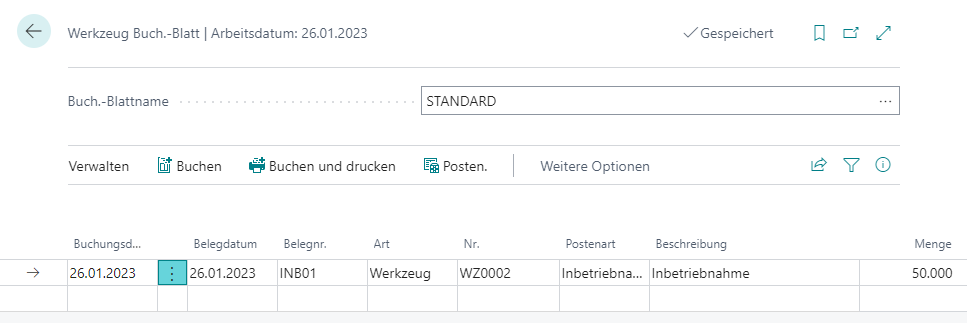
| Field | Meaning |
|---|---|
| Posting Date | Date of the tool ledger entry. It must be in the allowed posting period. |
| Document Date | Transferred into tool ledger entries and used as a search filter in Find Entries. |
| Document No. | Transferred into tool ledger entries and required. |
| Type | Defines whether a Tool or Complete Tool is posted. |
| No. | Number of the tool or complete tool. |
| Entry Type | Usage, Service Life Estimate, Commissioning, Resetting, or Repair. |
| Description | Copied from the tool or complete tool and can be changed. |
| Quantity | Interpreted differently depending on entry type. |
Quantity Logic by Entry Type
- For Usage, the quantity is transferred to the tool ledger entry with reversed sign.
- For Service Life Estimate, Commissioning, Resetting, and Repair, the quantity sets the service life as of the posting date to the entered value.
- The system calculates the reference service life of the tool or complete tool as of the posting date and posts the difference to the entered quantity as the tool ledger entry quantity.
- The entered value is also stored on the tool ledger entry as Original Service Life.
Because the reference service life is calculated as of the posting date, it can differ from the currently visible Current Service Life on the tool card, especially for backdated postings.
Post the Tool Journal
- Review the journal lines.
- Select Post or press
F9. - Confirm the question with Yes.
The posting function checks the lines and transfers them into tool ledger entries. For each transaction with one or more lines, a journal entry is created that groups the entries.
For normal Tool Journals, lines are deleted after posting. In Recurring Tool Journals, lines remain available for future periodic postings.
Post Usage of Complete Tools Directly
If you post Usage of a complete tool through the tool journal, the reference to the current production order and therefore the current configuration is missing. For this manual posting, only usage of the complete tool itself is posted, not usage of its components automatically.
Result
Direct tool postings create protected tool ledger entries. Entry type and posting date determine whether usage is posted, service life is set, or repair or resetting is historized.
Links