Administration
Purpose
Administration of tool management covers ongoing maintenance and control of status, service life, cavities, repair processes, postings, and dimensions. It is separate from general Manufacturing administration because it directly controls tool lifecycles.
Administrative Control Areas
| Area | Check |
|---|---|
| Tool status | Review whether tools and complete tools have the expected status for productive postings. |
| Service life | Review service life changes from resetting, repair, commissioning, and service life estimates. |
| Cavities | After repairs or rebuilds, review Number of Cavities and Number of Form Nests. |
| Tool BOMs | Check active versions, installed components, and status warnings. |
| Repairs | Track open repair orders, due dates, and finished repairs. |
| Journals | Review direct tool postings and recurring journals. |
| Dimensions | Check default dimensions, journal dimensions, and dimension rules before posting. |
Dimensions in Tool Management
Tool management is integrated with dimensions. You can:
- assign default dimensions to tools and complete tools,
- assign dimensions to tool journal lines,
- assign dimensions to repair orders,
- transfer tool dimensions into output journal lines and resulting entries.
Maintain Default Dimensions
- Open the tool card.
- Select Tool > Dimensions.
- Maintain the default dimensions that should represent the tool in postings.
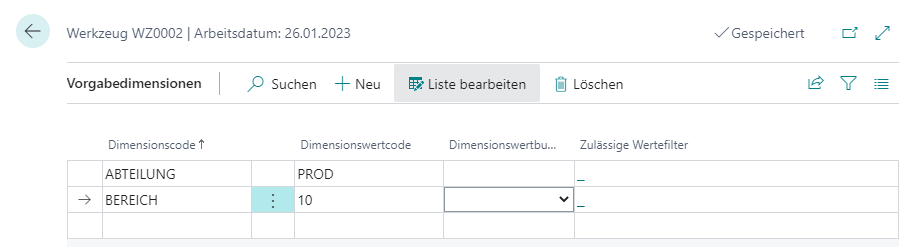
Tools and complete tools each have their own default dimensions. Dimensions from tools are not automatically passed to complete tools through the tool BOM.
Review Dimensions in the Tool Journal
When you enter a tool or complete tool in a journal line, its default dimensions are transferred into the line. You can change or add dimensions before posting.
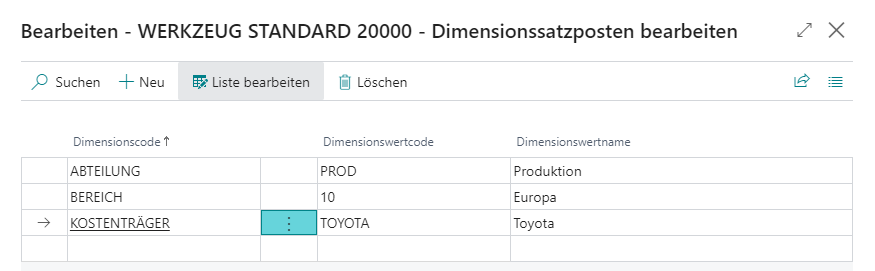
During posting, the rules from dimension setup are checked.
Review Dimensions in Tool Ledger Entries
In tool ledger entries, use Dimensions or Alt+D to display assigned dimensions.
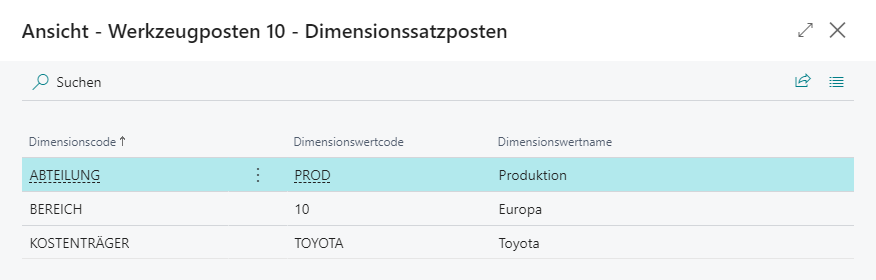
Review Dimensions in Repair Orders
When you enter Tool No. in a repair order, the tool’s default dimensions are transferred into the document dimensions of the repair order. Default dimensions from other tables are not transferred. The dimensions can be adjusted before posting and are transferred into tool ledger entries when posted.
Monitor Tool Dimensions in Output Reporting
Activate Transfer Tool Dimension to Item Journal in Manufacturing Setup if dimensions from tools or complete tools should be transferred into item journal lines.
During output reporting, dimensions are added as follows:
- Standard dimensions from the operation, for example from the work center group, are transferred into the journal line as before.
- Default dimensions of assigned tools and complete tools are copied into the journal line.
- For complete tools, default dimensions of installed tools that should be posted are copied as well.
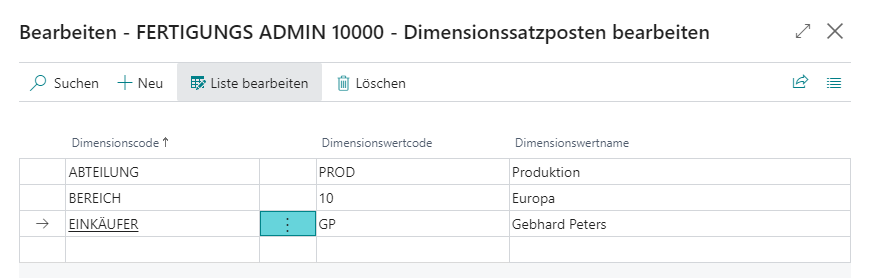
Business Central supports a maximum of 10 dimension values per output journal line. If many tools create more values, the last dimension values are ignored; no warning is shown.
Result
With regular administration, status, service life, cavities, repairs, postings, and dimensions remain consistent. This keeps the tool history useful for analysis and reliable for operational decisions.
Links