Pending Consumption
Purpose
When output is posted or when subcontracted work is received, automatically consumed backward-flushed components need sufficient inventory. If inventory is missing, the standard process can abort. BE-terna Manufacturing can, for selected locations, consume the available inventory and register the missing quantity as Pending Consumption.
Pending consumption is therefore not lost. It remains visible on the production order and must be reposted or cancelled before the production order can be finished.
Business Value
- Missing component inventory does not necessarily abort the complete output posting.
- Available inventory is consumed; the missing quantity is documented as an open remaining quantity.
- Open pending consumption prevents finishing the production order until it is resolved.
- Reposting is possible from a different location or bin.
- Cancellation is possible if the open consumption should not be reposted.
Activate the Function by Location
Pending consumption postings are activated per Location. This is especially useful for subcontractor locations where automatic backward consumption is not fully controlled by your own company.
For your own location, you may intentionally leave the function disabled because automatic consumption without sufficient stock should stop there.
- Open the Location Card for the location.
- On the General FastTab, enable Handle Pending Consumption.

If you want to disable the function later, there must be no open pending consumption entries for that location. Repost or cancel open entries first.
Create Pending Consumption
Pending consumption is created for components that should be backward-flushed during output because of a Routing Link Code. Other consumption postings are not affected.
For a typical example:
- Set up a location where Handle Pending Consumption is enabled.
- Create a released production order.
- Use a component with Flushing Method = Backward and a Routing Link Code.
- Set the component Location Code to the location with the enabled function.

- Make sure that an operation with the same routing link code exists. The operation can be in any position.

- Make sure the component inventory is not sufficient for the full automatic consumption quantity.
- Post a Finished Quantity for the operation.
If you use subcontracting, the same situation can occur when posting the receipt in the subcontracting purchase order.
The system posts the output, consumes the available inventory, and registers the missing quantity as open pending consumption.

You can open the entries from the released production order through Related > Order > Consumption Pending Entries or by searching for Pending Consumption.
Understand Calculation and Stored Fields
Before automatic consumption is posted, BE-terna Manufacturing calculates the current inventory at the component line location and compares it with the component quantity that should be posted automatically.
If current inventory is lower than the quantity to be posted, the system calculates:
Pending quantity = component quantity to be posted - current inventory
The consumption posting is reduced to the current inventory. The missing quantity is registered as an open entry for Pending Consumption.
Important fields in a pending consumption entry are:
| Field | Meaning |
|---|---|
| Entry No. | Unique number of the pending consumption entry. |
| Consumption Status | Pending, Posted, or Canceled. |
| Item No. | Component whose consumption could not be posted completely. |
| Parent Entry No. | Reference to the original open entry in case of cancellation. |
| Origin Qty. (Base) | Quantity that should originally have been posted automatically. |
| Remaining Pending Qty. (Base) | Remaining open quantity. |
| Origin Pending Qty. (Base) | Original missing component quantity. |
| Open | Indicates whether the remaining quantity is not zero. |
| Location Code | Location to which the missing quantity belongs. |
| Prod. Order No., Prod. Order Line No., Component Line No. | Relation to the production order and causing component. |
As long as open pending consumption with status Pending exists, the production order cannot be finished. The location function also cannot be disabled.
Repost Pending Consumption
After the inventory issue has been resolved, the missing consumption should be posted through the dedicated Pending Consumption Journal. Do not use the normal Consumption Journal or Production Journal, because those journals do not reduce the registered pending consumption.
You can also repost pending consumption from another location. This is useful when stock is made available from another location at short notice without a prior transfer.
- Open Pending Consumption from the released production order or through search.
- Focus an open line with Consumption Status = Pending.
- Select multiple open lines if needed.
- Choose Consumption Journal.
The system combines all selected pending consumption entries and opens the Pending Consumption Journal.
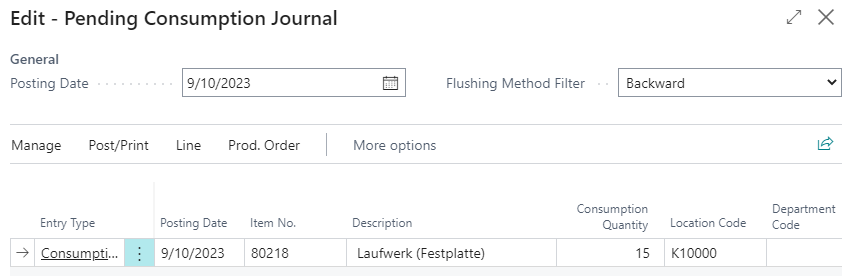
The system does not check item availability in this step. Review and adjust if needed:
- Posting Date
- Consumption Quantity
- Location Code
- Bin Code

- Choose Post/Print > Post.
After posting, the system registers the reposting in Pending Consumption and reduces the open remaining quantity.

Cancel Pending Consumption
If pending consumption should not or cannot be posted, it must be cancelled. This can be useful for data errors or components that the subcontractor provides independently.
Cancellation is required so that the released production order can be finished.
- Open Pending Consumption from the released production order or through search.
- Focus an open line with Consumption Status = Pending.
- Choose Cancel Open Entries.
- Confirm the dialog with Yes.
The system creates a pending consumption entry with Consumption Status = Canceled and offsets the open pending consumption.
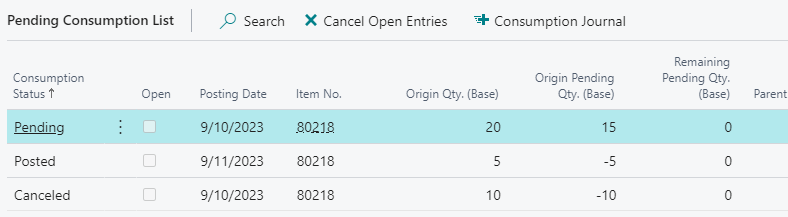
When there are no more open pending consumption entries on the order, the production order can be finished.
Result
After setup, automatic consumption postings with insufficient inventory can continue in a controlled way. Available inventory is consumed, missing consumption is registered, and the remaining quantity must be reposted or cancelled. This keeps production orders reviewable before finishing.
Links