Tool BOM
Purpose
Tool BOMs describe possible configurations and the current configuration of a complete tool. They are required for complex tools where different tools or components can be installed depending on the version.
Structure
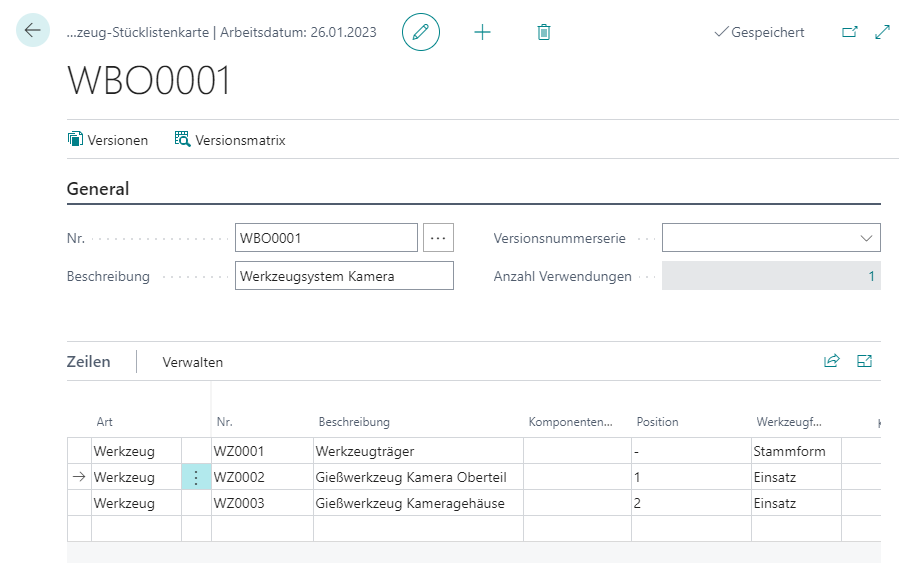
A tool BOM consists of a header and lines:
- The header contains a short description and optionally a number series for versions.
- The lines contain all components that can potentially be part of the complete tool.
Tool BOMs are single-level. You can insert Tools or Items, but not other complete tools. The actual configurations are maintained in the versions.
Create a Tool BOM
- Open Tool BOM.
- Select +New.
- Depending on the number series setup, press
Enter, or enter a tool BOM number manually. - Fill the header:
| Field | Meaning |
|---|---|
| Description | Short description of the tool BOM. |
| Version No. Series | Number series for new versions. If the field is blank, version codes are assigned manually. |
Maintain Lines
The lines contain all components that can be installed in a complete tool. Only the versions define whether a component is actually installed. Plausibility checks such as “only one base mold” or the use of self-contained tools are not performed here.
You can also use items such as screws, nuts, or pins as components.
| Field | Meaning |
|---|---|
| Type | Defines whether No. refers to a tool or an item. |
| No. | Number of the tool or item. |
| Description | Copied from the tool or item card and can be adjusted. |
| Component Quantity | Number of installed items. Editable only for Type = Item. |
| Unit Code | Suggested from the item base unit or the tool service life unit. For tools, the field is informational. |
| Position | Informational position value. It is transferred when the production order is calculated. |
Create Versions
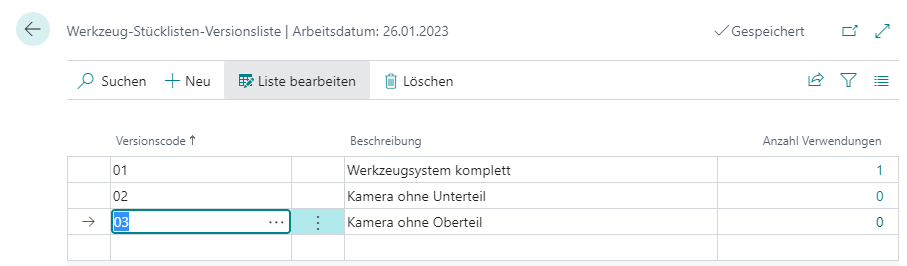
Versions store possible configurations of a complete tool. For a new complete tool, you usually start with one version. Create additional versions for rebuilds, removed inserts, or extensions.
If a new component is added to a tool BOM with existing versions, the component is automatically added to all versions as not installed.
- Open the tool BOM.
- Select Versions.
- Select +New.
- Enter a Version Code or let it be assigned from the number series.
- Enter a Description.
- Close the version list.
Configure Versions
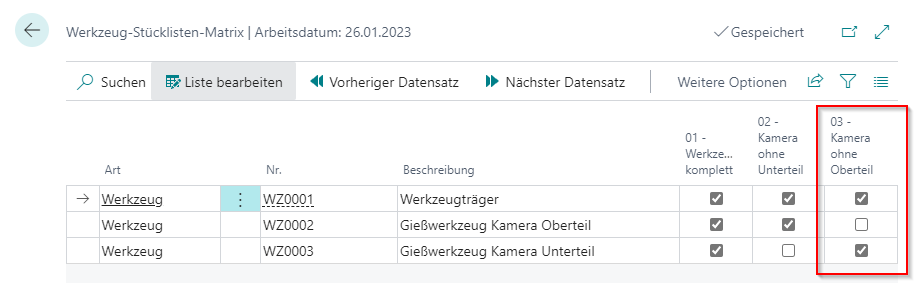
Configure versions in a matrix. The rows correspond to BOM lines, the columns to versions.
- Open the tool BOM.
- Select Version Matrix.
- For each version, select Installed for the components included in that version.
Result
After maintenance, the tool BOM describes all possible components. The active version on the complete tool controls which components are transferred when the production order is calculated.
Links