Prices
Purpose
For subcontracting purchase orders, prices directly on the operation are often not enough. Subcontractors may offer quantity tiers, use different currencies, or agree on prices by item and vendor. BE-terna Manufacturing adds Subcontracting Prices, which are evaluated when the production order routing is calculated.
Business Value
- Subcontracting prices can be maintained by vendor, work center, item, quantity, currency, and validity period.
- Quantity tiers are represented through different minimum quantities.
- Prices can be viewed from item, vendor, work center, or subcontracting worksheet contexts.
- The determined price is transferred into the current production order routing.
- Production order statistics show the determined values as Subcontracted Cost.
Maintain Subcontracting Prices
- Open the Vendor for which you want to maintain a subcontracting price list.
- Choose Related > Purchase > Subcontractor Purch. Prices.
The Subcontractor Purchase Prices page opens. Vendor No. is already filtered to the current vendor.
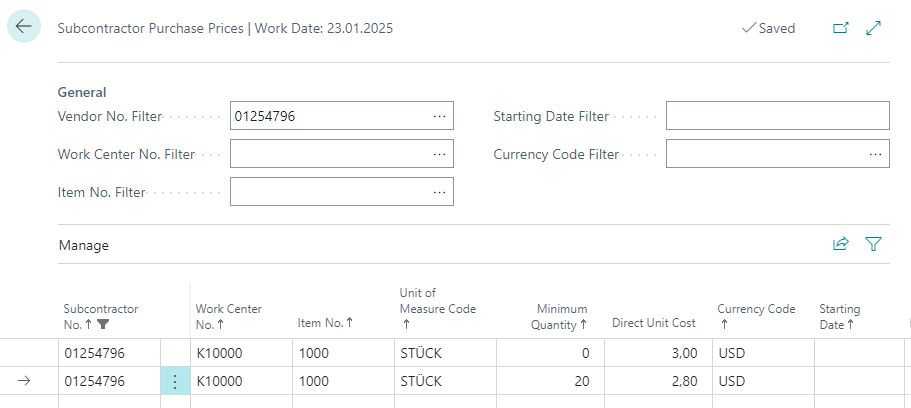
Maintain the price lines as required.
| Field | Description |
|---|---|
| Subcontractor No. | Vendor for which the price is valid. The field is required; wildcards are not supported. |
| Workcenter No. | Work center for which the price is valid. The field is required. |
| Item No. | Item for which the price is valid. The field is required. |
| Unit of Measure Code | Unit of measure for which the price is valid. |
| Minimum Quantity | Quantity from which the price applies. Multiple lines with different minimum quantities represent tier prices. |
| Direct Unit Cost | Purchase price for the combination of vendor, work center, item, minimum quantity, and currency. |
| Currency Code | Currency of the direct unit cost. |
| Starting Date | Date from which the price is valid. |
Additional fields can be shown on the price list if required.
Understand Price Determination in the Production Order Routing
When calculating the Prod. Order Routing, BE-terna Manufacturing filters subcontracting prices for the current operation. Price lines are considered when they match the current production order line and subcontracting operation:
- Item No. matches the item number of the production order line.
- Variant Code is blank or matches the variant code of the production order line.
- Workcenter No. matches the work center of the operation.
- Subcontractor No. matches the subcontractor number from the work center.
- Unit of Measure Code is blank or matches the unit of measure code of the production order line.
- Currency Code is blank or matches the subcontractor’s currency code.
- Direct Unit Cost is filled.
- Starting Date is on or before the work date.
- Ending Date is blank or on or after the work date.
The system determines the best, meaning lowest, purchase price from the matching subcontracting prices. If no matching subcontracting price is found, the system uses the price stored in the routing.
The system stores the determined Unit Cost per in the current operation. For foreign currency, Currency Code and Direct Unit Cost (FCY) are also maintained. These fields can be personalized on the Prod. Order Routing page and changed for the current production order if needed. Such changes apply only to the current production order.
Review Impact on Standard Cost and Statistics
Subcontracting prices do not affect the standard cost calculation of the item. The Standard Cost values stored on the item card are therefore not changed by subcontracting prices.
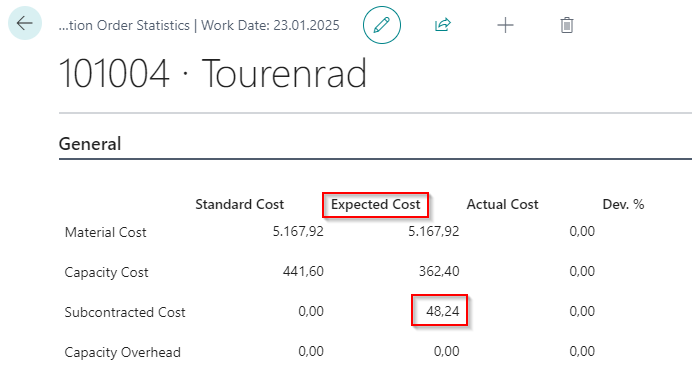
In Production Order Statistics, the current cost amounts from subcontracting routing lines are used in the Expected Cost column and in the Subcontracted Cost row. It does not matter whether the price came from Subcontracting Prices or was manually changed in the production order routing. If foreign currency is used, subcontracting costs are converted to local currency.
Result
After setup, you can maintain subcontracting prices by vendor, work center, item, quantity, and currency. When the production order is calculated, the matching price is transferred into the production order routing and shown transparently in statistics.
Links