Role Center
Purpose
Use the BE-terna Manufacturing role center to bring the information, key figures, and processes that are important for manufacturing together on one central start page. Production users and key users can see daily information from master data, planning, production order handling, and reporting.
The role center combines standard Business Central Manufacturing functions with extensions from the BE-terna Manufacturing app.
Business Value
- Important manufacturing information is available on one page.
- Users can switch directly to frequently used lists, journals, capacity pages, and reports.
- KPIs show own and general production orders, operations, purchase orders, approvals, and user tasks.
- Actions for central master data and production documents are directly available.
- Standard Manufacturing functions are supplemented with app-specific entry points.
Role Center Layout
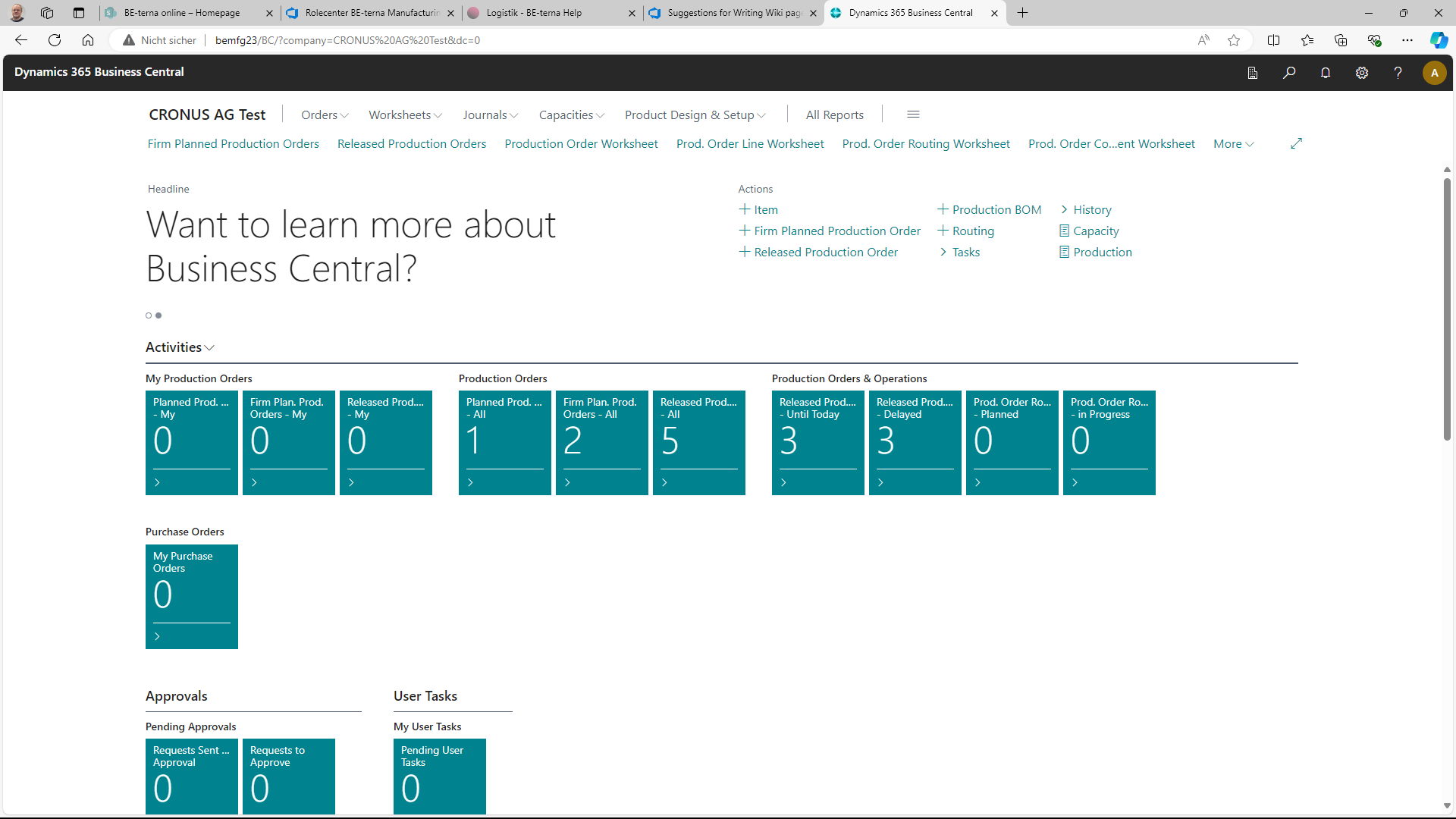
The upper navigation area provides the daily entry points for manufacturing. This includes Orders, Worksheets, Journals, Capacities, Product Design & Setup, and All Reports. Direct links below the navigation provide access to frequently used pages such as firm planned and released production orders, production order worksheets, production order line worksheets, routing worksheets, and component worksheets.
In the Actions area, you can create or open central records and documents directly. Visible entries include Item, Firm Planned Production Order, Released Production Order, Production BOM, Routing, Tasks, History, Capacity, and Production.
Use Daily Information and KPIs
The Activities area groups tiles for operational review and control. The tiles show counters and open the corresponding filtered list when selected.
Typical groups include:
- My Production Orders for own planned, firm planned, and released production orders
- Production Orders for planned, firm planned, and released production orders overall
- Production Orders & Operations for due, delayed, planned, or in-progress operations
- Purchase Orders for own purchase orders
- Approvals for pending or sent approval requests
- User Tasks for own open tasks
In the Insights area, additional lists such as items or routings can be shown for orientation. This keeps frequently used master data visible directly from the role center.
Open Processes and Lists
Use tiles, direct links, and actions depending on your task:
- Open a tile when you want to review a filtered work list, for example own released production orders or delayed operations.
- Use the direct links below the navigation bar when you want to switch directly to a frequently used list.
- Use the Actions area when you want to create or open items, production BOMs, routings, or production orders.
- Use All Reports to open evaluations and printouts for follow-up or control.
Relation to Other Role Centers
This page describes the general BE-terna Manufacturing role center. Specialized role centers or reduced workspaces, for example for time registration for workers or tool management, are described in their respective topics.
Result
The role center is the daily entry point for manufacturing users. It combines navigation, KPIs, actions, and insights so that master data, planning, production order handling, and reporting can be reached without a long search.
Links