Supplementary Modules for Financial Accounting
By default, Be-terna GmbH uses the base module and payment management from Continia OPplus for customers, since these extend the functional scope of Microsoft Dynamics 365 Business Central in a useful and practical way. In addition, there are a number of convenience modules that simplify handling, as well as modules that extend the functionality of the program. The modules are briefly presented below.
Continia OPplus Payment Import
The base module is divided into the following areas:
Extended application:
- clear several invoices with one payment, recognize cash discount on individual invoices, and still leave remaining amounts open
- automatic write-off of differences from underpayments or overpayments
- a remaining application balance is written automatically into a second general journal line
- clear display of payments in the account sheet
- relieve the original dimensions of the cleared document lines in cash discount postings
- practical sorting, searching, and printing in extended application
- support through color highlighting
File import:
- import from freely definable bank statement files and payment advices in text and Excel format
- REMADV format (EDI), Swiss payment files in BESR format, and credit card payments in EPA format can be processed without conversion
- automatic generation of interface data per bank account
- maintenance of the necessary data in one central place only, and automatic cross-company posting of returned debits and the specified fees
- application rates of more than 90%
- the system learns: as soon as a line originating from the import has been assigned to a customer or vendor, the new bank account is stored automatically on the corresponding account card
Cash book:
- a separate general journal that displays the current cash balance directly during entry and does not allow a negative balance in the general ledger account
Check deposit:
- a separate general journal for entering received checks and printing a report that is accepted by banks as a check deposit. This makes filling out a paper form unnecessary, as well as the use of external programs. After entry, the positions can be posted directly to customer accounts.
Continia OPplus Payment Export
The OPplus payment export module simplifies the handling of payment processes and creates greater transparency between applied entries and assigned payments. Payment proposals and payment runs for cashless payments are created in just one step, regardless of file format and payment direction, whether transfers, direct debits, or checks are involved. The software adapts flexibly to customer requirements: payment proposals that have already been created can be supplemented conveniently with additional amounts, and predefined remittance texts can be changed manually. A release function ensures security: it gives only selected users release authorization for payments. This allows internal control over which employee carries out which payment. Together with the Associations module, OPplus payment export also supports the execution of payments via central settlement offices and implements payment proposals in which assigned customer and vendor entries are cleared automatically against each other. A payment can then be created only for the netted amount. One focus of OPplus payment export is the availability of numerous national and international payment formats, which can be supplemented with any additional formats if required.
Open entry display and printing This module increases transparency in the display of entries on screen and in print. It also provides the following functionalities:
- optimized display of open customer and vendor entries in a two-part form
- the option to browse to the next master data record via a button
- clear display in account sheet printing through the activation of hatching
- when using the Associations module, output of open entries with reference to a central settlement office while filtering by the associated association number
- advanced options for printing and Excel output of open entry lists
- subsequent changes to posting texts or maintenance and printing of additional remarks per entry
Associations and central settlement
Below, some essential functionalities of the Associations supplemental module are described briefly. It is divided into customer associations or vendor associations (central settlement) and customer/vendor clearing (your customer is also your supplier or your supplier is also your customer).
- assigned customer and vendor entries can be offset against each other (with color highlighting)
- clear customer and vendor entries with the payment management supplemental module: option already in the payment proposal
- central settlement in interaction with the payment management module
- minimize data entry effort and avoid typing errors through importing advices from your associations
Extended analysis (balance sheet VAT)
The supplemental module Balance Sheet and VAT includes the following functionalities:
- assignment to asset/liability positions in the account schedule for so-called “swing accounts”, for example bank accounts
- assignment on the general ledger account to up to 3 account schedules with update functionality
- assignment on the general ledger account to up to 3 account groups
- correct presentation of vendor customers/customer vendors
- printing of account evidence for the lines of their account schedules
- plausibility check based on the chart of accounts
- correct presentation of prior-year values (balance sheet development)
- totals and balances list for general ledger accounts, customers, and vendors in the proven DATEV layout
Multi-level cash discount
The module includes the use of multi-level cash discounts in payment terms for vendors and customers. Up to four different cash discount due dates can be assigned to one posting.
Open-item-managed general ledger accounts
With the module for open-item-managed general ledger accounts, open entries can be created for general ledger accounts, analogous to customers and vendors. In addition, open entry lists for general ledger accounts can be printed or output to Excel. This functionality can be of great advantage, especially for accounts such as “cash in transit”, “suspense items”, or “active prepaid expenses”.
Installment payments
Our OPplus installment payment module makes it possible to create various installment payment documents. This means that the original document can be divided into installments with different due dates. This split is supported by the following adjustments:
- via freely definable templates or manually
- when posting the original document
- from the posted entry itself
Open entry display and printing - Continia
This module increases transparency in the display of entries on screen and in print. It also provides the following functionalities:
- optimized display of open customer and vendor entries in a two-part form
- the option to browse to the next master data record via a button
- clear display in account sheet printing through the activation of hatching
- when using the Associations module, output of open entries with reference to a central settlement office while filtering by the associated association number
- advanced options for printing and Excel output of open entry lists
- subsequent changes to posting texts or maintenance and printing of additional remarks per entry
Continia Expense Management
The Continia Expense Management supplemental module optimizes the capture, application, and approval of expenses. Employees submit documents via app or via a web portal. Through automatic information recognition, the information from scanned documents is extracted and transferred directly into the digital documents. These can be managed via app or in the web portal and forwarded to the responsible employees for approval.
The following functions are also available:
- Credit card integration Transactions from common credit card providers are imported automatically. They are then matched with the documents. If documents are missing, the respective user is notified automatically.
- Travel expenses Employees can submit their travel expenses at any time via the app or the web portal.
- Meal allowances Daily allowances for accommodation and meals are defined. Based on this, employees can enter the data for their trip conveniently via the app or web portal. The module then creates the corresponding expense statement.
- Overview of employee expenses Thanks to automatic digitization of the documents, monthly closings can be completed faster and more transparently. This also makes it possible for you to get a real-time overview of the current costs caused by employees.
Konfipay - WINDATA
Konfipay is a service of windata GmbH & Co. KG with which national and international payment orders can be transferred to financial institutions simply and securely. In addition, account movements can be tracked and retrieved. With konfipay, the highest security standards are ensured through the EBICS communication and authorization procedure.
The following payment files are transferred to banks or savings banks with windata konfipay:
- SEPA transfers (SEPA XML)
- SEPA core direct debits (SEPA XML)
- SEPA business direct debits (SEPA XML)
- PayPal refunds
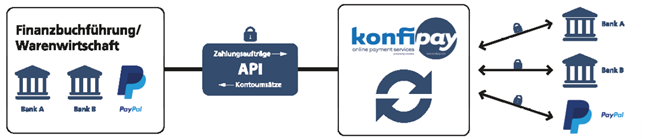
Thanks to the regularly updated data sets, konfipay provides precise information about the accounts. (The information is made available in XML/JSON format.) It is also possible to retrieve PayPal transactions with windata konfipay.
The introduction of the module is optional. The connection is included in the standard. Transaction fees are charged by the konfipay provider for payments and bank statements.
DATEV Interface - BSH AG
The Microsoft-certified DATEV interface is used to export ERP system data into a DATEV-compliant format. It also enables the import of DATEV data into the ERP system.
- Export of entries according to gross or net method
- Output of totals and balances lists according to DATEV accounts
- Storage of the outputs in the Microsoft Dynamics 365 Business Central database
- Import of the DATEV pro format with validation routines
- Import worksheet for correcting and adjusting the imported postings
DATEV Interface - Posting Data Service + Document Images
The DATEV format file generated by the DATEV export can be sent directly from the BC application to the DATEV data center via the DATEV eG posting data service and a secure connection with this supplemental module. Optionally, images (PDF) of outgoing and incoming documents can also be sent to the DATEV data center together with the general ledger postings to be transferred. Via a document link stored in the posting data file, the tax advisor can find the corresponding link directly for each posting. The module is available for SaaS and on-premises from BC version 14.
CrefoDynamics - COSMO CONSULT
CrefoDynamics offers integration of credit checks, payment information, and debt collection directly in Business Central. In addition to checking business partners, open receivables can also be transferred and monitored.
CrefoDynamics offers a fully integrated and bidirectional interface to Creditreform. The prerequisite is that a membership number with Creditreform exists. The early warning system points out payment defaults and insolvencies in good time. In addition, the status of the debt collection case can be displayed transparently in real time.
Functions:
- Creation of stakeholders with Creditreform data
- Retrieval of information from Creditreform
- Early warning systems and evaluation procedures
- Monitoring of existing customers
- Transfer of receivables without media discontinuity
- Status of debt collection cases in real time
- Automatic transfer of open receivables via dunning histories