Fixed Assets
The fixed assets module provides an overview of created, purchased, and sold fixed assets. Planned assets can also be created. The assets can be divided into different groups, for example by classes, cost centers, or locations. Assignment to cost centers can also be done as a percentage for an asset group. This makes it possible to include planned depreciation and sales in reports. Several assets can be combined into one main asset or split back into individual assets. This is necessary when only parts of the asset are to be sold.
In addition to managing assets, the module ensures that periodic depreciation is carried out correctly. It also makes it possible to trace maintenance costs, manage insurance policies tied to assets, post asset transactions, and output various reports and statistics. The assets are managed in a subledger.
Depreciation books and depreciation methods
In Microsoft Dynamics Business Central, it is possible to set up several depreciation books in order to account for the different types of depreciation. The fixed assets module includes the following commercial and tax depreciation methods:
- Straight-line
- Declining-balance 1 (depreciation during the year is based on the straight-line depreciation method)
- For this method, a fixed annual percentage must be entered.
- With monthly calculation, the annual depreciation amount is reduced to 1/12. This results in the same amount each month (linear from the monthly perspective of a fiscal year)
- Declining-balance 2 (depreciation during the year is based on the declining-balance depreciation method)
- Calculates the same annual depreciation amount as declining-balance 1.
- If several depreciation runs occur during the year, method declining-balance 1 results in equal depreciation amounts per period, while method declining-balance 2 results in decreasing amounts per period
- Decl1/linear (the higher amount of straight-line or declining-balance 1 is used.)
- Decl2/linear (the higher amount of straight-line or declining-balance 2 is used.)
- Table (for example depreciation based on units of output)
- Manual
An unlimited number of depreciation books can be set up. Each combination of an asset number and a depreciation book code is called an asset depreciation book. As many depreciation books as desired can be assigned to an asset - the only limiting factor is the number of books that have been set up. Therefore, an unlimited number of depreciation books can be set up for each asset. It is not necessary to link every depreciation book with all assets. The individual assets can therefore use a different number of depreciation books. For each depreciation book, however, a decision must be made as to whether it is to be integrated into financial accounting. Financial accounting integration means that all transactions posted to the depreciation book are also posted to the corresponding financial accounting accounts. Integration of the asset into the general ledger is handled via posting groups.
Fixed asset posting group
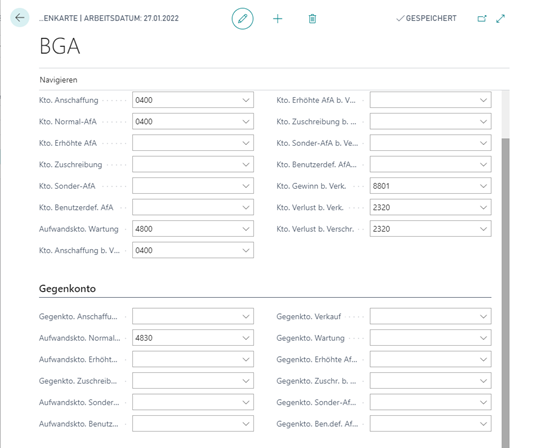
The fixed asset posting group links assets with the balance sheet accounts of fixed assets and the profit and loss accounts for depreciation. The structure of the fixed asset posting groups must be aligned both with the structure of the balance sheet accounts of fixed assets and with the profit and loss accounts for depreciation in order to control them correctly through the assets.
Meta process FAM - Fixed asset accounting
Long-term assets can be recorded and managed in the ERP system. This also includes the valuation and posting of additions and disposals and the determination and posting of depreciation.
FAM-0010 Create asset
The asset master data is recorded. It is defined over which period depreciation should take place in the respective depreciation book.
FAM-0020 Acquire asset
The asset is acquired either by document or in journals.
FAM-0030 Post subsequent capitalization
Subsequent changes to the asset are posted via vendor invoice processing or journals and are thus capitalized. They are thereby taken into account for depreciation.
FAM-0040 Carry out depreciation
The addition and depreciation amount of the asset is calculated in order to carry out a revaluation of the asset. A depreciation proposal is created via a report in the system. The journal with the depreciation values is checked and supplemented if necessary. Manual additions and write-downs can be inserted. In order for the depreciation to become effective, the journal is posted (in fixed asset accounting as well as in financial accounting).
FAM-0050 Sell/scrap asset
The asset is sold or scrapped. There is a choice between the following sales calculation methods: net or gross. Usually, the net method is used. With this method, the profit or loss is calculated and the amount is posted either to the profit on sale account or to the loss on sale account. With the gross method, profit or loss is not posted as individual amounts. Instead, the profit or loss represents the difference between the opposing entries on the proceeds on sale account (credit) and carrying amount on sale account (debit).
Maintenance
Maintenance costs and the date of the next maintenance can be recorded for each asset. Monitoring maintenance costs is important for cost planning and can be helpful when deciding whether an asset should be replaced.
Insurance
It is possible to assign one or more insurance policies to each asset. In this way, it can be checked very easily whether the amounts of the insurance policies correspond to the values of the assets assigned to the policies. This makes it easier to keep track of annual insurance premiums.
Posting
All posting processes in the fixed assets module originate from journals. There are four different journals:
- The fixed asset G/L journal is used for postings to depreciation books that are integrated into financial accounting.
- The fixed asset journal is used for postings to depreciation books that are not integrated with financial accounting.
- The fixed asset reclassification journal is an auxiliary journal. It is needed to make changes in posted entries (for example, to reclassify entries from one asset to another).
- The insurance journal is used to post insurance entries.
Statistics and reports
Each asset depreciation book has a statistics window that provides a quick overview of the carrying amount, the depreciation basis, accumulated depreciation, and gains/losses on sale. Each main asset has its own statistics window. Several reports are available, some of which can be tailored to the respective special requirements.
Supplemental module OPplus - Continia
Asset additions and general topics:
- Cash discount on fixed asset purchases
- Defaulting the check boxes, depreciation up to the asset date, and retroactive depreciation for subsequent acquisitions (if the acquisition takes place in the same fiscal year)
- Asset templates for the automatic creation of assets during asset additions
- Rounding carrying amounts, i.e. adjustment of depreciation amounts so that the residual carrying amount is rounded to smooth values
- Activate copy process, transactions are automatically posted in other asset depreciation books as well
- Disposals:
- Quantities on assets with the option of corresponding partial disposals (via automatically generated new asset)
- Scrapping and sale can be displayed separately
- Reversal of an asset sale simplified, also via credit memos
- Synchronization of reverse transaction and asset reversal
Reports:
- Asset inventory list
- Asset life cycle
- Asset movement schedule
- Asset additions
- Asset disposals
- Development of fixed assets
- Asset preview
Print reports for fixed asset accounting
The following reports must be set up and, if necessary, adapted as part of the project