Accounts Payable
The payables subledger is also the vendor master in purchasing. In addition to vendors, there are further payable accounts for the procurement of services that are not goods. Nevertheless, all vendors are managed in a single table. The integration of payables into the general ledger (trade payables) is carried out via posting groups that can be defined freely.
Vendor posting groups
The vendor posting group links vendors with liability, cash discount, invoice, and application rounding accounts as well as interest and fee accounts. Assuming that business and product posting groups are used, this posting group essentially stores the corresponding general ledger account for liabilities.
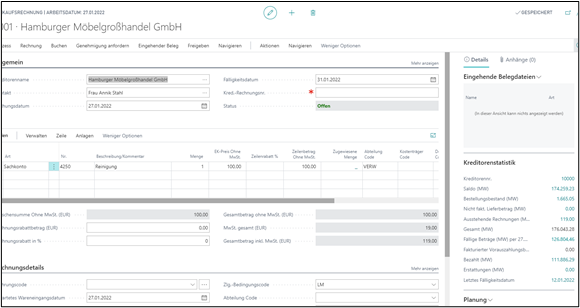
Vendor invoice processing
Vendor postings can be entered in documents (purchase order, purchase invoice, purchase credit memo) or in general journals.
Meta process VIN - Vendor invoice processing
This process describes the entry of incoming vendor invoices and their review. Entry is partly automated via electronic data exchange or performed manually by reconciling a paper invoice. When looking at invoice processing, a distinction can be made between two areas. First, goods invoices and order-related ancillary costs are considered. For these invoices, assignments are made to the procurement process and the corresponding procurement costs are evaluated. This affects the unit costs of the procured items. Postings that have already been carried out, such as transfers, issues, and sales, are corrected automatically afterward by inventory adjustment. Second, the remaining non-goods invoices are handled via the purchase invoice journal of financial accounting. These are usually pure general ledger invoices for other suppliers/vendors (for example caretaker, telecommunications, IT services).
VIN-0010 Create invoice header
The invoice is created and the invoice header is set up. Depending on the process, creation can take place automatically from a goods receipt or manually. Important header data includes the vendor and the vendor invoice number. All master data required for the process is taken from the vendor master.
VIN-0020 Add invoice lines
The individual invoice positions are added. Depending on the process, this is done manually (general ledger account lines or item charges/discounts) or automatically via the “Get receipt lines” function. When general ledger lines or item charges/discounts are added manually, the amount is entered (quantity is usually 1). Charges/discounts are also linked with an inbound delivery using the charge assignment. This is done to add subsequently recorded ancillary costs, such as customs duties and freight, to the goods value and thus adjust the costing of the item. With the “Get receipt lines” function, the delivered but not yet invoiced items of the specified vendor are displayed and transferred to the invoice by selection.
VIN-0030 Start approval process
The invoice is forwarded to the decision-maker for approval. The approvers for invoice review and approval must be set up as users in BC. Otherwise, a web approval portal must be used.
VIN-0040 Check and release invoices
The invoice is checked and released for posting and settlement. The check is based on the total invoice amount specified on the vendor document. The entered total is verified either via displayed totals or via the statistics function.
VIN-0050 Post invoice
The invoice is posted and the corresponding entries are created both in merchandise management and in financial accounting and accounts payable.
Prepayment
VAT ID check
Within Business Central, the VAT IDs of vendors can be checked for correctness.
Print reports for accounts payable
The following reports must be set up and, if necessary, adapted as part of the project