Cost and Performance Accounting by CKL
The following figure shows the structure of cost and performance accounting for Microsoft Dynamics:
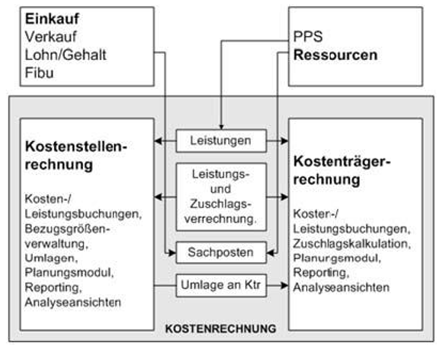
Cost and performance accounting for Microsoft Dynamics BC is divided into three modules.
Cost center accounting
In the cost type chart, a distinction is also made between primary and secondary cost types. Primary costs are the costs equivalent to expenses that can be transferred from financial accounting. After the transfer of the general ledger accounts from financial accounting, the cost type chart usually contains only primary cost types. The secondary cost types still have to be created. Secondary costs arise through the allocation of costs from one cost center to another.
Functions at a glance:
- Separation between fixed and variable amount components
- Storage of fixed amounts or percentage shares in the cost type
- Management of any number of dimensions/reporting indicators with each posting
- Optional automatic transfer of cost and performance postings from other modules
- Reference values for managing performance postings
- Transfer of flexible performance types by means of reference values (such as number of employees, number of quotes/orders, number of inquiries/purchase orders, number of warehouse movements, number of postings, number of invoices, number of customers)
- Storage of settlement rates in the reference value
- Use of the original value of the performance origin settlement rate
- Dynamic settlement rates from actual postings on cost types
- Definition of standard allocation keys, e.g. according to
- the step-ladder method with distribution by ratio, performance, or reference cost type
- quantity x cost rate with settlement rate
- the iteration method
- the ratio of budget values
- Recurring calculated recurring postings
- Budgets in cost center accounting with dimension integration
- Quantity budgets
- Budget structure with fixed and variable amount separation
- Budget link to financial accounting (bidirectional)
- Posting budget values as actual values
- Budget structure with the help of plan allocations
- Export and import function to/from Excel
- Management of analysis views for detailed evaluation on a multidimensional basis and for displaying plan/actual comparisons
- Linking analysis views with account schedules
- User-defined evaluation options for account schedules
- Detailed evaluations (e.g. cost type sheets, operating accounting sheet by cost center/period, plan/actual comparisons)
- Easy deletion of cost type postings by journal after incorrect postings
Cost object accounting
In cost center accounting, cost types are posted with cost center coding. In cost object accounting, however, the postings are coded to cost objects with cost object accounts. As in cost center accounting, the general ledger accounts of financial accounting can be transferred as the basis for the cost object account plan. Unlike the cost type chart, however, the accounts required here are not the accounts that absorb the costs equivalent to expenses, but the accounts to which sales revenue and direct production costs flow.
Functions at a glance:
- Any number of cost objects
- Separation between fixed and variable amount components
- Optional automatic transfer of cost and performance postings
- Any contribution margin levels
- Performance recording in connection with reference values and settlement
- purchased items (quantity), produced items (quantity), sold items (quantity)
- Internal performance settlement
- Setup of any number of surcharge costing schemes
- Internal performance settlement with original values from performance origin
- Settlement of cost objects to cost objects
- Calculation of overhead surcharges for crediting cost center accounting
- Structure of cost object budgets with fixed and variable (quantity-related) budgets
- Export and import of budget data in Excel
- Budget link to financial accounting (bidirectional), also from merchandise management (item budgets)
- Creation of any number of analysis views for actual and budget data
- Calculated recurring postings
- Easy deletion of cost object account entries by journal after incorrect postings
Cost accounting analysis
The cost accounting analysis module also provides evaluations that can be used in both cost center accounting and cost object accounting to build additional reports:
- Cost type analysis view
- Cost object account analysis view
Unlike cost centers and cost object accounting, the cost accounting analysis module is not implemented through a separate menu item, but is fully integrated into the other two modules. Analysis views for detailed evaluations by dimensions are available here. Budget values are also taken into account for subsequent plan/actual comparisons.
Cost accounting/financial accounting - budget
Budgeting is carried out on a cost type basis (general ledger accounts) in the operating accounting sheet within cost accounting on cost centers and cost objects. Budgeting, meaning within cost accounting, is then transferred into the financial accounting budget. Planning is carried out per company. Planning is consolidated in the master data company.
Print reports for cost and performance accounting
If required, only the print reports in the standard Microsoft Dynamics 365 Business Central system are used.